

Transport Fever 3 resource prospecting starts with an available resource card and a selected town. Choose the resource you need, then select the target town when the game offers the prospecting prompt. The search concerns resources around that town; it is not a command to place any processing factory at an exact coordinate.
Before spending a reward, establish whether you are missing a resource source, a processing industry, or a working transport connection. These problems need different actions. An existing mine with cargo in Output Stocks needs collection, not another search for the same material.
The worked example below follows a coal search at Royston through its matching discovery notice. Use the completion checks to distinguish selecting a town, discovering a resource and collecting cargo from its industry.
Identify what is missing before choosing a card
Open the destination that needs cargo and read the actual product. If it is a town, check the demanding district. If it is a factory, check its Production rule and Input Stocks. Work backward until you find the missing source rather than selecting a resource because its icon looks familiar.
If needed, scroll horizontally to read every column.
| What is missing | Example | Appropriate first action |
|---|---|---|
| A raw resource source | No suitable source of Iron Ore for a Steel Mill | Check map suppliers and an available prospecting reward for the needed resource. |
| A processing industry | The town wants Planks, but you have only Logs | Find the Saw Mill that processes Logs; a resource source is not the finished product. |
| Delivery from a known producer | A mine has output but the train remains empty | Diagnose the pickup, vehicle and stop configuration. |
| An intermediate transfer | A ship carries cargo but onward trucks receive none | Check warehouse storage and the two connected transport legs. |
| A product outside the usual climate list | You are looking for a Paper Mill outside Subarctic | Check industry availability before interpreting the absence as a failed search. |
Not every free-game cargo or industry is available in every climate. The industry list also differs from campaign scenarios, which can use special industries and cargo. Consult the industry directory for the producer, product and climate you are trying to connect.
A distant supplier is not the same as an absent supplier. Inspect the map's cargo and industry information before committing a resource reward. When a source already exists, compare the transport work of connecting it with the uncertain result of searching near another town.
Check resource availability and company progression
Prospecting is a company progression reward. Check the resource-specific option that is available in your save. Unlocking one resource does not demonstrate that every other resource card is available, and seeing an icon does not establish that it can currently be activated.
If the desired resource is unavailable, inspect its company reward and the displayed prerequisite. The company rank and headquarters guide explains why population-led progression and cash are different checks. Return here once the relevant resource option is available.
Read the card and its availability message before using it. Do not assume every reward has the same number of uses, cooldown or unlock rank. This guide does not provide a universal success probability or reuse timer; the actual message shown for the selected resource is the actionable information.
Also check the context of your save. A normal free-game resource reward, a campaign drilling objective and unrestricted industry placement in Sandbox are separate operations. An instruction that works for a story task does not prove that the same button or reward exists in your free game.
Select the resource and the town
Match the card to the required product
Open the company perk controls and the resource-selection panel. Read the selected option and compare it with the missing material you identified. Resource icons can be adjacent to other perk controls; check that you are selecting prospecting rather than a landmark or an industry improvement.
The illustrated panel contains multiple resource options. An oil option is selected, and the town tooltip says Start Prospecting Here. The selected town is the operation's target; you are not selecting a truck station, warehouse or an individual factory as the search location.
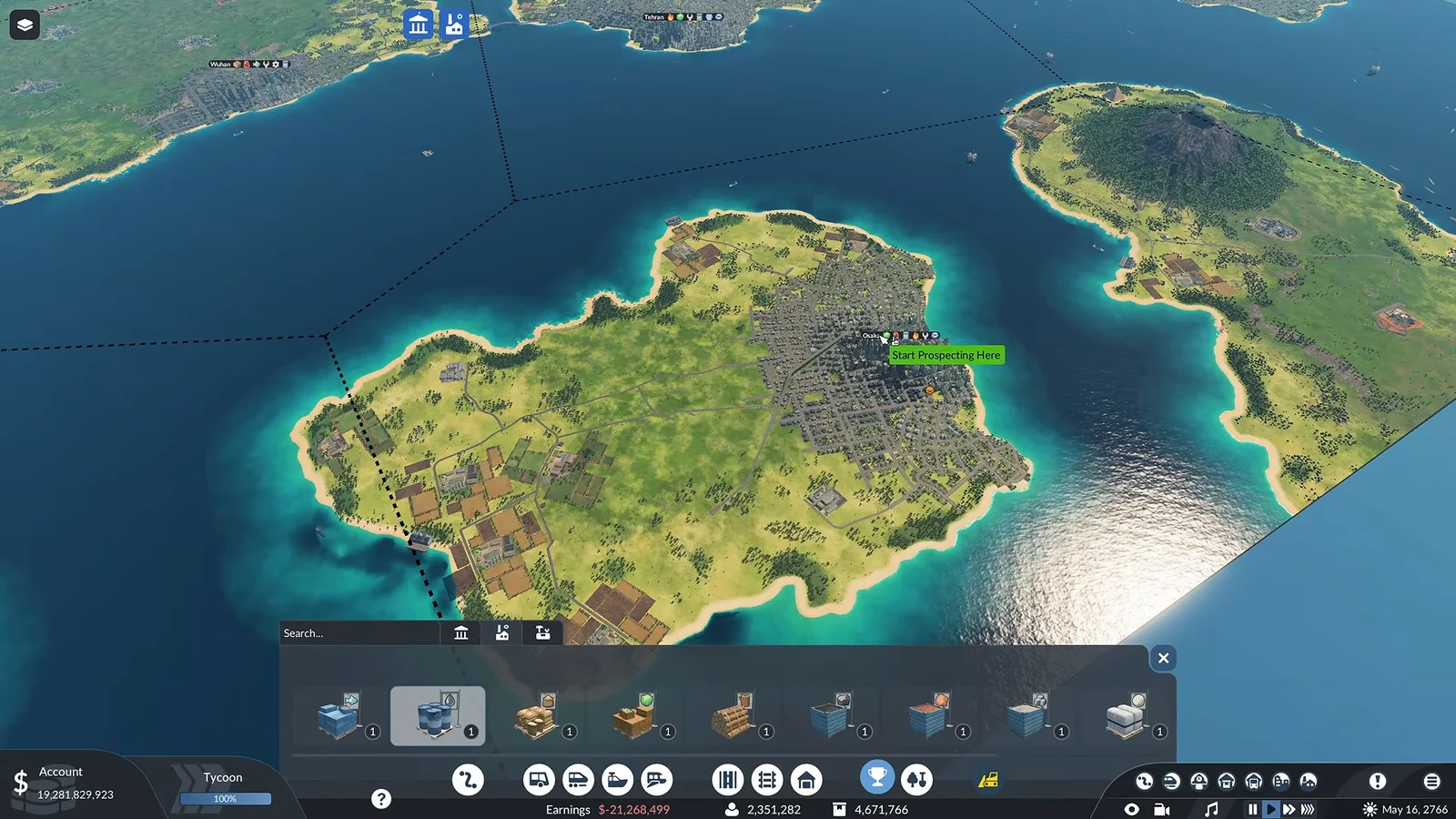
The image shows the resource panel and a valid next action in that save. It does not establish that every card is available at a lower company rank, or that a different map has the same resource options.
Inspect the municipality before committing
Check the town municipality surrounding the target, not just the buildings at its center. The resource search relates to that town's area. This distinction matters when water, potential connections or the desired receiver lie across a municipal boundary.
For a Fish search, check water within the chosen municipality and read any terrain or availability message. Water elsewhere on the map is not evidence that the selected search area is suitable. Do not extend this check into an invented terrain formula for every resource.
The climate list describes where industries are available in free game. It does not supply a guaranteed prospecting location or an exact success formula. Use it to rule out a mistaken industry expectation, then follow the selected card's own instructions.
Start the search and keep its identity clear
- Note the resource you selected and the town you intend to search.
- Confirm that this specific card is available, rather than relying on another unlocked reward.
- Select the resource and wait for the town-selection prompt.
- Hover or select the intended town and check the prospecting prompt before committing.
- Follow the resulting search notice and inspect its outcome before constructing a connection.
Do not keep clicking different towns because a new industry has not appeared immediately. First establish whether the search started, whether it is still running, or whether it reported a failure. Otherwise you lose the connection between the selected reward and the result you are trying to inspect.
Worked example: coal discovered near Royston
In ConflictNerd's recorded gameplay, the selected resource card and Royston's green Start Prospecting Here prompt are visible at 21:49. The resource panel then closes and another notification icon appears.
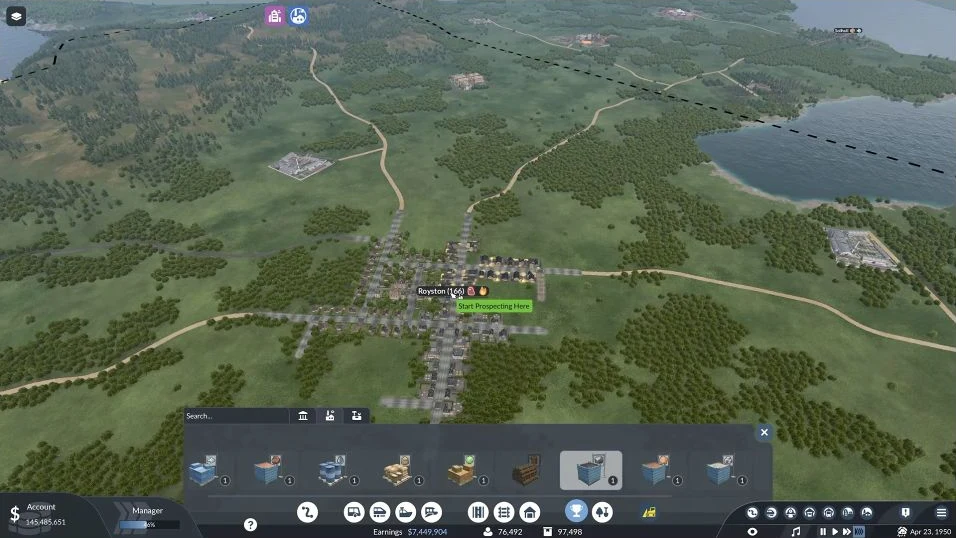
During the intervening footage, the player builds another connection while the search is pending. Keep that construction separate from the prospecting result. The recording does not open a readable countdown, so it does not establish a standard search duration.
At 23:23, Prospecting Successful! explicitly identifies Coal near Royston. The notice says a new industry will follow: this confirms discovery, with industry inspection still the next step.
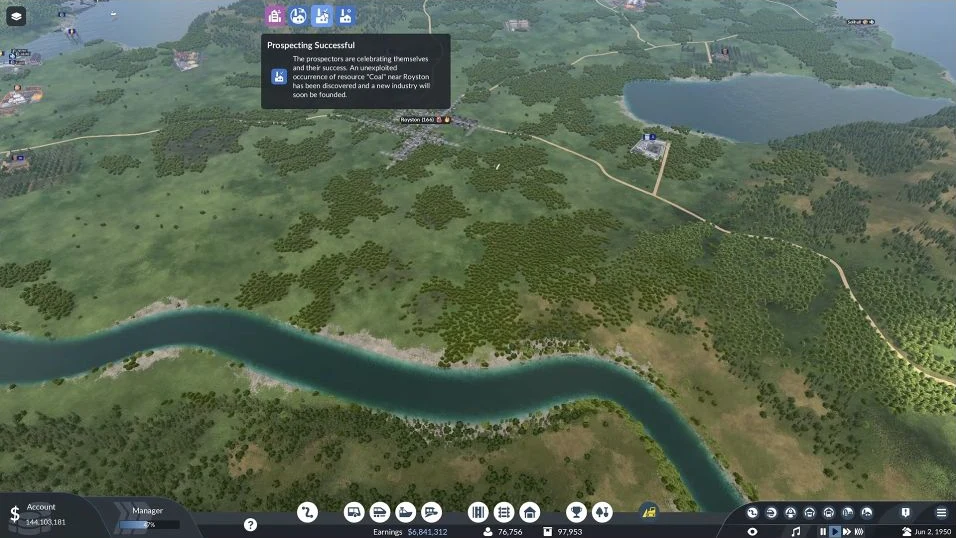
Once the resulting industry appears in your save, select it and check its product and Output Stocks before configuring collection.
Source: Coal prospecting at Royston, 21:49–23:23. This example matches the town and resource through the discovery notice; cargo pickup and delivery require the checks below.
Separate a locked card, an unfinished search and a failed result
If needed, scroll horizontally to read every column.
| Stage you can observe | What it proves | What it does not prove | Next useful check |
|---|---|---|---|
| A resource icon is visible | You have found a resource option | That it is unlocked or currently usable | Read its reward and availability message. |
| The card is selectable | You can select that option | That the target area contains a usable resource | Inspect the target municipality and the operation prompt. |
| Start Prospecting Here appears | The interface is asking for a town selection | That a new industry has been founded | Commit the intended town and follow the search result. |
| The search has started | The operation has been initiated | That it has finished successfully | Follow the displayed search status. |
| A new matching industry is identified | A resource source can be inspected | That your transport network serves it | Check the product, output and pickup connection. |
The resource is locked or cannot be selected
Go back to the resource's own company reward. Read the requirement shown for that option instead of changing town selection or building a new station. A lock is an availability problem; a cargo route does not unlock the card merely by existing.
If another perk is selectable, that only proves that other perk is available. Keep the target resource explicit. In particular, access to an HQ extension or a landmark is not the same as access to the prospecting card you need.
The search is running but no result is visible
Follow the search notice in the save and keep the selected town and resource recorded. Waiting and failure are different states. There is no fixed search duration established here, so do not diagnose failure solely because a video cuts away or because a particular amount of real time has passed.
Inspect the target region and any relevant notification after the operation resolves. A building elsewhere that produces the same cargo could have existed before the search. Match the result to the operation before treating it as a newly founded source.
The search reports a failure
Read the specific reason and check the selected municipality. For Fish, water in the target area is an essential terrain check. For another resource, follow the displayed condition instead of borrowing the Fish rule or inventing a universal biome requirement.
Before another attempt, recheck whether the resource is still available and whether your proposed target addresses the stated problem. Do not assume the same card can be reused immediately, or that changing towns guarantees success.
Inspect the industry's product before building its route
After identifying a successful result, select the actual industry. Its Production rule identifies what it produces, and Output Stocks shows cargo available for collection. Input Stocks and Boosters help distinguish the material needed for processing from optional production support.
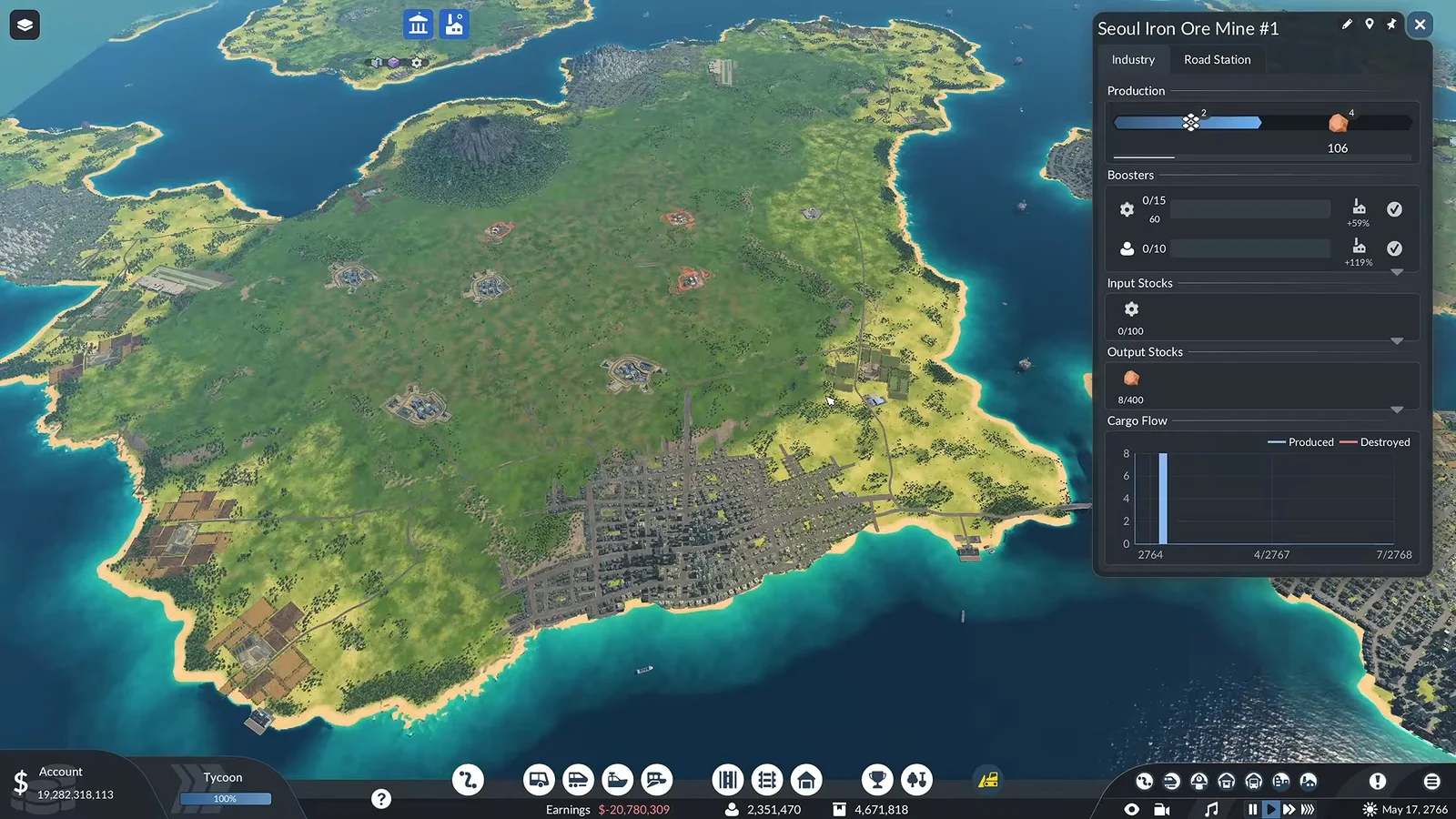
This is an industry inspection example: an Iron Ore Mine panel identifies Iron Ore output. It is not a completion notice for the Osaka search illustrated above. Use the same type of product check on the result in your own save.
Compare three identities: the requested material, the selected prospecting resource and the discovered industry's output. If they do not match, pause the route plan. Building a line to an industry with the wrong output will not satisfy the receiver simply because it is close to the town.
Then check the receiving side. Iron Ore goes into the appropriate production chain; it is not automatically the cargo a town district wants. Fish may serve a suitable town demand or a processing industry. Read the receiver's actual requirement rather than selecting the nearest town stop by default.
Connect a useful result and verify delivery
A discovered source is the start of a cargo route, not the end. Choose a compatible vehicle, configure the producer's pickup stop for the correct cargo and make sure the receiving stop reaches a building that accepts it.
If the route changes transport legs, provide transfer storage and an onward line. Do not assume a warehouse supplies factories or town buildings automatically. If the source produces Fish, the Fish supply guide covers the shore transfer and final town connection.
Watch one collection and delivery after the route starts. At the source, confirm that the vehicle loads the identified output. At the destination, confirm that the receiver takes the product. A nonzero industry stock, a running vehicle and a completed delivery are three different observations.
Low output after discovery belongs to production diagnosis. Raw industries can produce without input cargo, while processing industries need their ingredients; worker and cargo boosters can increase throughput where applicable. Do not spend another prospecting reward merely because a newly connected source has not yet filled a large vehicle.
Your useful completion record is the selected resource and town, the resolved search result, the matching industry product, and a working connection to the intended receiver. Keep any unresolved search result marked as unresolved until the game's actual outcome establishes it.