

Open the Transport Fever 3 SteamDB entry, which uses Steam App ID 3493540. Use that ID to find the correct SteamDB entry, then choose the table that answers your question: packages describe purchase bundles, depots describe distributed files, and branches show Steam build assignments. Those identifiers serve different purposes. A depot number is not a game version, and a package listing does not establish what your account owns.
The figures below come from the SteamDB page collected on 9 October 2026, at 00:12 China Standard Time. Treat them as a dated reference. Player counters, branch assignments and file sizes can change after collection. For a decision about today's download or update, compare the same field on the current page before acting.
Find the correct application
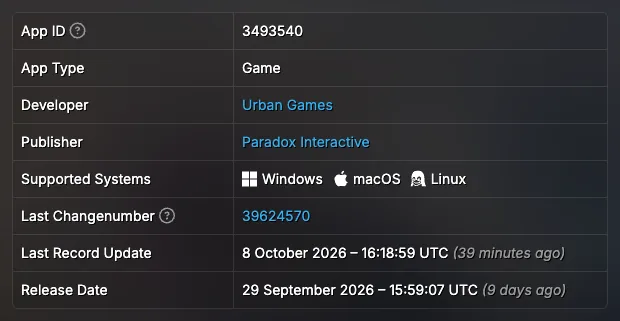
Start with the app number rather than the title alone. Transport Fever 3 is 3493540, with Urban Games listed as developer and Paradox Interactive as publisher. These three fields provide a useful identity check when a search also returns the earlier Transport Fever games, a package page or a discussion about another title.
SteamDB separates application information from the other objects associated with a game. An application page is the central entry for the title. A package page describes a bundle of access rights. A depot represents a collection of files delivered through Steam. A branch identifies a build assignment. Opening one of those related pages does not mean that you have left the game's ecosystem, but it changes what the page can tell you.
For example, searching for the Deluxe edition may land on a package instead of the main app. That is suitable for inspecting the package's contents, but it is the wrong starting point for interpreting the game's overall concurrent player count. Return to App ID 3493540 when you need application-level fields, and keep the entity type beside any number you copy.
Separate application, package and DLC identifiers
The collected page lists two prominent store packages and two DLC applications. Keeping the labels alongside the numbers prevents an easy mistake: assuming every large identifier is another edition of the base game.
| Entity | Identifier | Label in the collected page |
|---|---|---|
| Base game application | App 3493540 | Transport Fever 3 |
| Base game store package | Sub 1515797 | Transport Fever 3 |
| Deluxe store package | Sub 1515799 | Transport Fever 3 Deluxe Edition |
| DLC application | App 3979620 | Deluxe Upgrade |
| DLC application | App 3979630 | Pre-Order Pack |
The Sub prefix matters. A Sub ID is a package identifier; it is not a replacement for the base game's App ID. The Deluxe package and Deluxe Upgrade DLC also have different roles. One describes a purchase package, while the other is a DLC application associated with the game. Their presence together does not make the terms interchangeable.
Use the package table when checking exactly which database object a shop or discussion references. Use the DLC table when identifying an additional application. Neither table, by itself, verifies a particular account's ownership, a redeemable key's validity or an offer's availability in your country. Those conclusions need the actual offer and your account's entitlement information.
The Pre-Order Pack row is another important boundary. The collected table contains its application ID, but it does not provide a release date in that row. A database listing is enough to identify the object. It is not enough to promise that the pack can currently be bought, claimed for free or obtained through a new purchase. Do not substitute the base game's release date for a missing DLC field.
Read timestamps according to their labels
Several dates can appear on the same application page. They describe different events, so selecting the newest visible date is not a reliable way to identify the latest gameplay patch.
| Field | Collected value in UTC | Meaning to preserve |
|---|---|---|
| First seen | 27 January 2025, 10:36:12 | The entry's first-seen timestamp |
| Store Release Date | 29 September 2026, 15:59:21 | The field labelled Store Release Date |
| Steam Release Date | 29 September 2026, 15:59:07 | The separate Steam release field |
| Store Asset Modification Time | 7 October 2026, 07:43:31 | A store asset modification timestamp |
The first-seen date precedes the release fields. That does not mean the game was publicly playable in January 2025. Likewise, a later store asset modification is evidence about store assets, not a list of gameplay fixes. Keep each label attached to its timestamp rather than turning all four into a single release timeline.
The two release fields differ by fourteen seconds in this snapshot. They are database values, not a published promise that every account, platform or territory unlocked at an exact second. Keep the two labelled dates in a database comparison rather than replacing them with an unsupported promise about every store and platform.
UTC also needs to remain explicit. Comparing a UTC timestamp with a local announcement without checking the time zone can make one event appear a day earlier or later. Record the original field and time zone first; convert it only when a local comparison is actually needed.
Compare public and preview build assignments
In the collected branches table, both visible branches point to build 25754343. The public branch has an update timestamp of 8 October 2026, 13:00:02 UTC. The preview branch is labelled Upcoming Patch Preview and has an update timestamp of 6 October 2026, 16:10:14 UTC. Both rows show a build time of 6 October 2026, 14:30:02 UTC.
| Branch | Build ID | Time built, UTC | Time updated, UTC |
|---|---|---|---|
| public | 25754343 | 6 October 2026, 14:30:02 | 8 October 2026, 13:00:02 |
| preview | 25754343 | 6 October 2026, 14:30:02 | 6 October 2026, 16:10:14 |
This is a concrete example of why a branch's update time and a build's creation time should not be read as the same event. The public row was updated later, while the listed build identifier remained the same as the preview row. The table supports that comparison at collection time; it does not guarantee that those branches will continue to match.
A Steam build ID also is not an installed game's semantic version number. If an error report asks for a game version, copying 25754343 without explaining that it is a Steam build identifier can create confusion. Check what the receiving support form requests, and keep the distinction visible in your report.
The entry reports one private branch, but the collected material does not identify it or provide an access method. There is no basis here for publishing a private branch name, password or installation procedure. The visible preview label likewise does not establish beta access requirements or prove that switching branches will repair a particular bug.
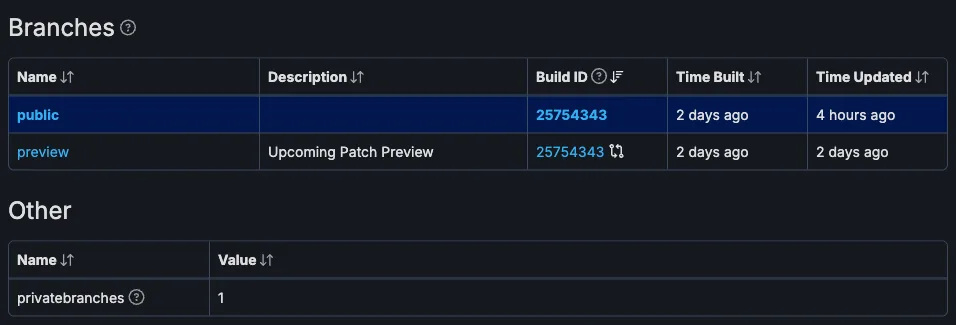
For an update investigation, first compare the current public build row with this dated snapshot. Then look for an actual patch announcement describing the changes. The branch table can show an assignment; it cannot explain which route behavior, graphics issue or simulation defect a build fixed unless that explanation is provided elsewhere.
Interpret depot sizes with the correct filter
The depot table is useful for understanding why several different size figures can all appear for the same game. The collected page includes depot 3493541 with no platform configuration shown, separate Windows, macOS and Linux depots, and additional depots associated with the Deluxe Upgrade and Pre-Order Pack.
| Depot | Listed purpose or platform | Size on disk | Download size |
|---|---|---|---|
| 3493541 | No platform configuration shown | 65.83 GiB | 27.52 GiB |
| 3493542 | Windows | 167.05 MiB | 47.14 MiB |
| 3493543 | macOS | 252.78 MiB | 61.36 MiB |
| 3493544 | Linux | 304.69 MiB | 80.71 MiB |
| 3979620 | Deluxe Upgrade | 1.92 GiB | 1.10 GiB |
| 3979630 | Pre-Order Pack | 666.25 MiB | 310.82 MiB |
The unfiltered total in this snapshot is 69.10 GiB on disk and 29.11 GiB downloaded. With the page filtered to Windows, English, no DLC, the displayed total is 65.99 GiB on disk and 27.57 GiB downloaded. Those results answer different questions because their selected depot sets differ.
Do not add every operating system row and call the sum a typical Windows installation. Do not copy the no-DLC total into a statement about a Deluxe installation either. Before quoting a total, write down the platform, language and DLC filter that produced it. That short note makes the number interpretable when someone compares it with another screenshot.
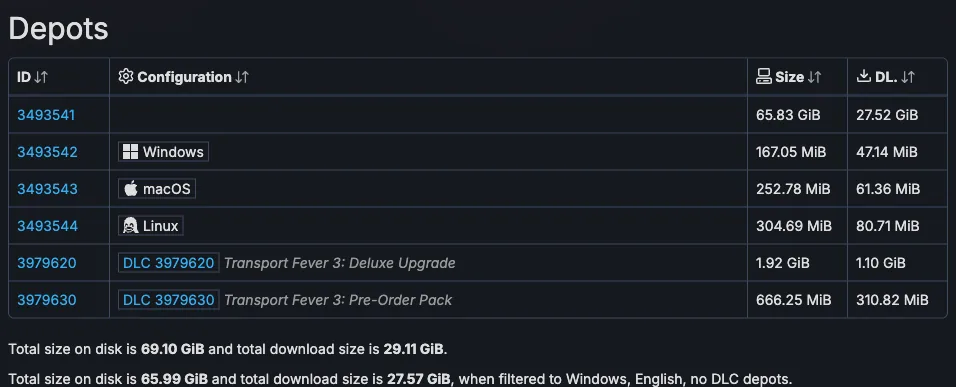
The table also separates size on disk from download size. The collected download figure is smaller than the disk figure; reporting either one simply as “game size” loses that distinction. Preserve the unit as well. GiB and MiB are the units shown in the source table, so changing them casually to a different unit would make the comparison less precise.
These are database depot figures, not a measurement of your current drive or a guarantee of the bytes your next update will transfer. They also do not replace the official 90 GB SSD system requirement. A minimum storage requirement and a filtered depot total are different kinds of information. For Mac or Steam Deck hardware planning, use the relevant device guide. Use this table for interpreting the selected Steam distribution data.
Read player counters without turning them into sales
The captured application page shows 25,429 players right now, a 27,728 twenty-four-hour peak, and an all-time peak of 47,521, dated 29 September 2026. These are Steam concurrent-player observations in the collected snapshot.
“Right now” belongs to the time the source was collected. It is not a live counter embedded in this guide. The twenty-four-hour peak is a different measurement from the current count, and the all-time peak is a historical maximum rather than a total of everyone who has played. Keeping the three labels separate avoids turning one snapshot into an unsupported growth claim.
Concurrent players are not copies sold, monthly active users or revenue. They also do not count every platform or store on which someone might play the game. A Steam player figure should therefore remain a Steam player figure when quoted elsewhere. It cannot establish the GOG population or a combined audience across stores.
If you want to compare activity on two dates, record the same counter on both occasions. Comparing one day's current count with another day's all-time peak would mix measurements. The collected page's longer chart access was limited, so this material does not support a complete historical curve, a retention calculation or an explanation of why the player count changed.
Recognize fields that do not establish compatibility
The application metadata includes full controller support and a macOS Apple Silicon field. It also contains a Steam Deck touchscreen flag and a Steam Linux Runtime entry. These are useful identifiers of recorded support metadata, but they do not establish measured performance on your hardware.
A touchscreen flag does not prove Steam Deck Verified status, frame rate, battery life or readability. A Linux runtime entry does not provide a Proton compatibility result. The macOS field does not replace the operating system, chip and memory requirements. Use the dedicated Steam Deck, controller and Mac guides when deciding whether a device is suitable; this page only explains what the database entry itself establishes.
The language table has a similar distinction. It lists thirteen languages for interface, subtitles and achievements, while full audio is marked for English and German. A language appearing in the table does not automatically imply full audio in that language. Read the column heading as carefully as the language name when checking a localization claim.
Keep unavailable history and empty sections explicit
The collected price-history graph returned a server error. Some chart access was limited, and the Builds and Achievements headings did not provide rows in the extracted material. These gaps should remain gaps. An empty extraction is not evidence that the game has no achievements, and a failed graph cannot support a complete price-history statement.
For a practical SteamDB note, keep four things together: the correct entity identifier, the exact field label, the observed value and the collection date. Add platform and DLC filters when quoting depot totals. That is enough to preserve the meaning of the useful tables without claiming that inaccessible history was checked.
Return to the current application page when a decision depends on a fresh value. For prices, edition contents, hardware compatibility and gameplay troubleshooting, continue with the relevant guide linked below. SteamDB provides structured evidence about Steam's records; interpreting each record within its own limits is what makes that evidence useful.