
Skip to content
SeedsConfirmed

Transport Fever 3 Seeds

Quick Answer

Copy the seed and matching generator settings. Compare four attributed setups; exact builds and platforms remain unknown, and none has been independently reproduced here.

Seed recipe workbench

Choose a creator-shared recipe, copy its recorded settings and compare your own generation before starting a network. Missing settings remain unknown.

Matching recipes: 4 / 4.

Squirrel’s Subarctic ridge map

A square map with a ridge dividing the northeast and southwest, water pockets and scattered mountains. The source starts in 1910 on Normal difficulty with population set to 150%.

Exact seed: dXrbYaTpOr

View the creator’s original demonstration · Source checked

Compare these settings in your game

0 / 6 personal comparison reminders marked.

These recipes were shown by their creators; this site has not independently reproduced them on your game build. Checking every box does not prove a matching map. Compare the generated preview, towns and industries before building.

Read the seed setup and mismatch guide

Map Seeds with Recorded Settings

Four attributed seed recipes. Squirrel and BadBen have detailed recorded setups; Skye Storme and Speedbrake22 still lack generator, mod or build evidence. Check those gaps before copying. None has been independently reproduced here.

4 of 4 entries

Sparse Subarctic preview in BadBen’s setup for seed T1UTRLDVYg

Subarctic

BadBen’s sparse Subarctic challenge

A long 1:2 Subarctic map with low town and industry density, a French naming set and the Very Hard preset. The creator demonstrates the launch-period setup and starts the game in 1900.

View the original source · Source checked

Creator
BadBen’s BattleMechs
Seed
T1UTRLDVYg
Size / ratio
Very Large / 1:2
Terrain
Water Medium; Swamps Sparse; Mountains Scattered
Build
Launch-period gameplay; exact build not supplied
Verification
Creator-demonstrated; not independently reproduced
Exact game build
Not confirmed
Source platform
Not confirmed

Seed: T1UTRLDVYg

Settings
Transport Fever 3 — BadBen Sparse Subarctic setup
Seed: T1UTRLDVYg
Climate/generator: vanilla Subarctic
Map size: Very Large (11 x 22 km in the source)
Map format: 1:2
Water: Medium (third slider position)
Swamps: Sparse (first slider position)
Mountains: Scattered (second slider position)
Names: French
Town density: Sparse (first slider position)
Industry density: Sparse (first slider position)
Start year: 1900
Weather: Dynamic
Time of day: Dynamic
Tutorial: Off
Difficulty: Very Hard preset; no custom gameplay overrides described
Enabled mods: none
Source: BadBen's BattleMechs, Very Large Sparse Subarctic Map on Very Hard, published after launch
Exact build number: not supplied
Verification: creator-demonstrated settings and preview; not independently reproduced by this site
Source recheck: 2026-10-26; original transcript/post checked. Exact source platform and build remain unidentified; no independent in-game reproduction.

Temperate

Skye Storme’s water-rich Temperate example

Large square map with Medium lakes, Dense rivers and Medium mountains. Two active mods and the exact build are unresolved, so the recorded settings are an incomplete reproduction recipe.

View the original source · Source checked

Creator
Skye Storme
Seed
skyestorme1
Size / ratio
Large / 1:1
Terrain
Lakes Medium; Rivers Dense; Mountains Medium
Mods
Two active entries; identities not confirmed
Build
Early-access review copy; exact build not supplied
Verification
Settings visually checked; not independently reproduced
Generator
Not confirmed
Reproduction status
Incomplete source settings; compare the preview before building
Terrain generator
Not confirmed
Active mod identities
Not confirmed
Exact game build
Not confirmed
Reproduction blocker
Two enabled mods are not identified in the available material. Match them before expecting the same map.
Source platform
Not confirmed

Seed: skyestorme1

Settings
Transport Fever 3 — Skye Storme Temperate setup example
Seed: skyestorme1
Climate: Temperate
Generator: exact selection not independently confirmed
Map size: Large
Map format: 1:1
Lakes: Medium
Rivers: Dense
Mountains: Medium
Names: European
Town density: Medium
Industry density: Medium
Start year: 1900
Weather: Dynamic
Time of day: Dynamic
Tutorial: On
Difficulty: Normal
Enabled mods: 2; identities unresolved
Source build: exact build not provided
Source: Skye Storme, setup at 1:27, https://www.youtube.com/watch?v=-JebCpZperg&t=87s
Verification: visually checked source settings only. Unknown generator/mod/build details prevent a guaranteed reproduction.
Source recheck: 2026-10-26; original transcript/post checked. Exact source platform and build remain unidentified; no independent in-game reproduction.

Climate not confirmed

Speedbrake22’s fjord-and-mountain setup

The author shares a Very Large 1:2 layout with a dividing fjord and mountain ranges. The post calls the climate “Arctic”; generator, game build and enabled content are not supplied. Use it as a partial starting record, not a guaranteed match.

View the original source · Source checked

Creator
Speedbrake22
Seed
AEUK5XFcs8
Size / ratio
Very Large / 1:2
Climate wording
Arctic in the author post; confirm the matching in-game climate
Terrain
Water Large; Swamps Medium; Mountains Medium (author wording)
Civilization
Towns Dense; Industries Medium in the author’s example
Generator / mods / build
Not confirmed
Verification
Community-posted settings; not independently reproduced
Terrain generator
Not confirmed
Active mods / DLC
Not confirmed
Exact game build
Not confirmed
Reproduction blocker
The original post names Arctic, not an exact generator; mods, DLC and build are not supplied.
Source platform
Not confirmed

Seed: AEUK5XFcs8

Settings
Transport Fever 3 — Speedbrake22 community fjord setup
Seed: AEUK5XFcs8
Climate: 'Arctic' in the original post; confirm the matching in-game climate label
Generator: not supplied
Map size: Very Large
Map format: 1:2
Water: Large (author wording)
Swamps: Medium
Mountains: Medium
Town density: Dense in the author's example; the author allows a different preference
Industry density: Medium in the author's example; the author allows a different preference
Names, start year, difficulty, weather, time of day, tutorial: not supplied
Enabled mods and DLC: not supplied
Exact game build: not supplied
Source: Speedbrake22, Post your map seeds, Steam TF3 discussion
Verification: partial community record; no in-game reproduction or independent preview check by this site
Source recheck: 2026-10-26; original transcript/post checked. Exact source platform and build remain unidentified; no independent in-game reproduction.
Subarctic map preview from the creator setup for seed dXrbYaTpOr

Subarctic

Squirrel’s Subarctic ridge map

A square map with a ridge dividing the northeast and southwest, water pockets and scattered mountains. The source starts in 1910 on Normal difficulty with population set to 150%.

View the original source · Source checked

Creator
Squirrel
Seed
dXrbYaTpOr
Size / ratio
Very Large / 1:1
Terrain
Water Medium; Swamps Scattered; Mountains Scattered
Build
Pre-release; exact build number not provided
Verification
Creator-demonstrated; not independently reproduced
Exact game build
Not confirmed
Source platform
Not confirmed

Seed: dXrbYaTpOr

Settings
Transport Fever 3 — Squirrel Subarctic setup
Seed: dXrbYaTpOr
Climate/generator: vanilla Subarctic
Map size: Very Large (16 x 16 km in the source)
Map format: 1:1
Water: Medium (middle/third slider position)
Swamps: Scattered (second slider position)
Mountains: Scattered (second slider position)
Names: European
Town density: Medium (third slider position)
Industry density: Dense (fourth slider position)
Start year: 1910
Weather: Dynamic
Time of day: Dynamic
Tutorial: Off
Difficulty: Normal, with Total Map Population: 150%; other gameplay values: 100%
Enabled content: Pre-Order Pack and Deluxe Upgrade; no additional gameplay/generator mods
Source build: pre-release; exact build number not supplied
Source demonstration: Squirrel, Subarctic Start, Ep1, 01:30–03:10
Verification: creator-demonstrated setup; not independently reproduced on the current retail build
Source recheck: 2026-10-26; original transcript/post checked. Exact source platform and build remain unidentified; no independent in-game reproduction.

A Transport Fever 3 seed recreates a generated map only when its climate, generator and settings also match. Copy a complete recipe rather than a code alone. The official Free Game manual states this same-seed, same-settings rule; it does not certify any community example.

The four records in the directory have different evidence limits. Squirrel and BadBen have detailed recorded setups; Skye and Speedbrake22 still have missing generator or enabled-content details. None has been independently reproduced by this site on the current game build. Exact source builds and platforms remain unknown where the creator does not identify them.

Choose a map seed for the landscape you want

If needed, scroll horizontally to read every column.

Your intended startRecord to inspectConditions and limits
A square Subarctic landscape with a ridge and water pocketsSquirrel: dXrbYaTpOrVery Large, 1:1; start 1910; Normal with population changed to 150%; pre-release demonstration
An elongated, sparsely settled Subarctic challengeBadBen: T1UTRLDVYgVery Large, 1:2; start 1900; Very Hard; Sparse towns and industries
A Temperate landscape with lakes and dense riversSkye Storme: skyestorme1Large, 1:1; two enabled mods and the exact generator remain unresolved
A fjord dividing mountain rangesSpeedbrake22: AEUK5XFcs8Very Large, 1:2; the author calls the climate “Arctic”; generator, mods/DLC and build are missing

These are attributed examples, not a ranking of the best Transport Fever 3 seeds. A preview does not establish a profitable opening, navigable water route or short cargo chain. Compare those conditions on your generated starting map before committing to a network.

For Skye's source timestamp and recorded water settings, use the Temperate seed guide. For a deliberately authored region rather than a generated landscape, use the custom map directory.

Resolve the missing settings before copying

The original videos and Speedbrake22's Steam post were rechecked on 26 October 2026. The post still does not identify a generator, enabled mods/DLC or exact game build. Its “Arctic” wording is preserved without silently replacing it with a specific generator.

If needed, scroll horizontally to read every column.

RecordWhat the source establishesWhat it does not establish
SquirrelDetailed recorded Subarctic setup and a pre-release demonstrationExact build number, exact source platform or current-build reproduction
BadBenDetailed Sparse Subarctic setup and Very Hard presetExact build number, exact source platform or current-build reproduction
Skye StormeTemperate, Large and Dense rivers in the opening demonstrationThe two mod identities or exact generator/build; the introduction says this was an early copy
Speedbrake22Seed, size, ratio and listed terrain settings in the original postGenerator, enabled content, build and several other world settings

Automatic captions are not a reliable way to recover mixed-case seed codes. Copy the exact values recorded in the directory; do not replace skyestorme1 with its phonetic caption spelling. The newly checked subtitles do not resolve the missing mod identities. If a recipe remains incomplete, request the creator's original map/save or select a better documented setup instead of inventing defaults.

Record the complete generation setup
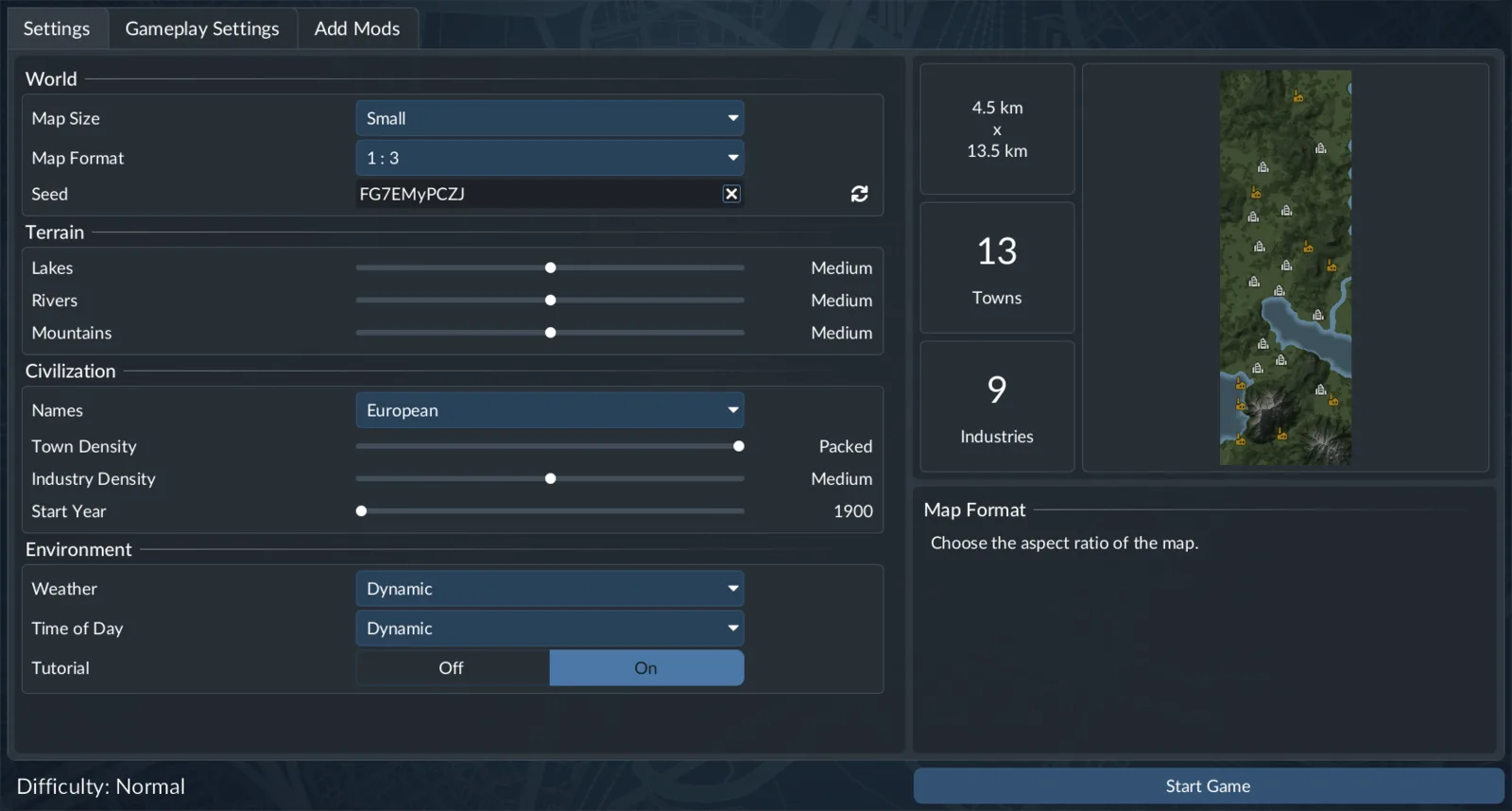
Transport Fever 3 Free Game World settings screen with the map Seed field

The manual's generation panel illustrates the controls; its example values are not settings for every record in the directory.

If needed, scroll horizontally to read every column.

Part of the recipeValues to retain
WorldExact seed, Map Size and Map Format
TerrainClimate, selected generator and every visible generator parameter
CivilizationName lists, Towns Density, Industry Density and Start Year
EnvironmentWeather, Time of Day and tutorial selection
GameplayDifficulty preset and individual changes
Content and versionGenerator-changing mods, enabled DLC, known build and platform

Squirrel's record includes European names, Medium towns, Dense industries, dynamic weather and time, tutorial off, and the population override. Pre-Order Pack and Deluxe Upgrade are enabled; no additional gameplay/generator mods are recorded. BadBen uses French names, Sparse towns and industries, Medium water, Sparse swamps, Scattered mountains, dynamic weather/time, tutorial off and no mods. Preserve these differences rather than treating both examples as a generic Subarctic preset.

Town and industry density are not cosmetic annotations. The manual explains that town density changes initial settlement distribution and size, while industry density changes the initial production arrangement. Speedbrake22 explicitly allows other densities as a personal choice; those alternatives are not the same recorded setup.

Recreate the starting world in Free Game

  1. Select the recorded climate and generator, including any required generator mod.
  2. Match Map Size and Map Format, then enter the exact seed.
  3. Match every terrain option supplied in the recipe.
  4. Match the civilization, environment and gameplay choices.
  5. Check the enabled content and any known version restrictions.
  6. Generate the map and compare terrain first, then towns and industries, before building extensively.

Map size is part of the generation request. A larger or experimental size is not an improvement to an existing recipe: changing it means making a different setup. Use the map size and platform guide before following an experimental-map tutorial; this page does not certify an unlock method or promise that a creator's layout will scale unchanged.

A seed also cannot reconstruct later stations, lines, vehicles, terraforming or economic progress. For an already developed world, you need the corresponding save rather than only its seed.

Keep Map Editor layers and seeds separate

The official Map Editor manual describes a terrain Seed field and separate town/industry placement tools. Each placement operation needs its own settings; a terrain seed is not a universal code for every procedural layer.
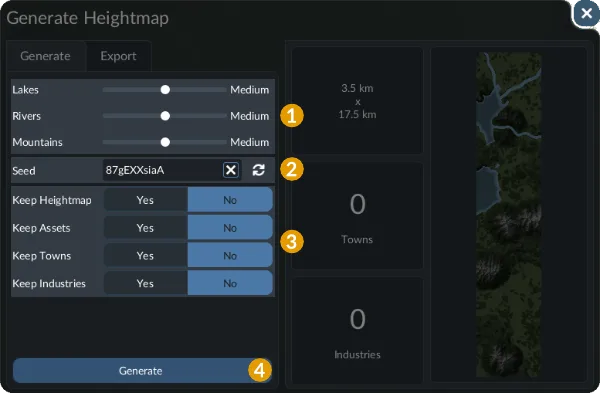
Generate Heightmap editor panel with terrain sliders, a map preview and Keep choices

Check retained layers before comparing a regenerated map.

Keep Heightmap, Keep Assets, Keep Towns and Keep Industries retain existing content during generation. If another player starts with empty layers while you keep earlier content, the two operations differ even with the same terrain seed. Record exactly what was preserved.
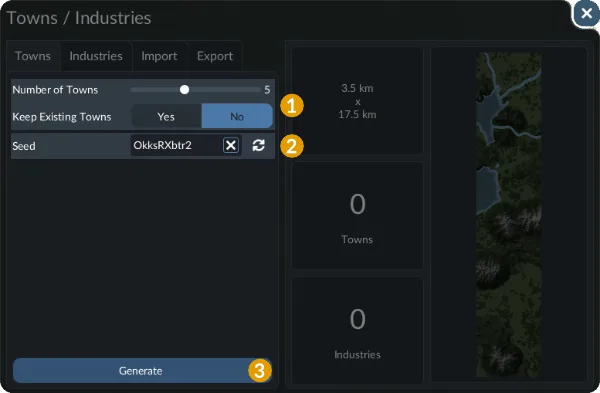
Transport Fever 3 Map Editor town generator with distribution controls, preview, and town seed field

Record the town generator's seed and Keep existing towns setting separately.

Town generation has its own number/distribution settings and seed; the maximum town count depends on map size. Industry generation follows an analogous process. Label terrain, town and industry seeds separately when sharing an editor project.

Find the first layer that differs

If needed, scroll horizontally to read every column.

DifferenceFirst comparison
Coastline, hills or rivers differSize, ratio, climate, generator, terrain options and terrain seed
Terrain matches but towns differName lists, town density or the editor's town-placement settings and seed
Towns match but industries differIndustry density or separate industry-placement settings
Old content remainsThe editor's Keep options and existing layers
Recorded visible settings matchUnresolved generator mods, enabled content or source version

Change one group of settings at a time. A similar river bend is not independent reproduction, and a mismatch does not prove that the community code is invalid. Keep missing values visible in your record. Workbench checkmarks are personal reminders; copying, sharing or checking a box does not test a map in the game.

Continue building the selected world

Compare Temperate map seeds, check map size and platform limits, or review terrain-changing mods before changing the generator. Each directory record links its original creator source; the official manuals explain the tools separately from those community examples.