
For an underground railway passenger station in Transport Fever 3, the Underground Railway Station mod by Maaxime provides platforms for trains. It is available from 1970. Connect its entrance to a surface street and its tracks to railway tunnels. Although the construction is adapted from the base game's underground tram station, this mod requires train tracks, not tram tracks.
Choose the station layout and platform length before building its approaches, then test a passenger train through the completed connection. Use the base game's tram infrastructure for an ordinary underground tram route. Similar-looking entrances do not make tram and railway stations interchangeable.
Identify the station and its actual purpose
Check the author's underground station listing for its current files and layout changes.
The mod is named Underground Railway Station, created by Maaxime, with mod ID 6428564. These identifiers help distinguish it from similarly named underground constructions and from requests in the discussion for additional features.
Its stated purpose is an underground passenger railway station with long, high platforms for trains. It is not presented as an underground cargo terminal. A cargo train's physical ability to use a rail corridor is therefore a separate question from whether this passenger station can handle its payload.
The base design is adapted from the game's underground tram stop. That explains the surface entrance's familiar appearance, but the author's clarification is explicit: use train tracks. If tram tracks will not snap to it, choosing a different tram street is not the intended repair.
| Part of the station | Confirmed role | Connection to check |
|---|---|---|
| Surface entrance | Passenger access from the town | A connected surface street |
| Underground platforms | Passenger train stopping | A suitable railway line and assigned stop |
| Track approaches | Train entry and exit | Railway tunnel connections |
| Interior style | Appearance choice | Choose independently of the line's track capability |
| Platform length | Space for the selected stopping arrangement | Match the train and intended service before final construction |
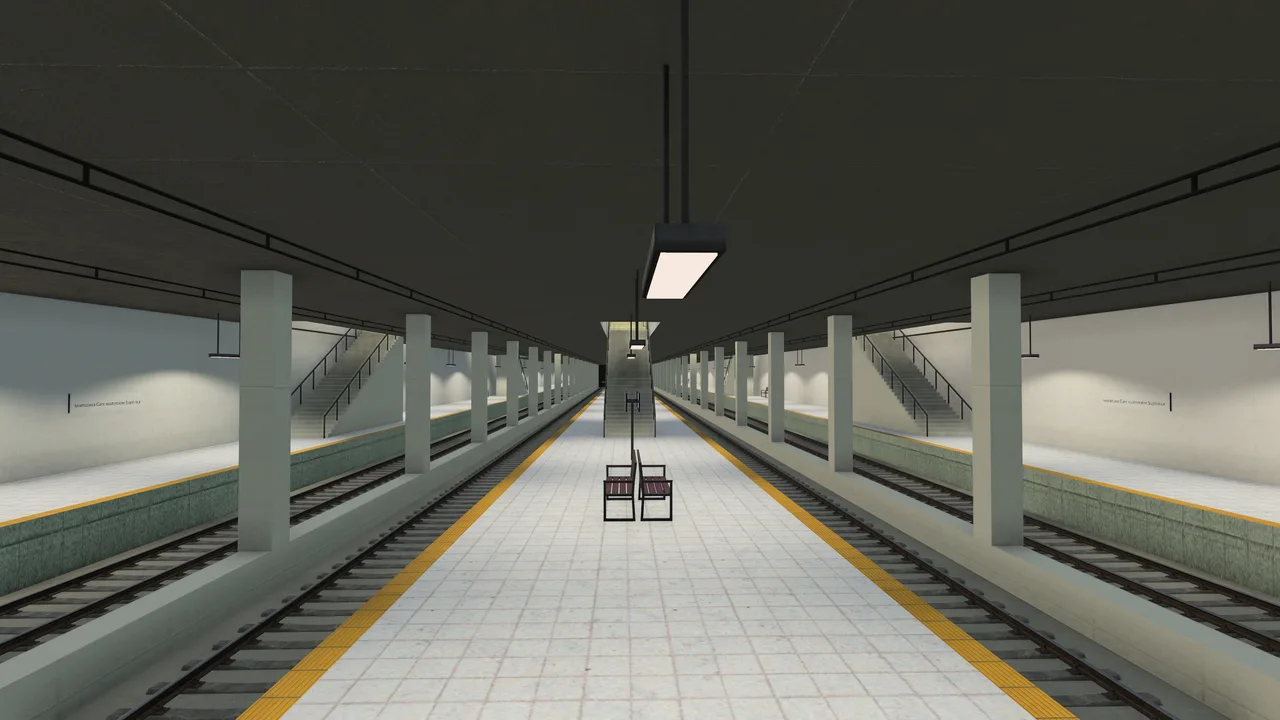
The Japanese-style interior uses white tiles and yellow platform safety strips.
Treat the station, its street entrance, and its railway approaches as distinct construction tasks. Completing the visible entrance does not establish that the train route below is usable, and connected tracks do not establish that passengers can reach the entrance.
Check the year and installed variant
The main description states that the station is available from 1970. In an earlier-year save, check the construction's availability before troubleshooting its menu location. A station not yet available in the chosen year cannot be repaired by connecting more track.
The main layout description lists seven layouts with 2, 4, or 6 tracks, side or island platforms, and through tracks on some layouts. Platform lengths are listed as 160, 240, or 320 meters. Choose the arrangement that fits the service you actually intend to run.
The author also announced 40, 80, and 120-meter options in the discussion. That is useful when looking for a shorter station, but check the installed version's actual construction menu before planning around one of those shorter lengths. The listing's main description and its later update comments are not identical inventories.
Do not infer an eight-track layout, arbitrary depth selector, or full multi-level interchange simply because a commenter asks for it. Requests describe desired changes. They do not establish that the requested feature is already in the installed construction.
Record the version you add to the save and retain the actual available layout choices. This is especially useful when following an older screenshot whose options differ from the version installed today.
Add the mod to the intended save
Find the listing through the Mod Hub using its exact name, author, or ID. Select the file appropriate to your platform and add the mod to the game or save you intend to use. A subscription in your account is not the same as confirming that the relevant save has the mod active.
The captured listing provides files for Windows, Mac, and Linux, and a console file for PlayStation 5 and Xbox Series X/S. It lists no dependencies. That describes the listing at the time checked; it does not mean every combination of other mods has been compatibility-tested.
Use a separate save before replacing important passenger infrastructure. This gives you a return point if the installed version, station geometry, or another mod produces a problem. The station should earn its place in the network through a small successful test before it becomes the only route serving a large town.
For general account authentication or missing Mod Hub downloads, use the dedicated Mod.io guides. Those are different problems from a successfully installed station using the wrong track type. Confirm installation first, then focus on the construction itself.
Do not remove a required station mod casually from a save that contains its constructions. If you are investigating a conflict, preserve the original save and separate the test. A missing construction dependency is not evidence that the railway service was incorrectly signaled.
Choose layout, length, and track options
Choose the number of tracks around the services that will actually stop. A larger layout can provide more platforms, but it also requires more underground approach geometry. Extra tracks do not help a line that cannot reach its assigned terminal.
The listing offers side and island platforms, with through tracks in some layouts. Inspect the chosen construction's visible arrangement before building the approaches. A through track and a platform track have different roles in your planned service, even when both pass through the station footprint.
Select a platform length appropriate to the train you want to operate. Do this before finalizing tunnel positions so that a later length change does not force you to rebuild a carefully placed approach. Use the actual menu and train information instead of treating a screenshot's layout as a universal default.
Track options include the three base-game railway track types, depending on the year, and choices with or without catenary and ballast. Match the required traction to the route. An electric train needs the relevant electrical infrastructure beyond the station too; adding wires only inside the platforms does not electrify the complete journey.
The mod also offers modern concrete or old masonry tunnel connections. These and the two interior styles are construction choices, not evidence that the station supports every vehicle class. Keep appearance and operating compatibility as separate checks.
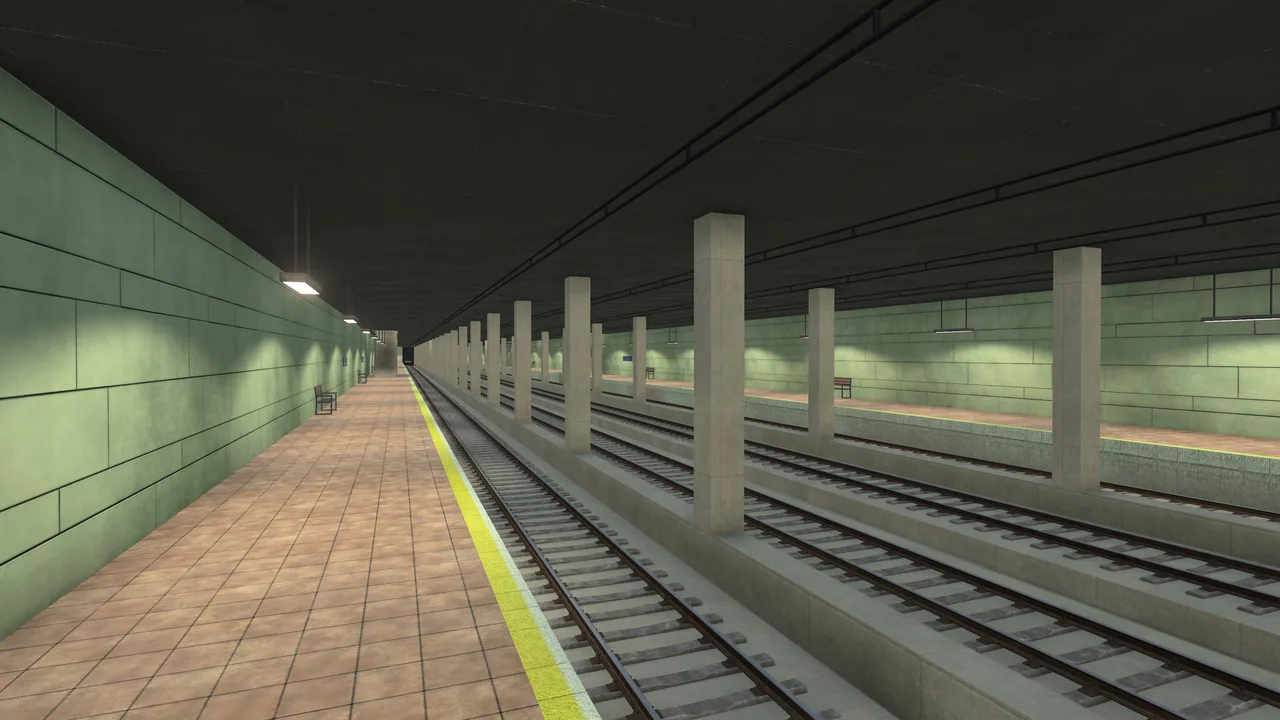
The original interior is an appearance option; railway track requirements still apply.
Connect the surface entrance to the street
Place the station where the surface entrance can connect to a useful street. The author describes its entrance as the same as the default underground tram station's entrance. Identify that access point in the placement view rather than judging only by the underground platforms.
Confirm the actual street connection after placement. A street nearby on the surface is not necessarily attached to the entrance. Likewise, a station can be correctly connected yet poorly located for the homes, workplaces, or other destinations you want passengers to use.
Passenger access depends on usable journeys. The general station rules distinguish passenger walking connections from cargo catchment: passengers need a valid path rather than a simple circular cargo radius. Check the station's highlighted passenger connections and the destinations it can serve.
If you plan a feeder bus or tram, connect the service to the entrance area with usable stops and vehicles. A colored feeder line on the map does not demonstrate that its passengers can reach the station or make the intended transfer.
Do not assume that placing two underground stations near each other creates a pedestrian tunnel between them. The discussion includes requests for full transfer hubs and linked multi-level stations. Until a particular construction provides that connection, inspect the actual access route rather than relying on the desired interchange design.
Build railway tunnel approaches
Connect the station tracks to railway tunnels. This is the author's required connection method. The station is not intended to accept ordinary tram tracks, even though its model began as a tram-stop adaptation.
Work from the chosen station layout toward the planned rail corridor and inspect both ends. A platform with an approach on only one side can be suitable for some service plans, but every stop sequence still needs a valid route for the selected train. Let the line path and vehicle behavior confirm whether the layout supports your intended operation.
When working below the surface, use the appropriate underground construction view to avoid selecting the wrong surface infrastructure. Do not interpret an unsuccessful snap to a surface tram road as proof that the station needs another entrance or a different decorative tunnel style.
Check continuity, track type, and required catenary along the approaches. A small unconnected segment can prevent the train from reaching a station that looks complete in a zoomed-out view. Inspect the immediate join before rebuilding the entire corridor.
Once the physical connection works, consider signals and shared-track conflicts as railway problems. An underground location does not change the train's need for a valid reserved path. Keep the first test simple enough that you can identify a construction error before introducing several intersecting services.
Run one passenger service through the station
Create a passenger line that uses the station and another reachable passenger stop. Select the appropriate platform or terminal assignment, buy a suitable train from a connected depot, and observe its journey.
The depot must connect to the route's first stop. A correctly constructed underground station does not provide a separate train purchase point merely because trains can stop there. Distinguish the station's passenger function from the depot's vehicle access function.
First verify that the train reaches the station and follows the line's stop sequence. Then inspect boarding, alighting, and passenger access. A train completing an empty trip demonstrates a different result from a train failing to find any path.
If the train moves correctly but ridership stays low, review the useful origins and destinations connected by the service. Adding more platform tracks is unlikely to fix an entrance disconnected from its intended residential area or a line that bypasses the places passengers need to reach.
Troubleshoot the specific failure
| Symptom | First inspection | What to avoid assuming |
|---|---|---|
| Station absent from construction choices | Active mod and game year of 1970 or later | That every save automatically activates a subscribed mod |
| Tram tracks do not connect | Use railway tracks as the author specifies | That the adapted tram-stop model implies tram compatibility |
| Train cannot reach the platform | Tunnel joins, track continuity, terminal assignment, traction needs | That more tracks create the missing path |
| Passengers cannot use the station | Entrance street access and useful walking connections | That physical proximity is a passenger connection |
| Short platform options are absent | Installed version and actual menu | That an author update comment matches every earlier file |
| Clicking or deleting causes a crash | Version, platform, other active mods, reproducible action | That one report proves a universal platform failure |
The discussion contains an Xbox user's crash report involving selection or deletion of a previously built station. The author could not reproduce it in an old save and asked for an error message. Treat that as a specific reported issue rather than a confirmed crash affecting every Xbox installation.
If you encounter such a failure, preserve the save and report the exact action, platform, mod version, and any visible error. Testing the same station in a separate simple save can help distinguish a construction issue from a larger save or mod interaction without risking the original network.
Related guides
Use Light Rail for capable trams crossing between street and railway infrastructure, Mod.io for obtaining and activating mods, and Train Signals for railway operation after the station's connections work.