

Transport Fever 3 has 36 Free Game cargo types: 12 raw materials, 11 intermediate products, 3 booster products, and 10 end products. The German term Güterarten means cargo types. Use this directory to find a cargo's producer, eligible consumers, production role, and transport specialization before choosing a vehicle or destination.
The tables are grouped by Goods, Bulk, Liquid, and Flatbed specialization. That grouping describes handling compatibility rather than the cargo's place in a production chain. A raw material can be Goods, and a booster can be Liquid or Flatbed. Campaign-only special cargo is outside this Free Game directory.
Separate cargo role from transport specialization
The production role explains why a product exists in the economy. Raw materials come from source industries, intermediate products feed further manufacturing, boosters support industry production, and end products serve town districts. Some goods have additional uses beyond their headline role.
Specialization is a different property. It helps you match the cargo to vehicles, terminals, and storage. For example, Fish is a raw material with Goods specialization, while Crude Oil is a raw material with Liquid specialization. These two raw materials need different transport compatibility checks.
Do not use the everyday meaning of a material to override its listed game category. Rubber is Liquid; Logs and Planks are Flatbed; Tools are Goods. Read the cargo's actual specialization before buying a vehicle or configuring a specialized transfer.
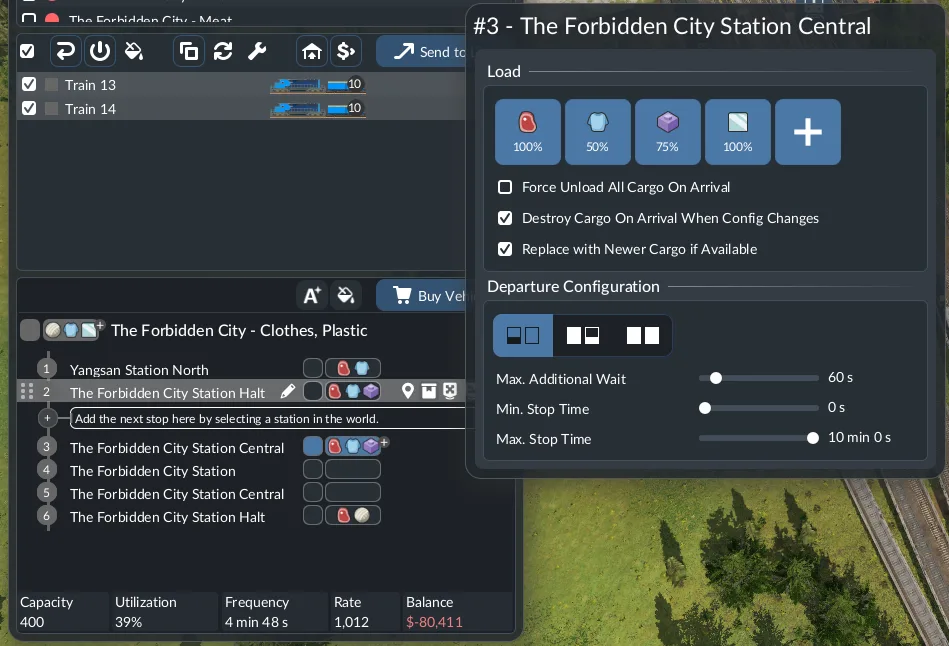
Goods cargo
Goods contains packaged, processed, and several raw products. It is not a synonym for end products: this group includes inputs such as Glass, Fabric, and Plastic as well as products delivered to commercial or industrial districts.
| Cargo | Producer | Consumers | Production role |
|---|---|---|---|
| Beverages | Brewery | Commercial District | End Product |
| Books | Printing Press | Commercial District | End Product |
| Bricks | Bricks Works | Industrial District | End Product |
| Canned Food | Food Factory | Commercial District | End Product |
| Clothes | Textile Factory | Commercial District | End Product |
| Fabric | Weaving Mill | Textile Factory | Intermediate Product |
| Fish | Fishing Grounds | Commercial District; Food Factory | Raw Material |
| Furniture | Furniture Factory | Industrial District | End Product |
| Glass | Glass Works | Furniture Factory; Brewery | Intermediate Product |
| Meat | Livestock Farm | Commercial District; Food Factory | Raw Material |
| Paper | Paper Mill | Printing Press | Intermediate Product |
| Plastic | Chemical Plant | Tool Factory; Machine Factory | Intermediate Product |
| Tires | Tire Factory | Vehicle Factory | Intermediate Product |
| Tools | Tool Factory | Industrial District; Clay Pit; Coal Mine; Fishing Grounds; Oil Platform; Quarry; Sand Pit | Booster Product |
| Vegetables | Farm | Commercial District | End Product |
| Wool | Cotton Farm; Livestock Farm | Weaving Mill | Raw Material |
Fish and Meat each have two consumer contexts. They can serve a commercial district with matching demand or a Food Factory making Canned Food. A line sending them to a processing site is therefore a different service from a line making final delivery to a town.
Tools similarly serve both town demand and listed raw-material industries. Their Booster Product role does not mean industrial districts cannot consume them. Check the selected district's actual demand before allocating an entire tool supply to a town rather than to an industry booster.
Wool has two listed producers. If the Cotton Farm is unavailable in the current climate or absent from your map, inspect whether a Livestock Farm provides the alternative source. The cargo remains Wool for transport purposes regardless of which listed producer supplies it.
The directory preserves the cargo index's producer labels. The facility directory uses Canning Factory for the canning recipe and Crop Farm for grain and vegetables; the cargo index labels them Food Factory and Farm. Use the cargo and production rule in the selected industry's window when matching those labels to your actual facility.
Bulk cargo
Bulk includes mineral raw materials, agricultural Grain, Sawdust, Fertilizer, and Cement. The group spans several production roles, so being Bulk does not tell you whether the product goes to another factory or a town.
| Cargo | Producer | Consumers | Production role |
|---|---|---|---|
| Cement | Cement Plant | Industrial District | End Product |
| Clay | Clay Pit | Bricks Works | Raw Material |
| Coal | Coal Mine | Steel Mill | Raw Material |
| Fertilizer | Oil Refinery | Cotton Farm; Farm; Rubber Farm | Booster Product |
| Grain | Farm | Livestock Farm; Brewery | Raw Material |
| Iron Ore | Iron Ore Mine | Steel Mill | Raw Material |
| Sand | Sand Excavator; Sand Pit | Glass Works | Raw Material |
| Sawdust | Saw Mill | Paper Mill | Intermediate Product |
| Stone | Quarry | Cement Plant | Raw Material |
Sand can come from either a Sand Excavator or Sand Pit. Those facilities have different listed cargo boosters, but the transported product is still Sand. Filter the vehicle for Sand first, then choose the source site that fits the map and your intended connection.
Sawdust is a Saw Mill output used by a Paper Mill. It is not interchangeable with Planks, the sawmill's other output. A Flatbed vehicle chosen for Planks does not demonstrate Sawdust compatibility; the two products belong to different specialization groups.
The production rules provide additional relationships that the cargo index does not consistently reflect. The table above includes Brewery as a Grain consumer because its recipe explicitly requires Grain, and lists Oil Refinery as a Fertilizer producer because the refinery rule explicitly produces Fertilizer. Use the selected industry's Production section to confirm the rule in your actual game when an index label is incomplete.
Liquid cargo
Liquid cargo includes the oil branch, chemical products, and Rubber. These products have different destinations even when they can share a handling specialization.
| Cargo | Producer | Consumers | Production role |
|---|---|---|---|
| Chemicals | Oil Refinery | Chemical Plant | Intermediate Product |
| Crude Oil | Oil Platform; Oil Well | Oil Refinery | Raw Material |
| Dyes | Chemical Plant | Textile Factory; Printing Press | Intermediate Product |
| Fuel | Oil Refinery | Industrial District | End Product |
| Rubber | Rubber Farm | Tire Factory | Raw Material |
Crude Oil is the input for an Oil Refinery, while Fuel is an output that can satisfy an industrial district's demand. A town asking for Fuel is not asking for Crude Oil. Use the exact cargo name when configuring the stop and vehicle rather than referring to both as “oil.”
Dyes support two production branches: Clothes through the Textile Factory and Books through the Printing Press. The printing branch is climate-specific, so the existence of Dyes does not establish that a Printing Press can appear on every vanilla map.
Rubber is a raw Liquid cargo used by a Tire Factory. Tires then become Goods for the Vehicle Factory. This is a specialization change along one production branch, which is why reusing the same vehicle assumption across the whole chain can fail.
Flatbed cargo
Flatbed includes timber products, metals, Machines, and Vehicles. These products are not all final manufactured goods. Several are inputs for other factories, and Machines also have a booster role.
| Cargo | Producer | Consumers | Production role |
|---|---|---|---|
| Logs | Logging Camp | Saw Mill | Raw Material |
| Machines | Machine Factory | Industrial District; Vehicle Factory; Furniture Factory; Livestock Farm; Logging Camp; Iron Ore Mine; Oil Well; Sand Excavator | Booster Product |
| Planks | Saw Mill | Industrial District; Furniture Factory; Tool Factory | Intermediate Product |
| Sheet Metal | Steel Mill | Food Factory; Vehicle Factory | Intermediate Product |
| Steel | Steel Mill | Machine Factory | Intermediate Product |
| Vehicles | Vehicle Factory | Industrial District | End Product |
Sheet Metal and Steel are separate outputs of a Steel Mill with different consumers. Food production uses Sheet Metal for canning, while Machine Factory uses Steel. A line configured to load Steel does not automatically serve a consumer requesting Sheet Metal.
Machines can be delivered to industrial districts, consumed by Vehicle Factory, or used at listed raw industries. These roles create separate allocation choices. The table includes Furniture Factory and Livestock Farm because their industry entries explicitly list a Machines booster. The consumer index and the industry-table booster column do not list every relationship identically, so inspect the site's Booster or Production section before assuming a specific bonus.
Vehicles in this cargo table are manufactured items delivered to industrial districts. They are not the operating trucks, trains, or planes purchased by your transport company. Delivering vehicle cargo does not add a bus to your fleet, and buying a bus does not satisfy a district's Vehicles cargo demand.
Match consumers to the current town demand
A district listed as a consumer can demand the product, but that does not mean every district currently wants it. Read the selected town's Supplies view and the commercial or industrial district's demand before arranging final delivery.
Residential districts have no cargo demand. Commercial and industrial districts share demands among their buildings, but the two district types have different requested products. Use the consumer column to identify the relevant district type, then confirm the actual request in the town.
Towns start with one demand in each cargo-demand district and add demands as they grow. A product that is useful later may have no current town consumer at the start. This is one reason a complete 36-item catalog should not be treated as a checklist of 36 products that must all be transported immediately.
Climate also limits cargo availability. The Paper Mill and Printing Press are Subarctic-only, while Rubber Farm and Tire Factory are Tropical-only. When a planned product's local chain is absent, distinguish climate restrictions from a permitted industry that has not yet appeared as demand develops.
Select a compatible vehicle and loading stop
Open the relevant vehicle store and filter by the exact cargo type. You can select multiple cargo buttons when looking for a vehicle capable of transporting all selected products. Inspect the supported cargo rather than assuming that a vehicle's appearance establishes its full compatibility.
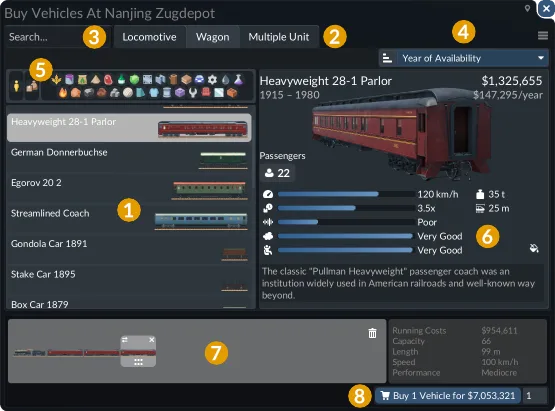
Configure the line's loading stop for the cargo you intend to pick up. A cargo filter chooses the allowed loading types and their share of capacity; it does not make an incompatible vehicle carry the product. For mixed cargo on trains or ships, inspect the actual compartments or wagons as well as the stop settings.
Specialized vehicles, terminals, and storage can change loading speed. Matching specialization can help, while a mismatch can reduce it. Separate a slow transfer from an unsupported product: a slow compatible load is a different problem from a vehicle unable to carry the cargo at all.
For facility recipes and climate lookup, use the Industry List. For connecting several production stages, use Cargo Chains. For storage compatibility and transfers, use Warehouses.