
Czech is available through the unofficial Čeština (Czech) translation by mara88cz, rather than as a built-in official language. Subscribe in the in-game Mod Hub, restart the game, then select Settings → Interface → Language → Čeština from the main menu. Complete the restart required for the language change before expecting the new selection to apply.
For Czech-generated town, street and resident names, select Names → Česká when creating a new game. This is a separate choice from the interface language and does not rename locations on an already saved map.
Identify the community translation
Find the mod named Čeština (Czech) and check the author name mara88cz. The described community release is 1.1. That number identifies the translation version, not a Transport Fever 3 game patch.
The package is not a product of Urban Games or Paradox Interactive. Its author discloses AI assistance and says the terminology and texts were manually checked and tested in the game. These are the author's production and testing claims, rather than publisher localization guarantees.
Transport Fever 3's official language table contains 13 languages and does not include Czech. The official documentation allows for additional languages through user-generated mods. This explains why Czech can be offered through the Mod Hub without becoming a publisher-provided localization.
Enable Czech in the correct order
Follow the community author's activation instructions and use the main-menu language setting:
- Open Transport Fever 3's Mod Hub.
- Find Čeština (Czech) by mara88cz and subscribe.
- Restart the game so you can continue with the newly subscribed translation.
- From the main menu, open Settings and choose the Interface tab.
- Open Language and select Čeština.
- Complete the game restart required for the language change.
The Language selection is unavailable when Settings is opened during active gameplay. If you are searching for it while a map is running, return to the main menu. Its absence from the in-game settings screen does not, by itself, show that the translation failed to install.
Understand the stated translation coverage
The author describes version 1.1 as a complete text translation across the following areas:
| Area | Author-described coverage |
|---|---|
| Interface | Menus, settings and Mod Hub text |
| Learning | Tutorial and help text |
| Achievements | Achievement text |
| Game descriptions | Vehicles, buildings and industries |
| Campaign | All eight missions |
| Cutscenes | Campaign cutscene subtitles |
The campaign claim concerns translated text and subtitles. It does not establish a Czech voice track. English and German are the languages marked for full audio in the official language table; the Czech community description does not offer a separate full-audio claim.
The author says terminology follows Czech transport and railway practice. Examples include trakční vedení, cestové návěstidlo, anglická výhybka, výhybna, and hlavové nádraží. The author also reports checking text meaning against the official German localization.
For campaign dialogue, the project description says the translation follows the original characters' relationships when choosing informal and formal address. Treat that as an explanation of the localization approach, not a guarantee that every line is error-free. If a particular description or campaign subtitle seems wrong, report the actual text and its location rather than judging the entire package from one isolated phrase.
Choose Czech names when creating a map
The mod adds a name set called Česká. The author describes a list of the 500 largest Czech municipalities by population, based on ČSÚ data, alongside Czech street names and resident names, including feminine surnames.
To use it, begin creating a new game and select Names → Česká in that game's map settings before creating the map. The choice belongs to map creation; it is not another option in the Interface language tab.
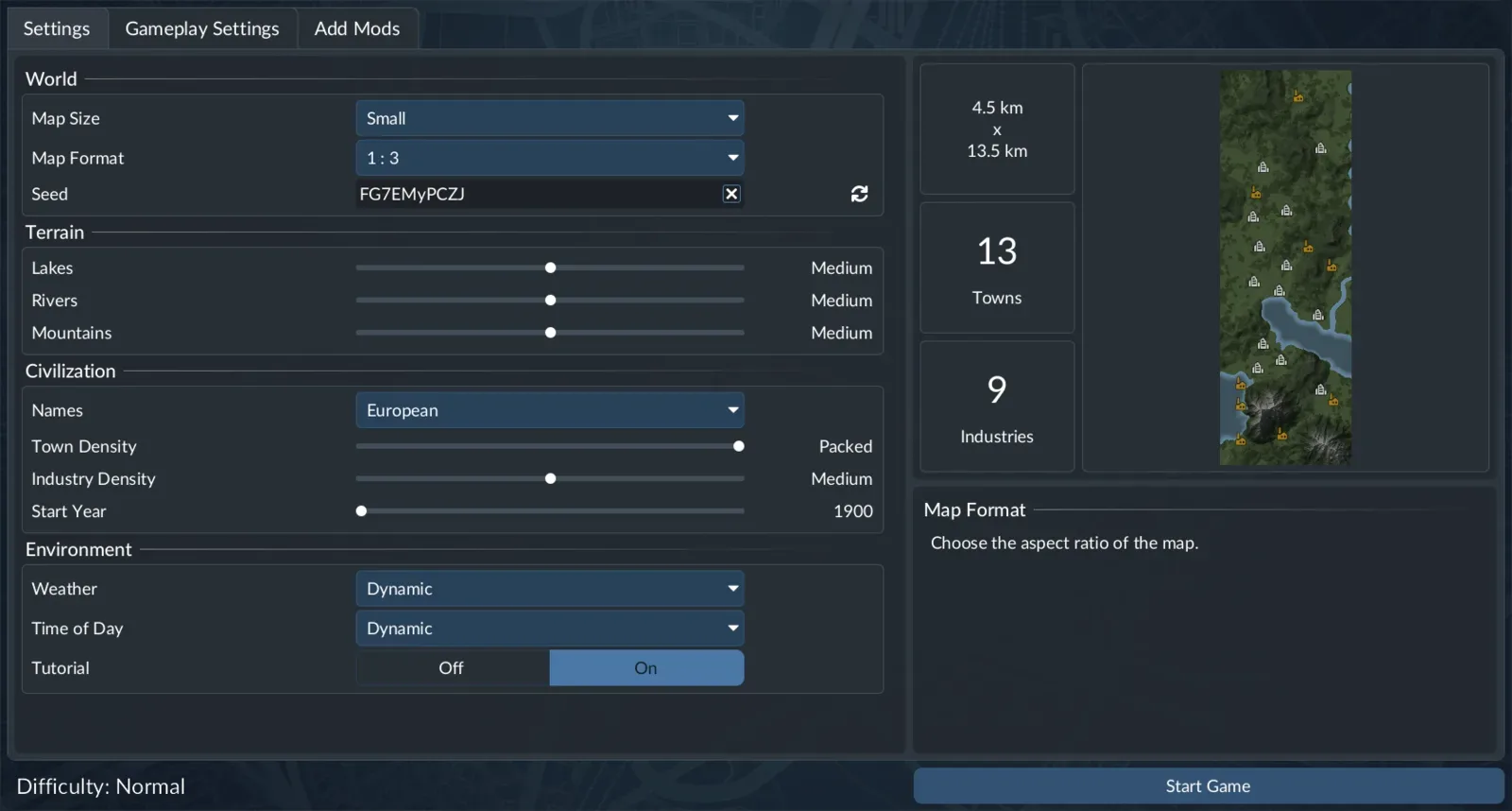
Names is a new-game setting. This example currently shows European; it does not depict an enabled Česká name set.
The official new-game settings image identifies the Names control with European selected. It does not show the community Česká option enabled.
The two Czech labels therefore have different purposes:
| Choice | Where you select it | What it changes |
|---|---|---|
| Čeština | Main-menu Settings → Interface → Language | The selected game-text language |
| Česká | Names in new-game map settings | Names generated for the new map |
Changing the interface language does not retrospectively apply a new generated-name set. The author explicitly states that names on already saved maps do not change. Keep an existing transport network if you want to continue it in Czech, but do not expect that language selection to rename its towns.
Diagnose a missing selector or unexpected names
The Language control is missing
Check where you opened Settings. The language control belongs to the Interface tab reached from the main menu and is unavailable from settings opened during an active game. Move to the correct entry point before treating the missing control as a mod problem.
The selector exists but Čeština is absent
Check that the subscription is for the correct project and that you restarted after subscribing. Those are the author's activation prerequisites. If they are complete and the option is still absent at the main menu, report that specific result to the community author. No manual-file path or load-order repair has been verified for this translation here.
A saved map retains its previous names
That matches the author's documented naming limitation. Do not use unchanged names on an existing save as the sole test of interface translation. The new-game name set does not provide a saved-map conversion procedure.
A newly created map uses another name set
Check the Names selection used when you created it. Selecting Čeština for game text does not select Česká for a new map. The author provides the new-game choice above but does not describe a procedure that replaces generated names afterward.
Check and report a specific translation problem
After applying the language change, inspect text you normally use: a settings label, a vehicle description, a help prompt or a campaign subtitle. This is a suggested reader check, not an independent review of the whole translation. One correct menu cannot establish complete campaign accuracy, and one awkward phrase should be reported specifically.
The author asks for errors and suggestions in the mod's comments, preferably with a screenshot and the location. Include:
- Location: the screen, vehicle, help entry or mission containing the text.
- Expected: the language or meaning you anticipated; label alternative wording as a suggestion.
- Observed: the actual wording and what appears wrong.
- Context: a screenshot with the surrounding interface and the translation version.
Report a missing Čeština selection as an activation problem, and incorrect wording after Czech is selected as a localization problem. Unchanged names on an old map are documented behavior, not proof that the subscription failed. Keep the mod name and author with your report so feedback reaches the community project rather than being mistaken for official Czech localization support.
If you also need to activate other mods or inspect save dependencies, use the general mods guide. To recreate the same generated world, record the remaining settings with the seed guide; the Česká names choice alone is not a full map recipe.