

Connect an oil rig to a port in Transport Fever 3 by using a Crude Oil-compatible ship, a reachable offshore loading stop, and a harbor landing that can accommodate the ship. The shore harbor then needs a complete onward route to an Oil Refinery or other accepting destination. A line drawn between two water stops is only the shipping leg; it does not prove that the refinery can receive the cargo.
Build and test this connection in three parts: loading at the platform, unloading at the shore harbor, and delivering Crude Oil inland. Check each transfer before buying more ships. If several harbor lines already use the same landing, adding a new dock alone will not redistribute them: change their assigned terminals in the line manager.
Trace the complete oil route first
The normal production chain begins with an Oil Platform producing Crude Oil. The Oil Refinery consumes Crude Oil and produces Fuel, Fertilizer, and Chemicals. Crude Oil and Fuel are different cargos, even though both use liquid-carrying vehicles. A town needing Fuel is not the same receiver as a refinery accepting Crude Oil.
Use this small route sketch before placing infrastructure:
| Leg | Cargo or connection | Result to verify |
|---|---|---|
| Offshore loading | Crude Oil from the Oil Platform | The selected ship can call at the loading stop and take the cargo |
| Sea transport | Liquid cargo carried to the shore harbor | The ship can reach the chosen harbor landing |
| Shore transfer | Crude Oil into the onward freight connection | The harbor and receiving transport form a usable transfer |
| Refinery delivery | Crude Oil into the Oil Refinery | The refinery receives its production input |
| Product distribution | Fuel, Fertilizer, or Chemicals to an accepting receiver | The relevant output reaches its own consumer |
Do not combine all these questions into “the oil line is broken.” If the vessel loads but the refinery remains empty, the offshore producer and ship may already be working. The missing part can be the harbor transfer, the inland cargo vehicle, or the final destination.
The refinery recipe is 4 Crude Oil into 2 Fuel, 1 Fertilizer, and 4 Chemicals. Those are production proportions, not a promised annual volume from every platform. The quantity your network handles depends on the actual industry and transportation conditions in the save.
Place a harbor with a usable water approach
A harbor needs more than a building near the shoreline. Its layout combines a landing in navigable water, a pier, and a street connection on land. The pier can span land and water; that does not remove the need for the landing itself to be reachable by ships.
Open the harbor construction or configuration view and inspect where the vessel is supposed to approach. A riverbank, a shallow-looking coastal edge, or a visually connected pier can still lead you to select the wrong part of the construction. The landing is the service point that matters to the ship.
Harbor landings come in two sizes. Large ships need large landings. Match the vessel and landing before interpreting a failed path as a problem with the entire sea route. A larger vessel is not automatically a replacement for a smaller one if its assigned terminal cannot accommodate it.
The harbor's yellow anchor marker identifies a landing. When expanding a busy harbor, distinguish the landing marker from other added construction pieces. A new pier or decorative-looking dock section does not by itself give every line a new service point.
Keep the shore street access usable for the onward cargo connection. If a truck terminal sits nearby, confirm that it participates in the transfer rather than judging by straight-line distance. If the refinery is farther away, a separate road or rail leg needs its own valid stops, vehicle, and cargo configuration.
Choose a vessel that carries Crude Oil
Crude Oil belongs to the Liquid cargo class. Inspect the ship's cargo compatibility in the vehicle store rather than selecting it by appearance, price, or size alone. A passenger boat or a vessel carrying another cargo class cannot perform this job simply because it can reach the oil platform.
Before purchase, check both capacity and infrastructure compatibility. A higher-capacity ship can be useful once demand supports it, but it also has to fit the receiving landing and travel along the intended water route. Buying the largest vessel first can turn a cargo question into a terminal or path question.
A shipyard also needs navigable water access to the line's first stop. The ship does not appear inside the completed harbor line merely because the shipyard is on the same map. Verify the launch connection before expanding the fleet.
For the first trial, use one appropriate vessel and watch its full trip. Record whether it reaches the offshore stop, loads Crude Oil, travels to the selected shore terminal, and unloads. This gives you a specific repair target if the service does not work.
Create the offshore and shore stops
Create a line with the relevant offshore loading stop and the shore harbor as its stops. A line cycles through its stops and returns from the last to the first. The service therefore needs a usable journey through the whole sequence, including the return leg.
At the offshore end, select the actual stop associated with the producing platform. At the shore end, select the harbor and inspect which terminal the line uses. An attractive route color on the map is not evidence that both stops are serviceable by the chosen ship.
Set the cargo loading filter to include Crude Oil at the producer. When using a vehicle with configurable cargo capacity, inspect the allowed types and allocation rather than assuming every compartment has the intended cargo. A valid vessel can still be constrained by an unsuitable stop configuration.
Start with a departure configuration that lets you observe normal circulation. A full-load rule can hold a vessel at its producer when cargo is not available, which looks different from a ship failing to find a path. Check the stated vehicle condition before changing infrastructure.
Once the service operates correctly, adjust waiting and loading rules around the actual production rate. There is no universal full-load choice that repairs a missing refinery connection or creates demand that the destination does not have.
Assign the new landing to the line
A busy harbor often has several lines arriving at one original landing. Expanding the harbor creates more possible service points, but the existing lines can continue using their previous assignments. This is why visible construction and actual queue relief must be checked separately.
Use the line manager's stop or terminal assignment controls to move the relevant harbor stop to an appropriate landing. In a demonstrated harbor expansion, the player adds dock and anchor modules, then changes individual lines' landing assignments. Merely leaving every line on its original terminal preserves the original concentration of traffic.
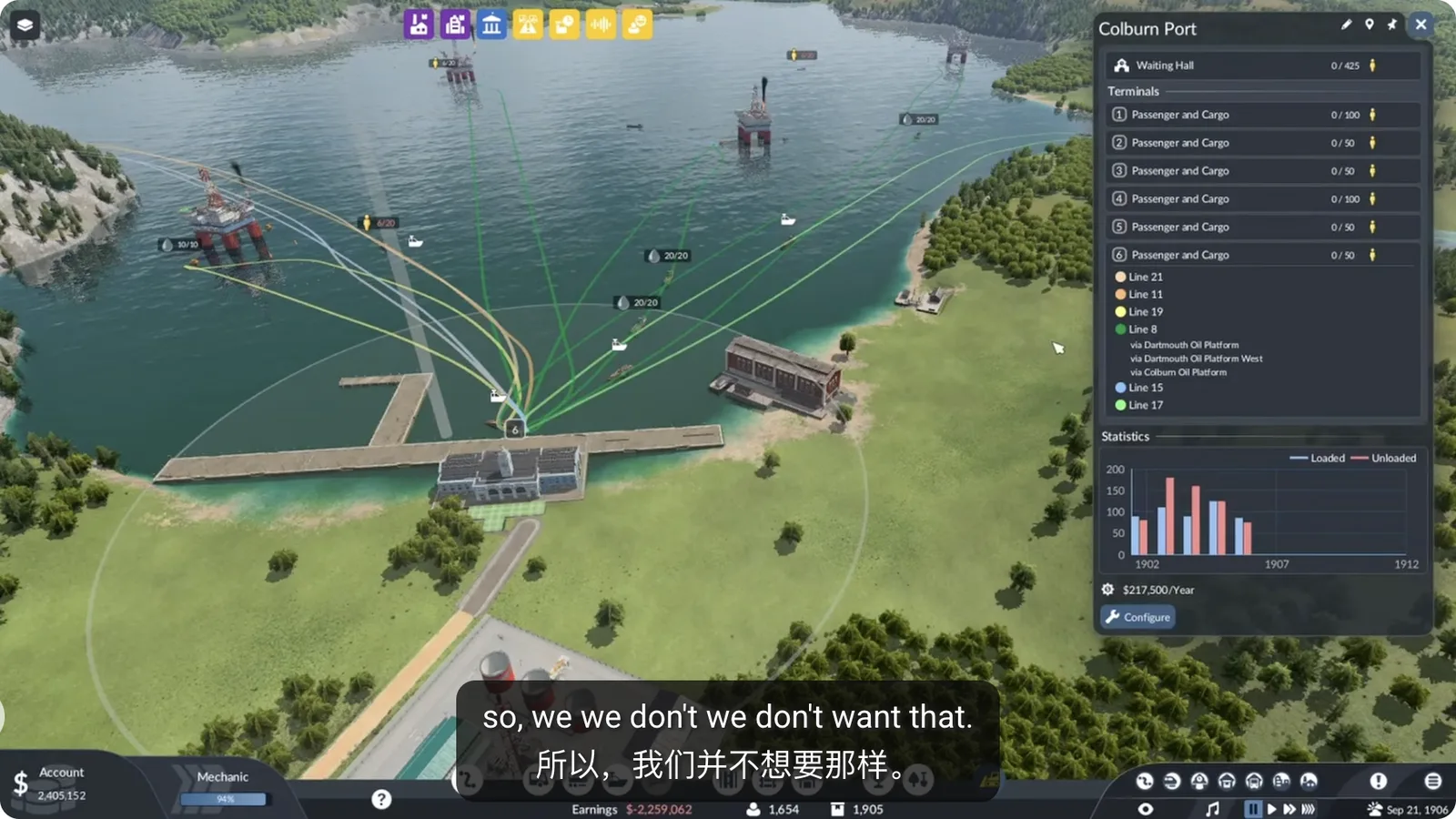
New harbor landings exist, but the visible lines remain concentrated on the same terminal.
After changing a landing, inspect the line path and watch a ship arrive. A new landing still needs a navigable approach and suitable size. Reassignment should solve a specific queue or compatibility issue; it should not move the oil vessel to a landing that cannot serve it.
Where alternative terminals are configured, keep their meaning separate from the primary assignment. The game's ship behavior evaluates alternatives from its waiting point outside the harbor. Adding alternatives is useful only when the alternatives themselves can serve the vessel and cargo flow.
Harbor landings do not distinguish passenger from cargo terminals. You still need the correct vessel and a complete receiving cargo connection ashore. Reachability alone does not establish that Crude Oil will reach the refinery.
Connect the harbor to the refinery
Select the harbor and inspect the cargo catchment or transfer connection to the onward freight stop. Cargo access is a logistics condition, not simply a visual overlap between two buildings. Use the game's highlighted connections and the industry's receiving state to confirm the handoff.
For road delivery, choose trucks that carry Liquid cargo and configure the onward line for Crude Oil. For rail delivery, ensure the train has suitable liquid cargo capacity. A compatible sea vessel does not compensate for incompatible inland vehicles.
The refinery must be reachable at the final stop. Confirm that the actual Oil Refinery receives the delivery, then inspect its input and production state. Delivering to a nearby town or warehouse is a different result unless that intermediary has been configured to accept and forward the cargo appropriately.
If you deliberately use a warehouse, check its accepted cargo and the outgoing connection. Storage can be an intermediate part of the route, but it does not turn stored oil into refinery input without an onward transportation path. Treat it as another transfer to verify.
Follow the resulting products separately. Fuel, Fertilizer, and Chemicals have different consumers and purposes. A ship unloading Crude Oil successfully may leave a later product line unfinished; expanding the offshore service will not fix that later distribution gap.
Diagnose the first failed stage
| Observed result | Check next | Avoid this premature response |
|---|---|---|
| Ship cannot reach its first stop | Shipyard access, navigable approach, landing size, complete line path | Buying more identical ships |
| Ship reaches the platform but takes no oil | Crude Oil compatibility, loading filter, producer state, accepting downstream route | Calling every empty ship a harbor bug |
| Ship waits at a crowded harbor | Actual terminal assignment, other lines using it, reachable alternative landings | Adding construction pieces without reassigning lines |
| Harbor receives oil but refinery does not | Cargo transfer, compatible inland vehicle, final refinery connection | Rebuilding the offshore stop first |
| Refinery receives oil but product receiver stays empty | Product-specific line, vehicle capacity, accepting destination | Treating Fuel and Crude Oil as one cargo |
Change one failing stage, then watch another complete delivery. This preserves the parts that are already working and makes the effect of the repair visible. Adding multiple new lines, ships, and terminals at once can hide which change actually restored the connection.
Keep campaign requirements separate
Campaign missions can add licenses, deadlines, special cargo, and story objectives around oil transport. Those requirements belong to the active mission. They are not general construction rules for every Free Game oil platform and harbor.
For example, a mission may ask you to deliver a stated quantity or use a particular destination. Follow that task panel rather than substituting the normal refinery chain. Conversely, do not impose a campaign competition's license or reward requirement on an ordinary Free Game shipping route.
The connection is ready when the ship completes its intended loading and unloading cycle and the accepting inland destination receives the cargo. After that, use actual queues, stock, and delivered volumes to decide whether another vessel, a larger landing, or more inland capacity is necessary.
Related guides
Use Cargo Chains for the wider production route, Warehouses for deliberate intermediate storage, and Cargo Not Unloading when the vessel arrives but the receiving step fails.