
Choose Campaign for directed historical missions, start a New Game for an ongoing transport company, or configure that free game for unrestricted construction. Sandbox Mode and No Costs are separate built-in options: the first supplies editing controls, while the second removes money. The built-in Tycoon option immediately unlocks company perks without removing the rest of the simulation. Select the combination that matches the experience you want before creating the world.
These choices change what you are trying to achieve. A campaign scenario measures its stated objective and rating conditions. An ordinary free game lets you develop a company over time. A construction-focused world can remove financial pressure while retaining whichever other systems you want to examine. The Map Editor prepares a landscape; it does not provide the same transport-building and operating tools as a running game.
Match the Mode to Your End State
Use the intended result to choose the starting point. If you want a sequence of assigned transport challenges, choose Campaign. If you want to build a network on a generated or authored map without a scenario's finish condition, choose New Game. If your immediate task is shaping terrain and placing the starting settlements, choose Map Editor and save that map before playing it.
| Intended experience | Starting choice | Important distinction |
|---|---|---|
| Complete historical objectives | Campaign | Mission completion, stars and medals are separate goals |
| Grow a transport company | New Game | Money, expenses, towns and company progression remain relevant |
| Build without financial limits | New Game with No Costs | Infinite money does not automatically grant every editing control |
| Adjust the world or calendar | New Game with Sandbox Mode | Editing controls do not automatically remove money |
| Use company perks immediately | New Game with Tycoon | Company rank starts at the highest level; other systems remain |
| Prepare terrain and settlements | Map Editor | Build and operate transport services after loading the saved map for play |
Several options can be combined, but they should be chosen for a reason. A world intended for construction may need No Costs and Sandbox Mode. A player who wants to explore company perks while still managing expenses may prefer Tycoon alone. Do not enable every option merely because it is available: that makes it harder to understand which rule produced the result you are observing.
Understand the Ongoing Gameplay Loop
Transport activity earns income while vehicles and infrastructure create expenses. The network connects residents and industries, and its consequences affect towns as well as your company's finances. As settlements develop, the service that worked earlier may need a different route, more capacity or a different transport mode. A completed line is therefore the beginning of an operating decision, rather than a permanent solution to every future demand.
The management systems extend beyond a profitable balance. Towns respond to transport, deliveries, traffic, happiness, noise, pollution and reputation. Company progression unlocks additional tools and benefits. Contracts and subsidies provide optional work with their own requirements. These systems can interact: expanding a network may move more passengers while also changing the environmental conditions around residential areas.
Decide which systems you want to keep consequential. Removing money changes the financial constraint, but it does not mean every town rating has been disabled. Unlocking company perks changes availability, but it does not mean all vehicles have become free. The setup screen gives you separate controls because these are separate decisions.
Create a Free Game in Four Stages
Open New Game from the main menu. First choose a generated climate or an existing map. Then review map settings, gameplay settings and active content before selecting Start Game. An authored world from the Mod Hub and a map prepared in the editor are alternatives to starting with a new random landscape.
The four climates are Temperate, Subarctic, Dry and Tropical. Climate determines the landscape and also limits which industries and cargo can appear. Check the industry guide when choosing a climate for a particular production plan. Fjords, islands, canyons and mountains present different construction opportunities. Choose the landscape that suits the network you want to build, then set the rules that determine how that network is managed.
A climate choice does not substitute for checking the remaining configuration. Two worlds with the same climate can differ in size, settlement distribution, industry distribution, start year and active generators. Review the setup as a complete selection rather than treating the climate card as the entire mode.
Separate World Settings From Gameplay Settings
The Settings tab defines the world. Map size and format determine its dimensions and proportions. A seed controls randomization together with the rest of the generation settings. Terrain sliders depend on the selected generator, and a generator supplied by a mod can offer its own controls.
Settlement density also changes the starting arrangement. Lower town density produces fewer, initially larger settlements; higher density produces more, initially smaller ones. Lower industry density increases initial production per industry. Industry count also depends on population and town demand, and further industries can appear over time. These are meaningful setup differences even before you change the financial difficulty.
Starting years are offered in ten-year intervals from 1900 through 2020. Weather can be Dynamic or a fixed Sunny, Cloudy or Rainy setting. Time of Day has its own choices, including Dynamic, Continuous, Local Time and fixed times. The tutorial switch controls onboarding. Keep these selections distinct from the difficulty preset: changing the atmosphere does not establish that operating costs or town sensitivities changed.
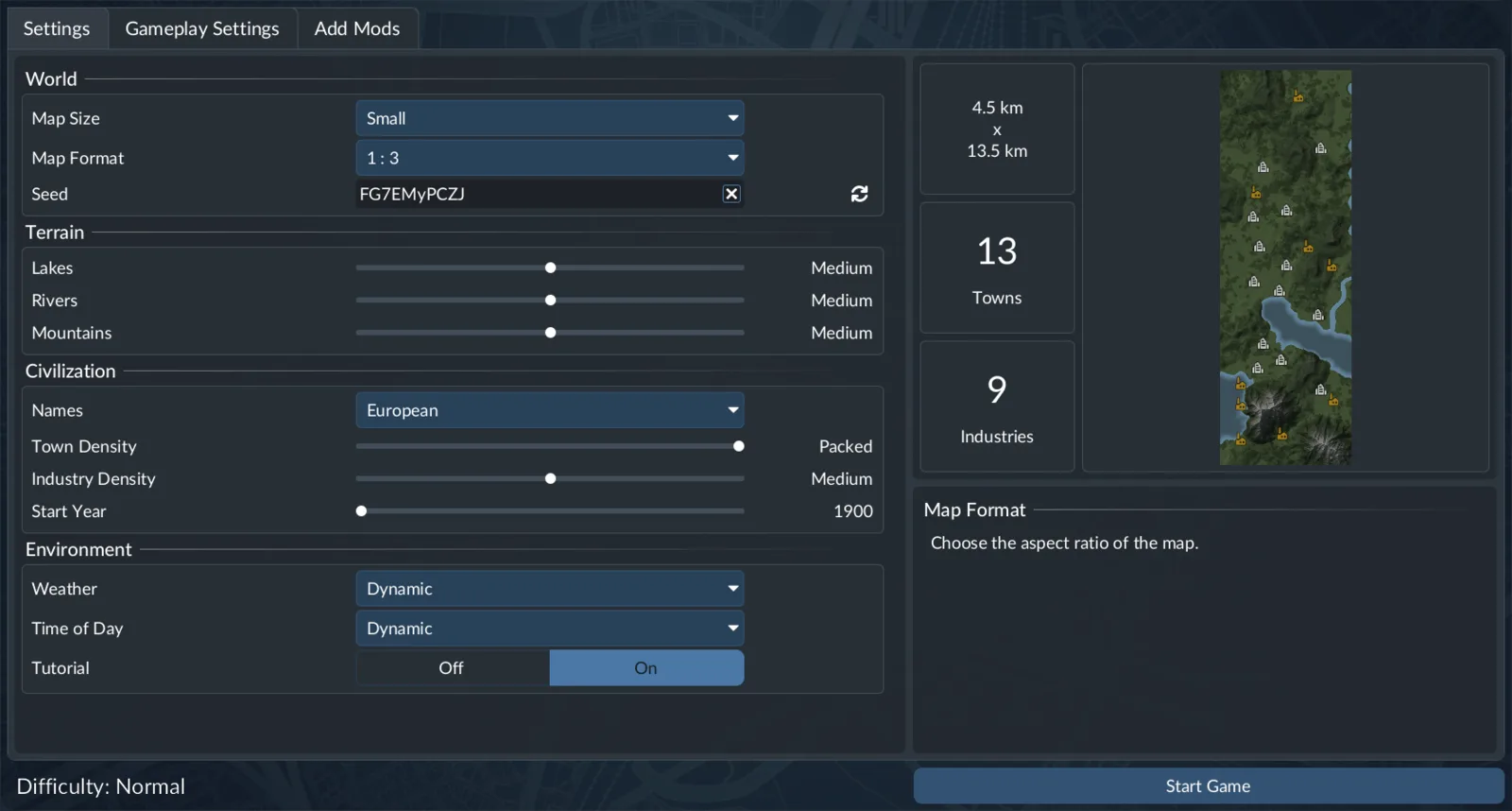
World settings define the landscape and starting arrangement.
Read the Difficulty Preset Before Customizing It
The Gameplay Settings tab offers a Difficulty selection that assigns the settings below it. Inspect those values before customizing individual sections. If you later select a different preset, review the resulting configuration again instead of assuming your earlier choices still describe the world.
The Economy controls cover industry productivity, closing frequency, target density, maintenance effects, subsidy availability and risk, landmark resources and inflation. A setting can alter an operating constraint without disabling the entire economy. For example, Vehicle Maintenance Effect: None removes the adverse maintenance effect, while No Costs concerns money. Those choices are related to fleet management but produce different results.
Subsidy risk changes targets, deadlines and upfront payments. Landmark Required Resources changes the cargo needed for construction; selecting None completes landmarks immediately. Inflation reduces cargo and passenger income proportionally to company rank. Choose these values according to the kind of challenge you want, rather than treating every difficult situation as a reason to replace the whole preset.
For a learning world, change one important constraint at a time. Keep enough of the system active to understand what your transport choices achieve. A world with several rules removed can be useful for construction, but it is a different test from a company expected to cover its costs and satisfy its towns.
Choose Town Ratings and Financial Pressure Independently
Town Ratings includes Reputation and separate sensitivities for traffic, passenger happiness, delivery timing, noise and pollution. Higher sensitivity makes development respond more strongly to the relevant problem. Active Sandbox Mode also allows sensitivities to be adjusted independently for individual towns.
The Finances section separates initial spending from recurring expenses:
- Vehicle Costs concern purchases and duplication.
- Vehicle Maintenance concerns recurring vehicle upkeep.
- Infrastructure Costs concern construction.
- Infrastructure Upkeep concerns ongoing infrastructure expenses.
Reducing a purchase cost does not establish that maintenance was reduced. Likewise, a cheaper station does not show that its recurring expense has changed. Read the named field when comparing two configurations. This is particularly useful when deciding whether you want an easier financial start or a world that remains cheaper throughout its life.
The Advanced section supplies further choices. Population changes the number of residents and can affect simulation performance. Passenger Income and Cargo Income are separate multipliers. Reforestation controls the return of trees in bulldozed forest areas. The Industries choice can select another economy where suitable custom content exists. Record these selections when you intend to revisit the same experiment.
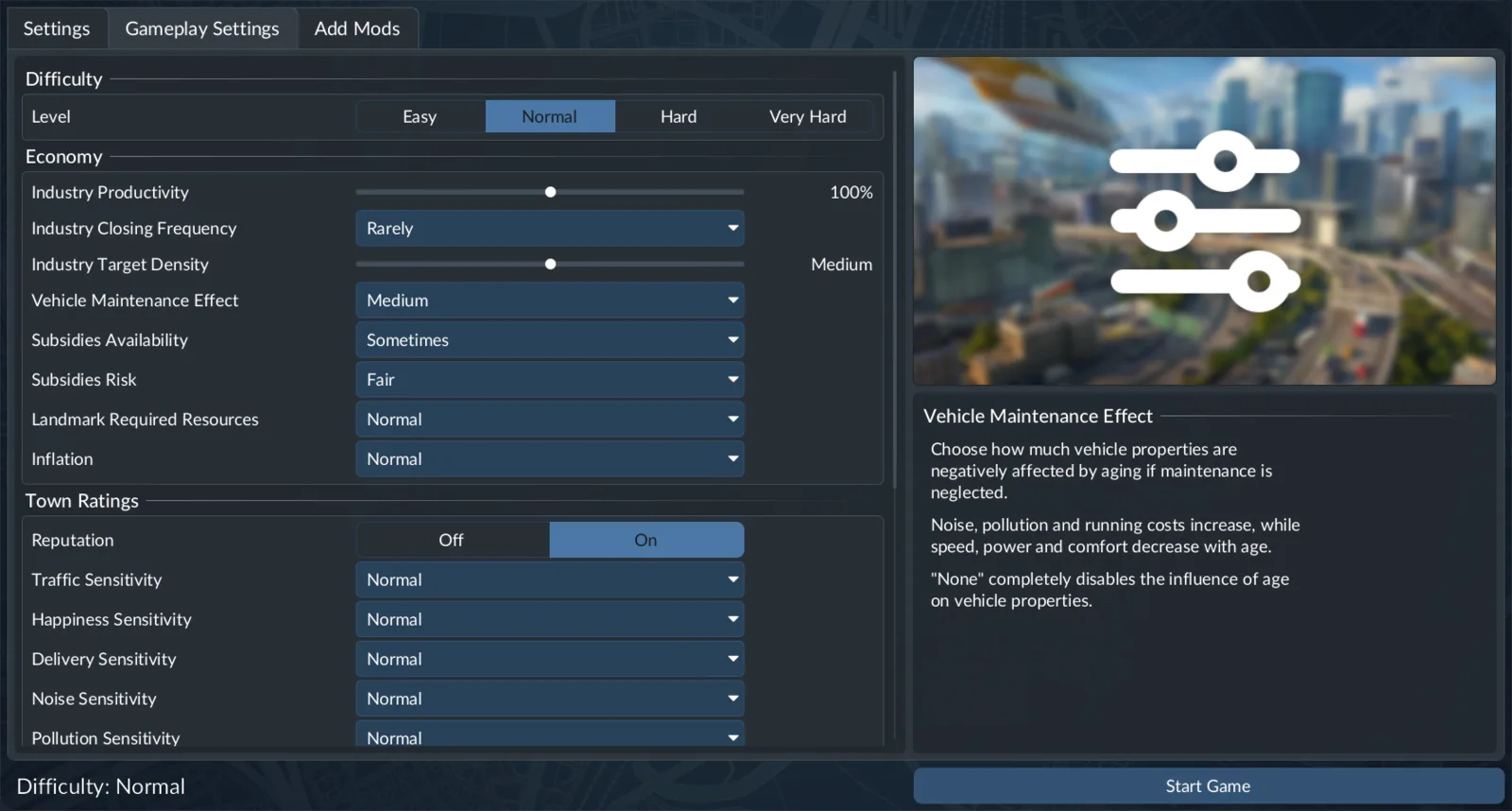
Read the individual values assigned by the chosen difficulty preset.
Activate Only the Built-in Options You Need
Open Add Mods and use Activate beside the desired content. This tab also handles available Deluxe and Pre-Order content. Reviewing a package in the list is different from activating it for this world.
Sandbox Mode enables changes to bank balance and calendar, construction of towns and industries, adjustments to cargo demands and generated-town size, and town demolition. Use it when the task requires those editing abilities. A Sandbox world can still have financial values unless you also choose settings that remove or change them.
No Costs disables money and shows an infinite bank balance. Use it when financial limits would interfere with construction. It does not mean the landscape was prepared in Map Editor, and it should not be confused with company progression.
Tycoon sets company rank to the highest level and unlocks all perks. Other aspects remain unchanged. Its unlocked options include landmarks, resource prospecting, marketing campaigns and the greenify industry tool. Choose it when you want those capabilities immediately while retaining the remaining rules you selected.
Vehicles: No End Year keeps a vehicle purchasable after it becomes available. It removes the end-year restriction, rather than making a future vehicle available before its starting date. Keep the calendar and the availability condition separate when setting up a world around a particular fleet.
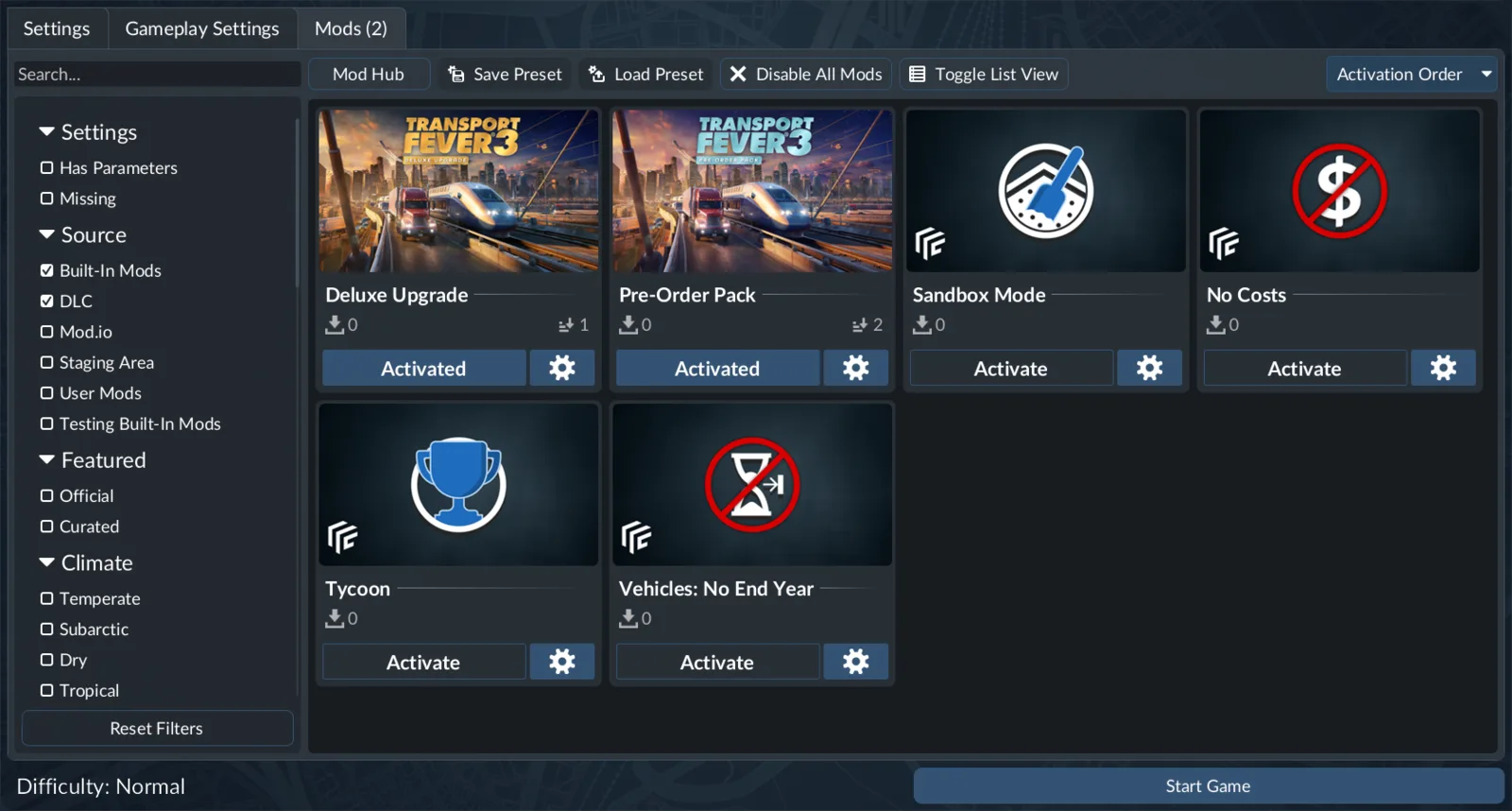
Activate each option for the world you intend to start.
Use Campaign for Directed Progression
Campaign contains eight historical scenarios, with completion unlocking the next mission. Each scenario has its own main target, star conditions and optional medal. Choose a basic completion run when you want to learn the assigned systems, or pursue a stricter rating when you are ready to protect its particular time, delivery, survival or other condition.
Free-game customization is not a substitute for reading a campaign objective. A scenario's result depends on the active task and its rating rules. Follow that task's wording rather than assuming that a visually successful railway or a profitable company automatically completes the mission. Resume an existing mission save through its mission page when continuing a run.
Keep campaign and free-game saves identifiable. The useful distinction is the purpose of the world: an assigned scenario with progression conditions, or an open-ended company using your chosen setup. That makes it easier to return to the correct experience without recreating a world you already started.
Reserve Map Editor for World Preparation
Map Editor supports terrain generation, heightmap import and export, landscape sculpting, and town, industry and asset placement. It can generate the starting street connections. It does not include ordinary station and depot construction, track construction, or vehicle and line management. Warehouses and Perks are also unavailable there.
Choose climate, size and format before entering the editor because those foundations cannot be changed inside it. Save the finished project with Save Map. To start operating a company on that landscape, return to the main menu and select the saved map through Load Game. Continue in Map Editor when the next task is terrain preparation; load it for play when the next task is a functioning transport service.
Review a Save Before Continuing It
Select Load Game to continue an existing world. A save card's settings control can provide autosaves, gameplay settings and the active-mod list where that save permits editing. Do not assume every save offers the same editable options.
Before loading, confirm that you have selected the intended world and that its required content is available. A disabled load control can indicate a missing mod. Inspect that requirement rather than recreating the map or changing unrelated difficulty settings.
For a new world, finish with a deliberate review: the landscape, starting year, difficulty values, town sensitivities and active options should all serve the experience you chose. For an existing world, review its own saved configuration. This keeps your gameplay goal consistent from the setup screen through the session you actually play.