
Transport Fever 3 industries work best when you treat each site as a production system rather than simply connecting two map markers. Before investing in a route, inspect the industry's production rule, current stocks, recent output, potential cargo links, available expansion space, and climate suitability. After service begins, use the same information to distinguish missing inputs, weak pickup capacity, blocked growth, and surplus cargo that is being destroyed.
The most important limitation is that not every industry is available in every climate, and not every facility produces cargo without supplies. Raw industries such as farms, mines, and logging camps can produce without incoming cargo. Processing industries require the inputs shown in their Production section before they can operate.
Choose an industry by role and climate
The first decision is whether you need a raw producer or a processing industry. Raw industries generate cargo without an incoming material requirement. Their output can still depend on physical plots around the facility. Processing industries consume one or more incoming cargo types and convert them into another product. They will not begin production merely because a station or road connection exists.
Some products can also act as boosters for raw industries. Boosters and workers increase production beyond normal capacity, but an industry can operate without those optional additions. Establish reliable basic production and pickup before adding a secondary network solely for higher output.
Climate is a hard planning constraint. The appearance of an industry in one map does not prove it will exist in another climate. The following examples are useful when deciding what kind of economy a map can support, but they are not a substitute for inspecting the industries actually present in the current game.
| Climate pattern | Explicit industry examples | Planning consequence |
|---|---|---|
| Subarctic only | Paper Mill, Printing Press | Paper and book production require a subarctic map. |
| Tropical only | Rubber Farm, Tire Factory | A tire supply based on locally produced rubber belongs to the tropical economy. |
| Temperate and dry | Clay Pit, Brick Works | These clay-based facilities are not listed for tropical or subarctic climates. |
| Tropical and subarctic | Cement Plant | Do not plan around a Cement Plant on temperate or dry maps. |
| Temperate and tropical | Cotton Farm | Cotton Farm availability is limited to these two climates. |
| Temperate, tropical, and subarctic | Fishing Grounds, Sand Excavator | These facilities are not listed for the dry climate. |
| All four climates | Crop Farm, Coal Mine, Iron Ore Mine, Logging Camp, Oil Platform, Oil Well, Sand Pit | These raw-industry examples can appear across temperate, dry, tropical, and subarctic maps. |
Livestock Farm is also listed in all four climates, but it requires Grain to produce Meat and Wool. Its climate availability does not make it an input-free producer.
Town growth changes the range and complexity of demanded products. Additional industries can spawn when demand becomes high enough or when a new cargo type is demanded for the first time. This means the correct industry plan can change during a game. Build for confirmed present demand, then revisit the network when towns request more advanced products.
Read the Production section before building
The Production section at the top of the industry window shows the facility's production rule. It also reports how much cargo was consumed and produced during the last 365 days, alongside the theoretical annual maximum. Those values answer different questions:
- The production rule tells you which inputs are mandatory and which output the facility creates.
- Recent consumption shows whether required materials are actually reaching a processing industry.
- Recent production shows whether the facility has been operating, not merely connected.
- The theoretical maximum gives you a ceiling for comparison; it is not proof that your network can achieve that level.
Start with the rule. If the industry requires incoming materials, trace every required input back to a viable source. A route delivering only part of the rule may leave the industry unable to start. Detailed multi-stage recipes deserve their own cargo-chain plan; for industry selection, the key point is simply that all mandatory inputs must be available.
For a raw industry, low production calls for a different investigation. Raw facilities already produce some cargo without inputs, so check their plots and recent service history. Farms, mines, logging camps, and similar sites can add surrounding fields, plantations, mine shafts, or other plots when they are served well. Their physical footprint is therefore part of their productive capacity.
Protect space around raw industries
Do not build tightly against a raw industry just because the unused land looks convenient. The number of plots around a raw facility affects production. Good service can cause the industry to expand by adding plots, but roads, tracks, stations, buildings, and other blocked terrain can deny it that space. Bulldozing existing plots can also reduce production.
A safer layout leaves a buffer around the industry's visible footprint while placing transport infrastructure close enough for reliable cargo pickup. The buffer does not need an invented fixed measurement; judge it from the surrounding terrain and the places where additional plots could reasonably appear.
Before approving nearby construction, compare its benefit with the production space it may consume. A short station approach that cuts through productive plots can undermine the industry the station is meant to serve. When redesigning an old route, check whether an earlier expansion has already crowded the facility. If plot space is the constraint, adding more vehicles will not restore the missing physical capacity.
Diagnose Input Stocks, Output Stocks, and Cargo Flow
The Input Stocks and Output Stocks sections show the current stored amount and the upper limit for each listed cargo. Expand them to see potential sources or destinations. The world view also displays symbolic links: actively used relationships are animated, while unused potential relationships remain static.
A potential link is not evidence that cargo is moving. Confirm activity with the stock values, recent production figures, Cargo Flow chart, and visible waiting amount above the industry. Read those signals together:
| Observed state | Likely constraint | First action |
|---|---|---|
| A processing industry has empty input stock and no recent consumption | Required cargo is not arriving | Verify the source, line connection, compatible vehicle, and cargo assignment. |
| Input stock is present but recent production remains absent | The full production rule may not be satisfied | Check every mandatory input shown in Production rather than inspecting only one material. |
| Output stock repeatedly reaches its upper limit | Pickup is slower than production | Increase or repair suitable outbound service before pursuing more production. |
| Cargo Flow shows destroyed output | Produced cargo exceeded available output storage | Improve pickup frequency or downstream movement so output does not remain stranded. |
| A raw industry's production is well below its theoretical maximum | Service or physical plot capacity may be limiting it | Inspect route performance, surrounding plots, and blocked expansion space. |
| A relationship is visible but static | The link is potential, not currently active | Confirm that a working line is actually moving the required cargo. |
| Waiting cargo appears above the industry but vehicles leave without it | The pickup configuration or vehicle suitability needs attention | Check that the line is configured to collect that cargo type and that the vehicle can carry it. |
Produced cargo remains at its industry until a suitable vehicle on a correctly configured line picks it up at or near the facility. You decide where it is transported. If output storage fills, production continues, but cargo beyond the storage limit is destroyed. A full output stock is therefore not a harmless buffer: it is evidence that productive capacity is being wasted.
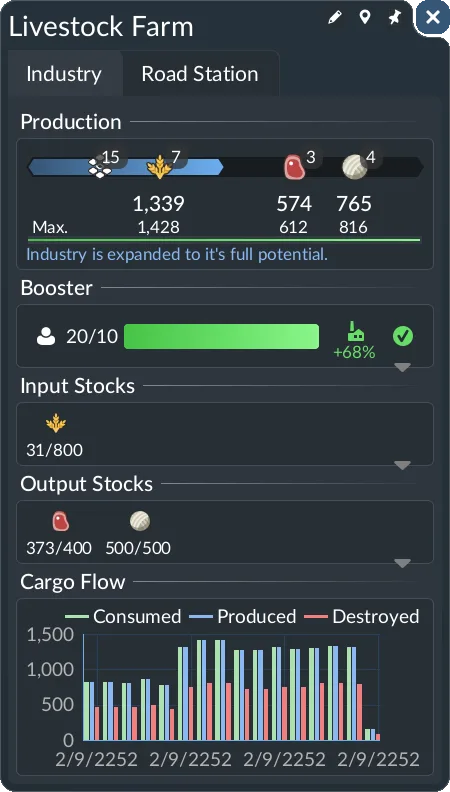
This Livestock Farm uses Grain to produce Meat and Wool. Read its Production rule together with the input and output stocks; the displayed amounts describe this particular facility.
Use the Cargo Flow chart to confirm whether cargo is entering useful transport or disappearing as excess output. Then change the smallest part of the network that addresses the measured constraint. More production is not the answer when output is already being destroyed, and more pickup vehicles are not the answer when a processing facility has no inputs.
Scale transport only after finding the bottleneck
A direct truck connection through an industry's built-in access can be quick and simple to establish, but it is slow. That makes it useful for initial service while demand is modest, not automatically the best permanent layout.
When loading becomes the measured constraint, specialized station infrastructure can improve throughput. A bulk-material module at a truck stop, for example, speeds the handling of bulk deliveries but requires additional land and creates additional pollution. Vehicles focused on the relevant cargo category can improve the same part of the operation. Those investments make sense only when loading or vehicle handling is the actual bottleneck.
Warehouses can store and redistribute cargo from multiple sites when production and pickup schedules do not align. They can operate as universal storage or specialize in Liquid, Bulk, Goods, or Flatbed cargo. These handling categories differ from raw, intermediate, booster, and end-product roles. Keep the warehouse decision separate from the industry's production diagnosis: storage can organize a flow, but it cannot replace a processing industry’s required inputs or restore plots removed from a raw facility.
Optional workers and specialist goods can raise production beyond normal capacity. Add them after the base industry is functioning and its output has somewhere to go. Boosting an industry with saturated output storage only increases waste unless outbound capacity improves at the same time.
Respond to industry spawning and closure
The industry landscape changes over time. New industries can appear as demand rises or as towns begin demanding a cargo type for the first time. Unused facilities can also be abandoned, but only when all relevant closure conditions are met:
- Industry closure frequency is not set to Never.
- The industry has neither consumed nor produced goods during the last 10 years.
- No goods have been shipped from the industry during the last 10 years.
- The industry is not owned by the player.
The game sends a notification when an unused industry is marked for closure. The industry then receives a 730-day countdown before permanent removal. That countdown also appears above the facility. If calendar speed is paused, the display uses real time instead of calendar days.
Treat the notification as a deadline for diagnosis, not as proof that the facility is already lost. The countdown stops if the industry begins to consume, produce, or ship goods before time expires. A rescue therefore needs actual activity. Placing an unused station or drawing a line that never moves suitable cargo does not satisfy those activity conditions.
Use this recovery sequence:
- Open the industry and read its Production rule.
- Check whether it is a raw producer or requires incoming cargo.
- For a processor, establish every mandatory input needed to begin production.
- For a raw industry, create suitable pickup service for its output.
- Confirm that the vehicle can carry the selected cargo type.
- Configure the line to pick up that cargo at or near the industry.
- Watch the recent consumption, production, shipment, stock, and Cargo Flow signals for real activity.
- Confirm that the closure countdown has stopped before moving attention elsewhere.
Do not wait until the final days to build a complex rescue chain. Terrain work, vehicle purchases, missing inputs, and slow first deliveries can consume part of the available countdown.
Confirm the industry is working
An industry project is complete when the interface shows the intended flow, not when the construction tools close. Verify that required input stock is arriving, recent consumption and production are nonzero where applicable, output is being collected by suitable vehicles, and Cargo Flow is not reporting avoidable destruction from a full output stock.
For raw industries, also confirm that nearby infrastructure has not removed important plots or boxed in future expansion. For processing industries, confirm that every required input remains supplied rather than relying on a temporary stockpile. If you add workers, boosters, station modules, specialized vehicles, or warehouse capacity, compare the industry data again afterward. The upgrade should improve the constraint you identified without creating a new pileup farther down the network.