
Choose Transport Fever 3 if you want to run a transport company: plan passenger and cargo routes, buy vehicles, manage their costs, and make deliveries work across a regional network. Choose Cities: Skylines 2 if you want to govern a city: zone land, provide public services, manage taxes and budgets, and shape the conditions in which households and businesses develop.
Both games involve traffic, industry, and citizens, but those systems answer different player decisions. This comparison focuses on the management work you will repeatedly perform. It does not claim one game runs faster on your hardware or assign a purchase recommendation from untested frame rates.
Compare the job you perform
The clearest difference is the role at the center of the simulation. In Transport Fever 3, an additional train or truck is an investment by your company. You need its route to transport the right people or cargo and justify the operating expense. In Cities: Skylines 2, a transport connection is part of a wider city economy, alongside housing, employment, utilities, education, and services.
| Decision | Transport Fever 3 | Cities: Skylines 2 |
|---|---|---|
| Main organization you manage | Transport company and its network | City and its public administration |
| Main network investment | Vehicles, lines, stations, depots, and connected infrastructure | Roads and transport integrated with zones and city services |
| Industrial problem | Move specific inputs and outputs between accepting producers and consumers | Support businesses with resources, workforce, location, services, and economic conditions |
| Budget emphasis | Delivery income versus fleet and infrastructure costs | City revenue, taxes, service budgets, loans, and the wider economy |
| Citizen connection | Useful transport between homes, work, and other destinations | Life, health, well-being, education, employment, housing, and travel |
| Typical investigation | Why this vehicle or line is not delivering as intended | Why this neighborhood, company, or service is underperforming |
A regional freight corridor can be enjoyable in both games, but the question you answer changes. In Transport Fever 3, you assemble and operate its transport chain. In Cities: Skylines 2, you also consider what the resulting resource access and traffic mean for the city around it.
Choose Transport Fever 3 for fleet and line decisions
Transport Fever 3 makes the company route the direct unit of work. You connect stops, purchase compatible vehicles, configure their operation, and inspect whether the resulting transport takes place. The line can be technically reachable yet commercially unsuitable, or profitable yet constrained by loading, transfers, congestion, or capacity.
A freight project therefore involves specific cargo decisions. The producer's output, the receiving facility's input, and the vehicle's cargo class all matter. You can investigate a single failed handoff instead of treating the whole city economy as one production system.
The fleet also evolves over time. The available transport includes trains, road vehicles, trams, ships, aircraft, and helicopters across more than a century of transport development. Choosing when to replace or extend a service is part of the transport company's investment problem.
This is a strong fit if you like inspecting an individual train, designing its route, and then watching the effect of a revised station approach or cargo connection. It is also a good fit when your main interest is the regional relationship between industries and towns rather than zoning each neighborhood yourself.
A visually impressive railway is not automatically the best company project. The useful decision is whether it serves a real transportation need with an appropriate fleet and affordable infrastructure. That relationship between construction and operation is central to the game's management loop.
Choose Cities: Skylines 2 for municipal decisions
Cities: Skylines 2 places households, industrial businesses, commercial businesses, offices, and city services within one economic system. You shape their circumstances through land use, connections, taxes, utilities, and public-service provision.
Industrial companies consider access to resources, transportation costs, workforce, land value, and expenses. Commercial companies need products, employees, and customers. Offices have their own workforce and production requirements. Improving a connection can help, but it is one of several influences on a company's position in the city.
The Economy panel gives you city finances, loans, taxes, service budgets, and resource production information. That means you can approach a shortage by considering the city's production and imports, and also the conditions that encourage businesses to locate or operate there.
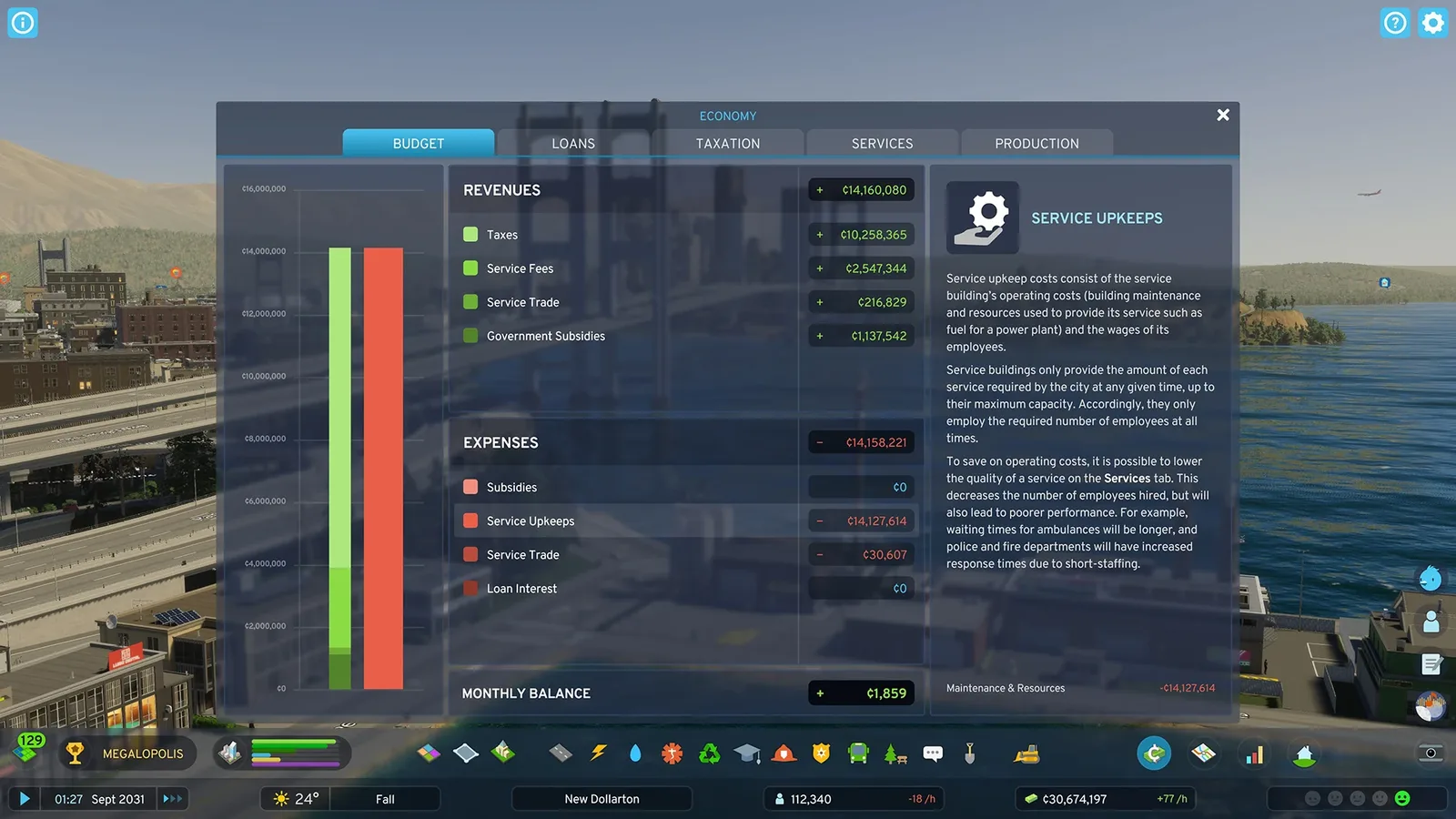
Cities: Skylines 2 manages a city budget alongside its transport system.
City services extend the management scope beyond transport. Citizens need utilities and sewage treatment, waste management, education, medical care, and other services. A residential area can have a usable road while still suffering from a service or living-condition problem.
Choose this management role when those additional systems are part of what you want to control. If you prefer solving a transport route without also governing health, housing, and public-service budgets, the broader municipal responsibilities can feel like work outside your main interest.
Compare industrial logistics
Both games represent production and resource movement. The distinction is how directly you construct and operate the chain and how much of the economic environment you govern around it.
In Transport Fever 3, inspect the actual facility's required inputs and output cargos. Build the transportation path, configure suitable vehicles and stops, and check delivery to the accepting receiver. Optional cargo boosters and worker access add further reasons to establish useful connections.
A tool factory, for example, needs its actual recipe inputs. Delivering something else simply because a nearby industrial district accepts it does not complete that factory's input requirement. The logistical chain provides concrete intermediate states you can inspect.
In Cities: Skylines 2, resource access interacts with companies' profitability and locations. Transportation distance and resource weight affect costs, while workforce, rent, utilities, and economic conditions also influence production. Imports and exports connect the city's economy to outside connections.
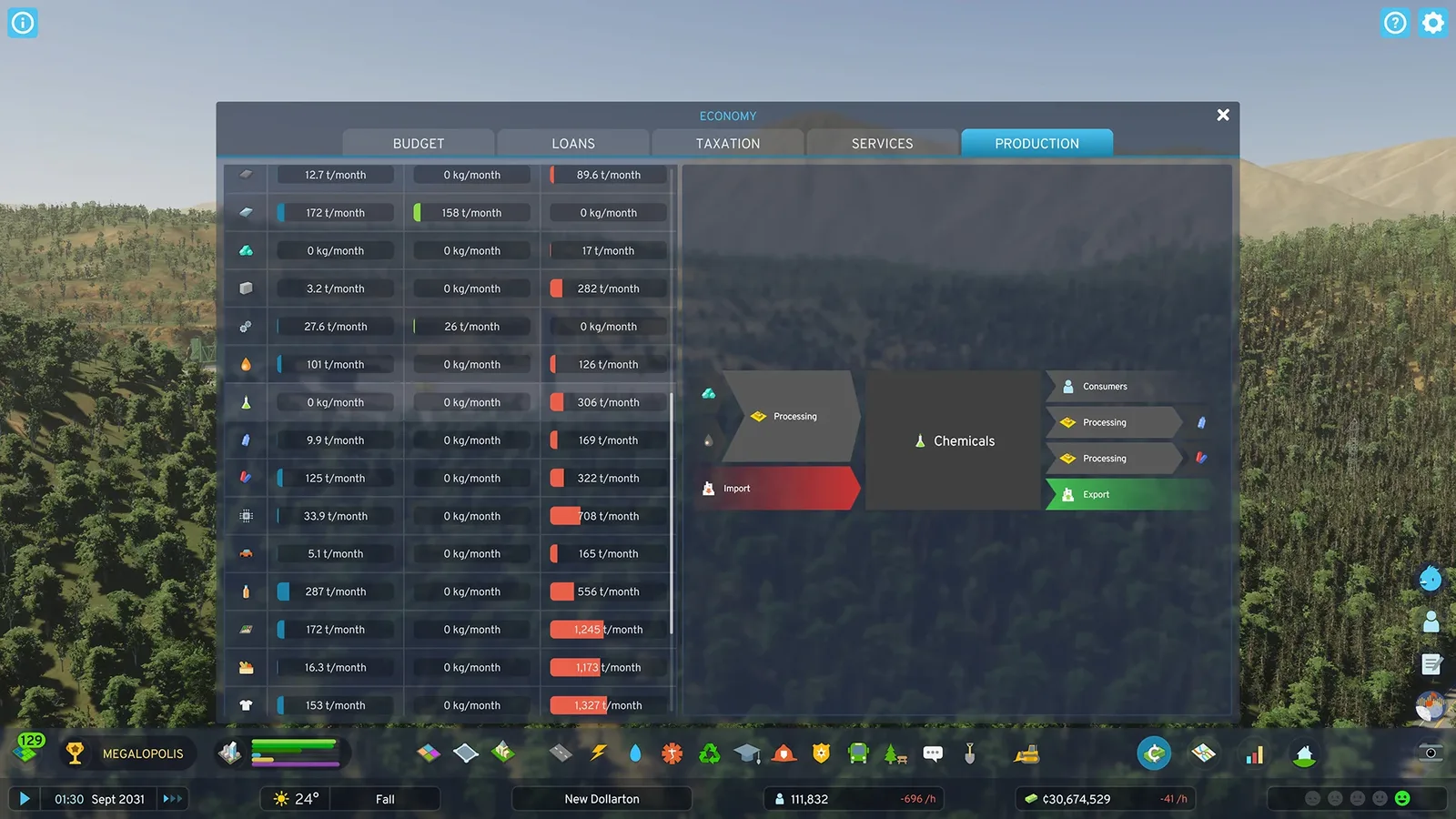
The city production overview tracks resource output and surplus or deficit.
The production overview lets you inspect local output and resource surplus or deficit. That supports decisions about city specialization and transport connections. You are influencing the conditions of the production system, rather than performing exactly the same company-line workflow as Transport Fever 3.
Choose around the industrial question you find interesting. “Which wagon, harbor transfer, and final stop make this delivery work?” points toward Transport Fever 3. “What mix of businesses, workers, resources, services, and connections supports this city's economy?” points toward Cities: Skylines 2.
Compare citizens and demand
Transport Fever 3 models citizens with homes, jobs, and places to go. Passenger service needs to connect useful origins and destinations. Town growth and changing needs mean that an early network may require new connections or more capacity later.
This gives transport decisions a living context. A line can have vehicles and stops yet fail to serve the journey residents actually need. Inspecting that journey connects the town's development to the network you operate.
Cities: Skylines 2 expands the player's responsibility across citizens' lives. Education affects available work, health and well-being affect their circumstances, and household needs influence where people live and what they consume. Citizens can also be followed through their Lifepath Journal.
Public transport is one part of those lives. The city must also support housing, employment, medical treatment, and other needs. A citizen problem can therefore call for a school or healthcare decision rather than a new bus line.
Neither preference requires ignoring citizens. The choice is whether you want to respond mainly through a transport company's network or through the city's broader set of institutions and land-use decisions.
Compare roads and traffic work
Transport Fever 3 provides road construction, lane connections, intersection controls, traffic-light adjustments, and road-side features. These tools support the company network and the towns through which it operates. Its tram-trains can also transition between street and railway infrastructure when the vehicle supports light rail.
Cities: Skylines 2 treats traffic alongside the city layout and service operation. Its pathfinding accounts for time, comfort, money, and behavior; parking and the journey's purpose also influence movement. Emergency and service vehicles have their own operational demands on the road network.
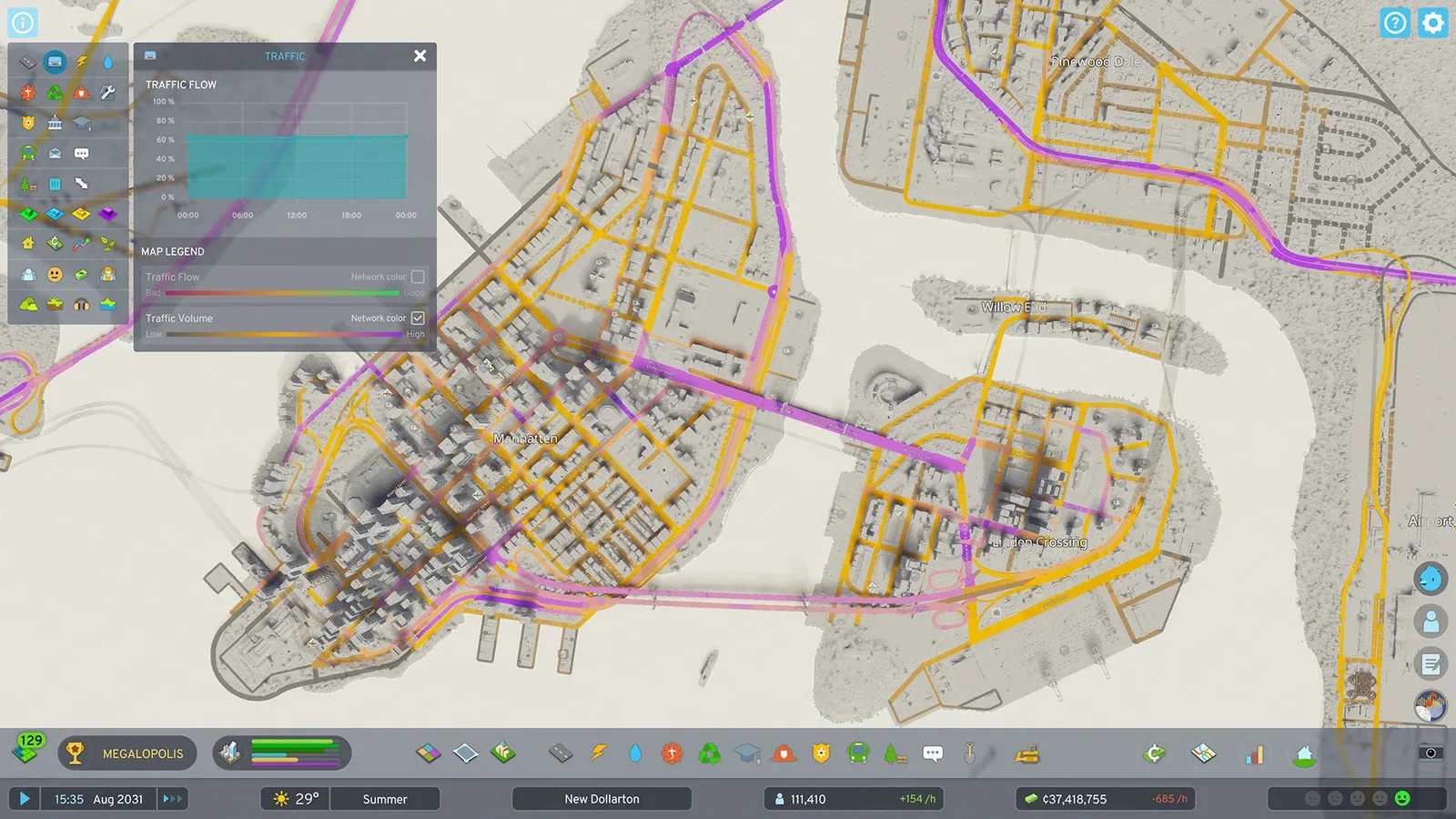
Citywide traffic diagnostics serve the municipal network and its many trip types.
This makes the surrounding city relevant to a traffic diagnosis. A jam can involve commuters, deliveries, public services, parking choices, and traffic passing between outside connections. Fixing one road is part of shaping how the city generates and handles those trips.
In Transport Fever 3, the company route remains a useful starting point: inspect what your service is trying to reach and which infrastructure prevents it. You still need to consider town traffic, but the direct operational question often belongs to a specific line or fleet.
If your preferred session is an hour spent refining a complex interchange, both games offer reasons to do it. Choose based on the systems you want to manage before and after that interchange is built, rather than assuming that a shared road-building interest makes the rest of the games equivalent.
Choose the session structure you want
Transport Fever 3 offers Tycoon, Sandbox, and Campaign modes. Tycoon provides the company economy with adjustable difficulty. Sandbox allows construction with the economy disabled, while the campaign supplies historical story missions and stated objectives.
These modes let you distinguish an economic transport challenge from a free construction project or a mission with a specific completion target. If you want a railway-building session without the same budget pressure, the mode choice directly changes that project's constraints.
Cities: Skylines 2's central project is developing and governing the city. Its citizen and economic systems provide many interacting conditions to manage as the city grows. Choose it when the expanding urban project itself is the desired session structure.
Do not base this choice on an invented promise that every mode or save in either game is equally demanding. The important question is which responsibilities you want active: company operation, unrestricted transport construction, campaign objectives, or comprehensive urban management.
Evaluate hardware separately from gameplay preference
A gameplay fit does not establish hardware suitability. Large simulations depend on their actual map, population, network, settings, and the machine running them. A screenshot or a genre comparison is not a controlled benchmark.
Check each game's current requirements for your operating system and exact hardware. For a laptop, distinguish a mobile GPU from a similarly named desktop card and inspect the complete laptop configuration. Do not turn a graphics product name into a guaranteed frame rate for either game.
Look for measurements from a comparable configuration and workload if performance will determine the purchase. Record the map or city conditions and settings with the result. A test of a new empty map answers a different question from sustained play in a developed simulation.
This comparison does not rank current patch stability, downloadable content, sale prices, or mod catalogs. Those are separate, changing purchase conditions. Resolve them for the version and store you plan to use after deciding which management role fits your preferred play.
Make the choice with a concrete project
Write down the next project you want to build. If it is a regional rail and shipping network, a cargo chain, or a fleet that must pay for its expansion, Transport Fever 3 gives that project direct company-management structure.
If it is a complete city with residential districts, schools, services, jobs, industry, and a transport network supporting all of them, Cities: Skylines 2 places those systems within your administration. Its appeal comes from their combined urban development.
For a train-centered player who also likes cities, ask whether zoning and municipal services are desired responsibilities. For a city-builder who enjoys railways, ask whether vehicle-by-vehicle company operation is the project you want to spend the session managing. These concrete preferences are more useful than selecting a winner from the number of shared features.
Related guides
Use Gameplay to choose a Transport Fever 3 mode, Review for the game's own strengths and limitations, and Transport Fever 2 vs 3 if you are choosing between the two entries in that series.