
Transport Fever 3 reputation reflects how your company treats a town and the surrounding nature. Landscaping, removing town buildings, and breaking main connections to other towns can lower it. Planting trees can recover reputation lost through tree removal; celebrations and marketing campaigns can improve reputation. Tree planting is not a documented universal repair for every kind of construction damage.
Start by opening the affected town's ratings and identifying what changed before the loss. Then choose the response that matches that cause. A reputation problem requires a different intervention from unhappy passengers, late freight, noise, or congestion, even when several ratings deteriorate during the same rebuilding project.
Identify the town and the recent damage
Select the town and inspect Reputation separately from the other municipal ratings. Opening the town window also displays its boundaries, helping you establish which municipal area contains the construction work. Keep this area visible when examining the altered landscape and road connections.
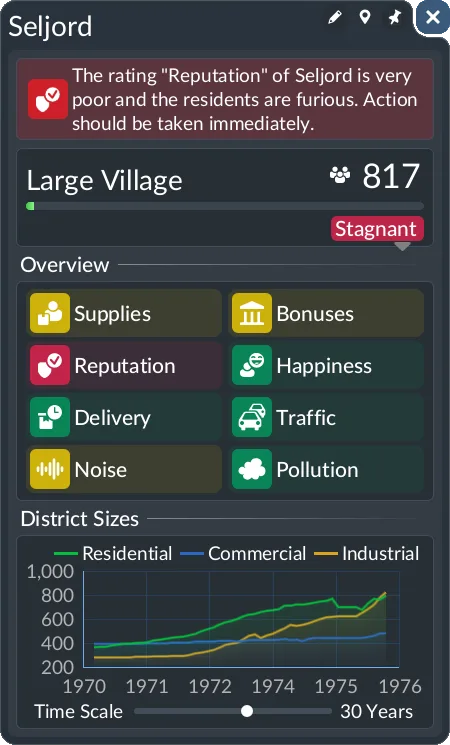
Inspect Reputation separately from Happiness, Delivery, Traffic, Noise and Pollution.
Use the recent project to narrow the investigation. A station extension through mature trees, a new road cutting through existing buildings, and a severed intercity road are three different changes. The same low rating does not tell you which one caused it, so inspect the actual work before applying a remedy.
| Recent change | Reputation concern | Appropriate first check |
|---|---|---|
| Trees cleared for infrastructure | Tree-removal loss | Identify the cleared area and remaining planting space |
| Town buildings demolished | Treatment of the existing town | Inspect which buildings the proposal removed |
| Main road connection broken | Connection to another town | Trace the affected connection through the complete route |
| Terrain raised, lowered, or flattened | Landscaping damage | Review the extent of the permanent terrain change |
| No recent construction, but growth remains weak | Another rating may be lower | Compare Reputation with all other Authority components |
Treat this table as a diagnostic order rather than a point formula. There is no verified fixed penalty here for removing one building, cutting one tree, or changing a given amount of land. Use the town's displayed rating to judge its state rather than assigning invented scores to your construction history.
If several changes occurred together, separate the repairs. Restore the necessary road connection, address tree removal, and then inspect the rating again. Making another large terrain alteration while testing recovery introduces another possible cause and makes the result harder to interpret.
Restore trees after tree removal
The specific tree remedy is straightforward: reputation lost by removing trees can be recovered by planting new ones. Use the vegetation tools to place actual trees. Painting green ground or adding unrelated decorative objects is not the same action.
Open the landscaping menu and switch to Vegetation. Trees can be placed individually or using a brush. A mixed-tree brush lets you enable or disable the tree types you want to include, which is useful when restoring a larger cleared area rather than placing every tree separately.
Use a controlled planting pass:
- Identify the municipality affected by the earlier removal.
- Choose tree vegetation rather than a terrain-height or ground-paint tool.
- Select individual placement for precise gaps or a brush for a broader area.
- Inspect the placement area so the planting does not interfere with your intended infrastructure layout.
- Place the trees, then return to the same town's Reputation rating.
- Evaluate the displayed result before repeating the operation across additional land.
This method avoids treating all landscaping tools as interchangeable. Raising land, smoothing a slope, painting a grass texture, and placing trees may all change the appearance of a scene, but only tree planting is the documented recovery action for tree-removal reputation loss.
Do not promise that a certain number of trees restores a certain percentage. The documented mechanism does not supply a universal conversion rate or planting radius. Likewise, do not assume that trees planted anywhere on the map repair a specific town's loss. Keep the affected municipality in view and check its actual response.
A project that both removed buildings and cleared trees has more than one possible reputation consequence. Replanting can address the tree-removal part; it is not evidence that the demolished-building part has also been reversed. Continue the diagnosis if the rating remains weak.
Protect the main connections between towns
Breaking a town's main connections to other towns can lower reputation. Before a road project, trace the existing connection beyond the street section you want to replace. A short deletion near an intersection can affect a much longer intercity route.
When repairing a broken connection, inspect continuity at both ends and along the intervening road. A visible road fragment beside the town does not establish that it still connects to the next town. Follow the complete corridor and identify the missing or disconnected section.
Distinguish physical continuity from a new layout's intended direction. A one-way conversion changes how the road can be used, while replacement changes its street type. For a directional corridor, inspect the approaches and exits after changing it rather than relying on the appearance of the middle section.
Where a type change can be performed with Replace, use that tool to work on the existing street rather than immediately demolishing the whole corridor. Review its extent and preserve the transport features that should remain. Replacement is an operation choice; it is not a promise that every proposal carries zero reputation consequence.
Restoring access is a sensible response to a severed connection, but the documented reputation description does not provide a guaranteed recovery time or fixed score for reconnecting it. After the repair, verify the route and inspect the town's rating. Do not interpret an unfinished reconnecting road as a completed recovery.
Limit demolition before confirming construction
Town-building removal is another documented reputation risk. Before constructing a road, inspect the yellow highlighted buildings and the demolition warning in the proposal. These identify buildings that the road construction would remove.
If the proposal removes buildings unnecessarily, cancel it before confirming. On PC, Esc or a right-click cancels the pending road construction. This cancellation concerns an unfinished proposal; it is not an undo command for a terrain change or demolition that has already happened.
The advanced Drag-and-Confirm construction mode can help you inspect a road proposal before accepting it. It allows the proposed end point to be adjusted rather than immediately committing the segment. Use the preview to compare an alignment that passes through buildings with an alternative that avoids them where possible.
Consider the scale of the intervention. If the purpose is to change a street's type or retain a transport feature, replacing the existing section may be sufficient. A completely new alignment has different spatial requirements and may require demolition. Match the operation to the actual need before clearing a broad area.
Do not assign a guaranteed reputation benefit to rebuilding a visually similar house or placing decorative buildings. The confirmed description identifies removal as a possible loss but does not establish that arbitrary construction reverses it. Avoid spending on an unverified recovery mechanic.
Separate terrain work from visual decoration
The landscaping menu has Terrain, Vegetation, and Ground tabs. Use Terrain to modify the height or shape of the landscape, Vegetation to place trees and other vegetation, and Ground for surface painting. These categories do not have the same gameplay effect.
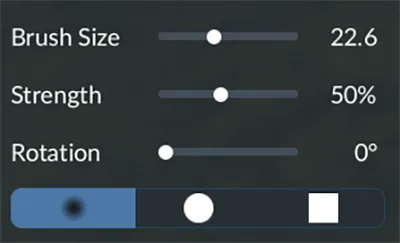
Review the brush settings before applying permanent terrain changes.
Terrain tools permanently raise, lower, flatten, or smooth the map's surface. Their settings include brush size, strength, rotation, and brush shape. A larger or stronger brush changes more terrain at once, so inspect the intended area before applying it near a town.
Buildings, streets, and tracks occupy areas that the terrain tools do not modify. Trees and rocks adjust their position with the altered terrain. This collision behavior does not mean every surrounding landscape change is irrelevant to reputation; landscaping itself is listed among the actions that can lower it.
Ground painting has no gameplay influence and is free even outside Sandbox mode. It is useful for appearance, but it is not a documented reputation treatment. A grass texture that looks like restored greenery does not substitute for planting trees after tree removal.
If the completed terrain shape is unsuitable, evaluate the necessary corrective work deliberately. Do not repeatedly raise and lower land in search of a reputation reset. The available description provides no universal undo, no displayed reputation refund, and no automatic restoration of a previous rating when the surface looks similar again.
Use celebrations and marketing for supported improvements
Celebrations and marketing campaigns can improve reputation. A town celebrates when it reaches a new level. That event belongs to the town's progression, so it should not be treated as an immediate button available whenever a construction project lowers the rating.
If a marketing campaign is available in your game, it is another supported means of improving the town's reputation. Inspect the actual action and its displayed conditions. Do not assume a fixed cost, duration, reputation increase, or unlocking rank that has not been established for your current game.
These improvements do not replace infrastructure repair. If construction has severed a necessary road connection, address that connection as an operational problem even when another action can raise the rating. Likewise, a campaign that improves reputation does not prove that passengers now have satisfactory journeys or that late cargo has become timely.
Use the same town window before and after the intervention. Track the rating you intended to improve, then compare the remaining Authority components. This keeps a reputation improvement distinct from the broader question of whether the town's development constraint has been removed.
Check the remaining municipal constraint
Authority takes its value from the lowest of six ratings: Reputation, Happiness, Delivery, Traffic, Noise, and Pollution. If Reputation was the lowest and rises, another component may become the new minimum. That does not imply that the reputation intervention failed.
Check the ratings rather than continuing to plant trees automatically. A town now limited by Noise needs a residential-exposure investigation; one limited by Happiness needs a passenger-journey investigation. Those tasks require their own evidence and will not be resolved by another decorative planting pass.
Continue with road upgrades for street replacement and ownership controls, town growth for the full Authority and Supplies calculation, or citizen happiness when Reputation is healthy but passengers remain dissatisfied.