
Transport Fever 3 supports tram-trains: light-rail-capable trams can travel on tram infrastructure, transition into underground sections, and continue onto railway tracks. You need a vehicle that supports that operation and a continuous compatible route. An ordinary tram does not gain railway capability merely because its line passes close to a train station.
On streets, tram-trains follow road traffic rules. On railway tracks, they follow rail signaling and reservation rules. Build and test the connection as a change between two operating environments, then check the actual vehicle's path. The optional Light Rail for All Trams mod expands which trams can use railway tracks; it is not required for the base game's vehicles that already support light rail.
Choose the vehicle before drawing the whole corridor
A light rail corridor can connect local urban stops with a regional railway. Its practical advantage is that a capable tram can remain on one service across those sections rather than forcing every rider to change between an isolated city tram and a separate train.
Start by examining the intended tram in the vehicle store. Confirm its supported operation, passenger or cargo role, and traction requirements. The development overview specifically says some trams can become tram-trains. Do not interpret that as every base-game tram being able to use every rail connection.
| Question | Check before construction | Why it matters |
|---|---|---|
| Can this tram use railway tracks? | The selected vehicle's light rail capability | Track proximity cannot add vehicle capability |
| Is this a passenger or cargo service? | Vehicle and stop purpose | A cargo tram is not a passenger tram with a different line color |
| Is the tram electric? | Its traction and the route's infrastructure | The required electrical connection must remain usable |
| Does the line enter shared railway? | Track connections, signals, and other services | Railway reservations apply after the transition |
| Is the railway segment necessary? | Actual towns, workplaces, or cargo receivers served | A long connection is not useful solely because it exists |
Choose a small first service that demonstrates the transition. Connecting one useful city section to one useful regional destination makes a failed connection easier to locate than building a complete multi-town system before its first vehicle runs.
Separate vehicle configuration from track configuration
Transport Fever 3 also introduces cargo trams and configurable tram formations with separately attached wagons. These features expand the transport work a tram can perform, but they do not remove the need to select suitable cargo capacity and actual receiving stops.
A tram may have the right track capability while carrying the wrong traffic. A passenger service should connect places where residents can make a useful journey. A cargo service needs a producer, a compatible cargo configuration, and an accepting destination or a complete onward transfer.
For a mixed urban and regional passenger route, examine residential access at the urban stops and access at the regional destination. The direct journey removes a transfer only when the service actually reaches the relevant origins and destinations. Running past a town without a useful stopping point does not provide that connection.
For cargo, work backward from the receiver. Identify the cargo type it accepts, the producer that supplies it, and the receiving connection at each end. Light rail changes the infrastructure choice; it does not change industrial recipes or make every town district accept every cargo.
Do not choose a cargo tram solely because a goods icon appears somewhere on the map. Use the vehicle's cargo specification and the stop configuration. If the payload is incompatible, rebuilding the railway transition will not solve the loading failure.
Build the urban tram section
Use tram tracks in the city section where the service needs street access. The street tools can add or remove tram tracks, including variants with or without catenary. When modifying a road, inspect those settings instead of assuming the new street keeps every previous track feature.
The Keep choice in street replacement retains existing bus lanes or tram tracks while changing the street type. This is useful when the road needs improvement but the tram's infrastructure should remain. Other replacement choices can deliberately change those features, so check the selected option before applying the work along a corridor.
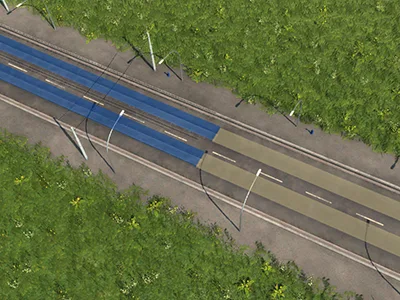
Verify the tram tracks and required electrical infrastructure on the urban segment.
Cities do not always offer straight road grids. The game's road and intersection tools allow more flexible layouts, but a visually elegant crossing is still only part of the service. Confirm that the route can pass through the required intersections and reach its stops.
Road-side operation also means sharing the street environment. A tram-train traveling on the road follows normal street rules. Moving part of the route onto railway tracks does not retroactively give the street section railway priority or remove its road traffic constraints.
Use a direct urban alignment where it serves the intended destinations. Avoid adding detours simply to force the service through a visually impressive interchange. Check waiting passengers, actual boarding, and the vehicle's completed journeys before extending the line.
Connect tram infrastructure to railway
The base-game infrastructure supports connecting tram tracks with rail tracks for capable vehicles. Plan the physical transition as part of the service route, then inspect the resulting line path with the selected vehicle.
Do not replace a tram-only section with railway merely because both use rails. The vehicle needs to support the change, and the connections must form a continuous usable route. A parallel railway beside a tram road is not a connection between them.
Verify the section immediately before and after the transition. If the vehicle can reach an urban stop but not the next rail stop, focus on that boundary, the selected vehicle, and the adjoining rail infrastructure. Buying another copy of the same incompatible tram will reproduce the problem.
On railway, tram-trains use the usual rail signaling and reservation logic. Include the new service when reviewing single-track sections, junction conflicts, and shared station approaches. A light rail vehicle does not receive a separate immunity from occupied track.
Rail line priority can influence which service reserves shared infrastructure first, but it cannot create a missing connection. Establish a valid path before using priority to manage conflicts with other trains. For detailed signaling and reservations, follow the dedicated train guides rather than treating an entire regional rail network as a street junction.
Use underground sections deliberately
Tram construction supports an underground mode, making it possible to edit and extend subsurface infrastructure without ordinary surface snapping getting in the way. Underground operation can be part of a tram-train corridor, but it still needs suitable stops and continuous track.
A tunnel entrance alone is not an underground passenger connection. Riders need usable station access. Likewise, a station entrance on the surface does not establish that the track below accepts the selected vehicle or connects to the rest of its line.
The distinction becomes especially important with mods. A mod called an underground railway station may use railway tracks even when its appearance is adapted from the base game's tram station. Match the station's actual track type and intended vehicles, not only its architectural style.
For a local tram service, use the appropriate tram infrastructure. For a railway passenger service, use a station that supports railway. If a light-rail-capable tram spans both systems, check every segment and stopping arrangement instead of assuming one type of underground entrance serves all configurations.
Keep a simple test line before adding deep interchanges or several intersecting routes. Confirm the first working underground journey, then extend it. That gives you a known working connection to compare against when a later addition creates an unreachable-stop warning.
Decide whether the all-trams mod is useful
Light Rail for All Trams changes tram eligibility so that trams can leave the tram network and use railway tracks like the vanilla tram-trains. Its description says it selects trams by their properties rather than a fixed list, covering vanilla trams, modded trams, and future matching vehicles.
The mod offers settings for all, electric-only, or non-electric-only trams, a minimum year, and passenger and/or cargo vehicles. If an expected vehicle does not gain the behavior, inspect these settings before treating the mod as nonfunctional.
Under this mod, trams can stop at regular railway stations, and electric trams need electrified railway tracks with catenary. Include the electrical requirement along the complete railway section, not only near the destination platform.
This is an optional modification to vehicle eligibility. The base game already has light-rail-capable trams. If your chosen vehicle supports the intended route without the mod, adding it is a separate choice rather than a mandatory installation step.
The author also warns that removing the mod from a running game can break tram lines routed over railway tracks. Before changing that dependency, identify which services rely on it and keep a separate save. Disabling it is not a guaranteed harmless way to compare route performance.
Check a failed light rail route in order
| Failure | First check | Next check |
|---|---|---|
| Tram will not enter the railway | Vehicle capability or the optional mod's eligibility settings | Physical tram-to-rail transition |
| Electric tram cannot complete the rail leg | Required catenary on that segment | The rest of the line's usable path |
| Vehicle reaches the station area but cannot use the stop | Station type and assigned terminal | Connections immediately around the station |
| Service runs but few passengers use it | Origins, destinations, and station access | Waiting and completed trips along the actual route |
| Cargo tram runs empty | Cargo compatibility and loading filters | Producer, accepting receiver, and complete transfers |
| A previously working line breaks after removing a mod | Whether that line depended on expanded railway eligibility | Restore the dependency or redesign the service in a separate save |
Test one correction with an actual vehicle trip. The vehicle's behavior distinguishes a connection problem from a demand problem: inability to reach a stop calls for a path check, while a valid empty trip calls for cargo or passenger access checks.
Finish the first service before expanding
A working light rail route has a compatible vehicle, connected urban and regional infrastructure, reachable stops, and observed transportation. A map containing rails and underground entrances has not yet demonstrated those results.
Once that first route works, review its shared railway section alongside the existing trains. Watch queues and repeated waits before adjusting priority or adding vehicles. On the street section, inspect the actual road traffic environment separately; it uses a different set of rules.
The useful expansion is the next destination the service can reach reliably. Keep the vehicle's capabilities, electrical requirements, and any mod dependency visible in that decision, so the extended corridor retains the behavior you verified in the first test.
Related guides
Use Underground Stations to distinguish tram and railway station requirements, Train Signals for shared rail operation, and Upgrade Roads when the urban tram corridor needs street changes.