

A Transport Fever 3 mod.io auth code is the five-digit verification sent to your email address when you use email login. Enter it in the prompted code field; you do not need to reply to the email. A code is valid for 15 minutes, and you can request only one code every 15 minutes. If it no longer works, wait at least 15 minutes, restart the game, and request a new code from the mod menu.
Choose the branch that matches the problem: no email, a delayed email, or a received code that is rejected. These states need different first checks. Repeatedly requesting another code is not a reliable way around either the validity period or the request limit.
Identify the email-verification step
The five-digit code belongs to mod.io's email verification flow. It is not a Steam product key, a Transport Fever 3 purchase key, a mod identifier, or a password you create for a particular mod. Use the code entry prompt that follows the email-login request.
You should be able to identify three pieces of information before troubleshooting: the email address entered, when you requested the code, and whether an email arrived. Those details determine which action to take next. The name of a subscribed mod does not establish which email inbox received the verification.
If your current sign-in flow uses another account provider, do not paste an email code into a different provider's password field. Follow the prompts actually shown by your chosen login method. The instructions here concern the mod.io five-digit email code, not every account-login error that can appear while using the Mod Hub.
The game's login chooser can show a Paradox Account username or email field and password field, with Steam and Mod.io options below. The visible password form belongs to Paradox Account. Use the Mod.io option for the mod.io login route; do not enter a mod.io verification code into the Paradox password field.
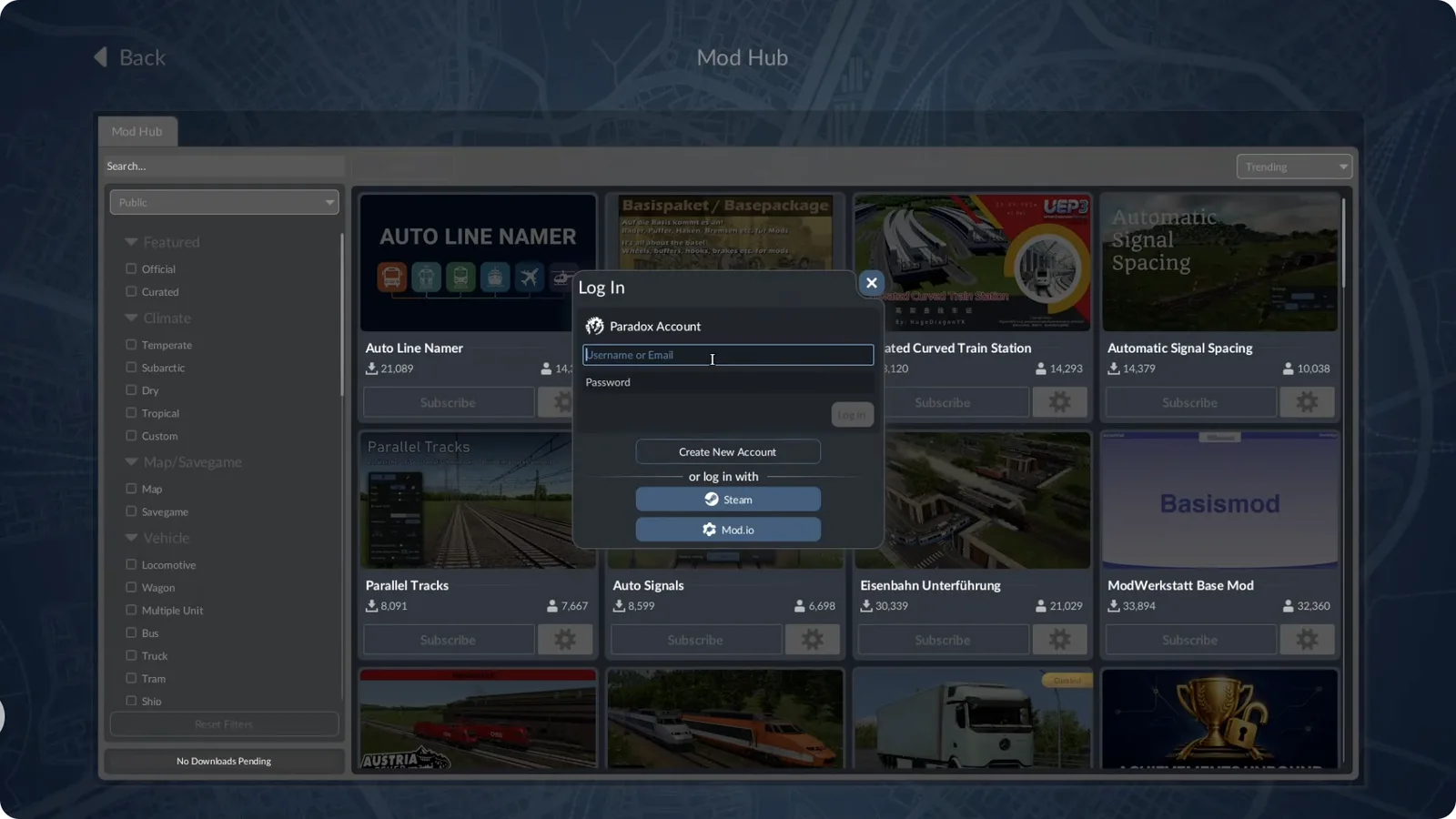
Select Mod.io for that login route; the visible password form belongs to Paradox Account.
Use the 15-minute limits correctly
The validity period and the request interval are separate limits, even though both are 15 minutes. Validity determines how long the issued code can be used. The request interval determines when you can obtain another code.
| Situation | Relevant limit | Next action |
|---|---|---|
| Code arrives promptly | Valid for 15 minutes | Enter it in the verification prompt while it is still valid |
| No email after a recent request | One request every 15 minutes | Check the address and inbox before attempting another request |
| Email arrives after the code has become unusable | Code validity | Wait for the request interval, restart the game, and obtain a new code |
| Code is received but no longer works | Both limits may matter | Follow the wait, restart, and fresh-request sequence |
For example, a code that appears in your inbox after a long delay may be older than its arrival notification suggests. The useful starting point is the request time. Do not assume that opening the message begins a fresh 15-minute validity period.
Likewise, the absence of a message does not remove the request limit. Record the last request time and use the waiting period to check delivery. Pressing the request control repeatedly does not establish that a new valid code has been issued each time.
Fix a code email that never arrives
First confirm that the request used the correct email address. Check the complete address, including the local part before the at-sign and the full domain after it. Look for typing errors, unintended spaces, invalid characters, or a missing domain ending.
Do not change a valid domain simply because an example in a help article uses a different ending. Addresses can legitimately use endings other than .com. The goal is to enter the address you actually control, with its correct spelling, rather than replacing it with an assumed format.
Then inspect the mailbox:
- Open the inbox for the address entered in the login prompt.
- Check Spam or Junk as well as the normal inbox.
- Refresh or manually retrieve messages in the email client.
- Check whether the message arrived under a different mailbox view or filter.
- Compare its request timing with the 15-minute validity period.
- If another request is needed, wait for the permitted interval before retrying.
If the address was mistyped, requesting to that same incorrect address again repeats the problem. Correct the address in the new login attempt. Receiving notifications from a different account on the same phone does not show that you have checked the mailbox used for this request.
After a recent request, wait at least 15 minutes before restarting the game and trying again. Once you make the fresh request, allow a few minutes for delivery and check the junk folders. Keep the new attempt separate from the earlier one so you can identify which message belongs to the current verification.
Diagnose delayed email delivery
An email client may check for new mail every 15 minutes or longer instead of using push delivery. This can make a message appear late in the app even when it is already available to the mailbox. Use the client's Send/Receive, refresh, or equivalent retrieval control after requesting the code.
Manual retrieval is a mailbox action, not a new verification request. This distinction is useful during the waiting interval: checking for messages does not require you to repeatedly ask mod.io for another code.
Delivery may also be affected by high traffic at the email provider or mod.io's servers. A delay by itself does not identify which system is responsible. Avoid diagnosing it as a game-file problem solely because the email did not appear immediately.
When the message finally arrives, inspect whether the code is still usable. If it has aged beyond the validity period, move to the expired-code sequence instead of repeatedly entering it. A fresh request should still respect the request interval.
If you receive several messages while investigating the delay, compare them with the request times you recorded. Do not assume that the last message your client displayed corresponds to the most recent attempt. Treat the message associated with your current verification as the relevant one.
Replace an expired or rejected code
For a code that no longer works, use the supported retry sequence: wait at least 15 minutes, restart the game, enter the email address again in the mod menu, and request a new code. Enter the new code when the game prompts for it.
Before retrying, make sure you are using the five digits from the relevant email rather than copying surrounding text. Paste them into the verification field, not into the email-address field. Do not send the code as an email reply; replying is not part of completing verification.
Use one fresh attempt to establish a clear result:
- Note the last request time and allow the waiting interval to pass.
- Restart Transport Fever 3.
- Return to the mod menu's email-login flow.
- Enter the correct email address.
- Request the code once.
- Refresh the correct mailbox and check junk folders if needed.
- Enter the received five-digit code in the active verification prompt.
- Check whether the game accepts the login.
This sequence does not promise that every unrelated network or account error will disappear. Its purpose is to replace a stale or unusable code with a fresh, traceable attempt while respecting the platform's limits. If the same failure remains, preserve the result for support rather than repeating requests without recording what happened.
Confirm login before diagnosing mod downloads
Successful code verification and successful mod installation are different outcomes. After the code is accepted, check the account state shown by the game. Then inspect subscriptions and downloads separately if the mod you expected is still missing.
Do not treat a mod's presence on the website as proof that the game completed its login. Likewise, once verification has succeeded, requesting another code is not a diagnosis for every missing dependency or inactive mod. Identify the stage that is failing.
The distinction also matters when using a browser alongside the game. An existing browser session does not establish that an email-code attempt inside the game was accepted. Check the result in the interface where you made that attempt.
For subscription, activation, dependency, or account-consistency issues after login, continue with the mod.io guide. It covers the mod workflow beyond the verification step. Keep this page's retry process for a missing or invalid email code.
Prepare a useful support request
If a correctly addressed, properly timed fresh attempt still fails, use mod.io support's Submit a request entry. Describe the verification problem precisely: no message, late message, or a code rejected by the prompt.
Include the platform and game, the approximate request time and time zone, whether junk folders were checked, whether manual mailbox retrieval was tried, and the exact error text shown. A screenshot of the error can help identify the failed stage, provided it does not expose the active code or unrelated private mailbox content.
Do not post the verification code in a public discussion or include it in a guide comment. Support needs the failure context, not a still-valid credential. If asked for account information, provide it through the support channel rather than sharing it with everyone reading a community thread.
Record the outcome of the fresh attempt before changing unrelated settings. “No email after a request to the correct address” and “email arrived, code rejected after the waiting sequence” are different reports. That distinction gives support a more useful starting point than a general claim that all mods are broken.
For the supported mod channels, see Mods. For help choosing a community venue and writing a reproducible report, see the Reddit guide.