
Search the catalog by vehicle or component name, filter by category, and sort by availability start year, top speed or numeric capacity. The current reference contains 294 listed vehicles and components across 12 categories. It is a dated, partially verified reference rather than a claim to include every vehicle in every game version, edition or mod collection.
Reference coverage checked 5 October 2026. The underlying vehicle table was published 3 October 2026.
How to read the catalog
Speed is shown in km/h. Passenger capacity uses passengers, and cargo capacity uses units. A locomotive's capacity is left blank because it is a traction component, not a passenger or freight wagon. Entries with mixed capacities retain their description rather than receiving a guessed single sortable number.
The year is the listed availability start year. It does not establish an end year or prove that the vehicle is currently purchasable in your save. Your calendar, active content and other world requirements still matter. Prices and annual running costs are reference values from the dated vehicle table; difficulty and world settings can change the financial comparison.
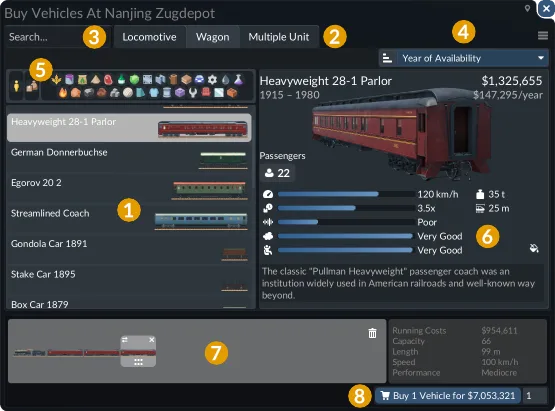
The purchase window shows an individual coach's attributes. Check the actual store entry in your world before buying a whole consist around a catalog value.
Vehicles and components are separate entries
The categories distinguish passenger and cargo road vehicles, tram railcars, tram locomotives and wagons, train locomotives, train wagons, multiple units, ships, aircraft and helicopters. A wagon row and a locomotive row are separate components; counting them both does not mean two complete train services.
For a train, compare the locomotive's ability to operate the route with the wagons' cargo compatibility and capacity. For a multiple unit, inspect the unit as its own purchase. For a tram using separate components, distinguish its traction and carrying roles in the same way.
Choose a useful comparison
- Find a named vehicle: enter a distinctive part of its name, then check the category to distinguish similar components.
- Compare a historic fleet: filter the mode and sort by start year. Confirm the world's current date before treating a row as available.
- Compare carrying capacity: stay within a relevant category and unit. A passenger number is not comparable with cargo units.
- Compare speed: remember that top speed is a specification, not the average speed of your route.
- Compare cargo equipment: read the supported cargo or component facts as well as the numeric capacity.
A faster vehicle may spend more time loading or waiting than traveling. Before replacing a working service, identify whether the limitation is travel, handling, capacity or path access. Use the catalog to narrow the purchase choices, then use the game's comparison window to confirm the attributes relevant to your line.
Availability and missing values
The built-in Vehicles: No End Year option keeps a vehicle purchasable after it first becomes available. It does not remove the start year. If a catalog row is absent from your purchase menu, check the year and active content before assuming the catalog or game has lost it.
Blank values mean the reference does not provide a suitable comparable number. They are not zero values. Mixed-use descriptions and component relationships are retained where a single capacity would mislead. Numeric sorting therefore helps compare populated values within a relevant category, rather than ranking every listed component as one interchangeable fleet.
Use this list for discovery and comparison. Use the actual purchase window for the final decision in your save, including the current price, supported cargo, loading attributes and available configuration.