
The reliable way to fix Transport Fever 3 traffic congestion is to find the first point where traffic stops flowing, identify the movement causing that delay, and change only the control that limits it. Start with the Traffic data layer, trace the queue toward its downstream end, and decide whether the actual restriction is a junction connection, a traffic-light phase, a stopped road vehicle, or the path chosen by one of your managed lines. Widening every red road usually treats the visible symptom rather than the limiting point.
Use the smallest targeted change that preserves every movement the junction or line still needs. Then watch the same approach again under comparable traffic. There is no universal best lane count, intersection shape, or signal timing: the useful layout depends on which origins, destinations, and line vehicles are using that part of your town.
Diagnose the real bottleneck before rebuilding
Open the Traffic data layer before changing the road. It colors road and track sections from green to red according to traffic flow, and it also colors vehicles. Redder sections indicate heavier congestion; greener sections have less traffic. The important part is not simply finding the largest red area. A long red queue can be created by one short restriction at its front.
Use this diagnostic sequence:
- Start at the front of the queue. Follow the stopped or slow vehicles in their direction of travel until you reach the first point where vehicles cannot continue normally. That point is a better repair target than the middle or back of the queue.
- Watch the requested movement. Note whether vehicles are trying to continue straight, turn across another stream, enter a stop, leave a stop, or follow a managed line through the area. This tells you which connection or phase must be inspected.
- Compare the approaches. A junction may look busy from every side while only one approach is consistently unable to discharge. Conversely, a short queue on one side may be caused by a conflicting movement that receives too much access.
- Observe more than one cycle. Traffic can arrive in bursts. If a signal is present, watch several complete phase cycles before deciding that one approach is permanently underserved.
- Check what is downstream. If vehicles clear the junction but immediately stop at a road stop or loading access, the junction is not the final cause. Do not push more vehicles into a blocked exit.
Keep the camera and layer focused on this location while you work. Changing several nearby crossings at once makes it difficult to identify which edit helped and can move the queue without fixing the constraint. Record the visual baseline in practical terms: where the queue begins, which direction is blocked, whether through traffic can pass a stopped vehicle, and whether the downstream segment has room to receive vehicles.
Fix junction geometry with lane connections
If the queue begins at a crossing, inspect the junction's permitted lane movements. The Crossing Tool lets you define where vehicles may turn and which outgoing lanes they may enter. Treat these connections as routing rules, not decoration: removing a path can prevent a required turn, while concentrating several movements into one lane can leave other lanes unable to help.
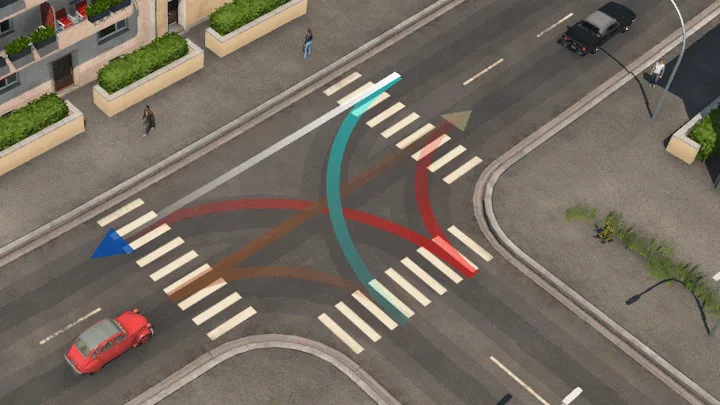
Inspect the permitted turn paths and lane connections at the junction.
Work through the junction in this order:
- Select the approach identified with the Traffic layer.
- Follow each displayed connection from its incoming lane to its outgoing lane.
- Confirm that every movement your road network and managed lines require is still available.
- Look for an intended destination that can be reached from only one lane while adjacent lanes have no useful connection to it.
- Adjust only the connections involved in the observed queue.
- Return to the live view and watch vehicles enter, cross, and leave the junction.
Additional lanes help only when their connections make them usable for the destinations traffic is trying to reach. Street behavior allows vehicles to use all available lanes according to destination; when multiple lanes reach the same destination, faster vehicles can use the additional lane or lanes to overtake slower traffic. That does not mean adding lanes automatically increases useful capacity. If those lanes merge immediately into one blocked exit, or if the relevant turn is still available from only one approach lane, the restriction remains.
Also inspect the receiving side of the crossing. A lane connection can be logically valid yet still feed a segment that has no space because of another queue, a road stop, or a nearby crossing. In that case, increasing access from the current approach may block the junction itself. Make sure vehicles can leave before giving more movements permission to enter.
Tune traffic lights after lane paths are correct
Traffic-light phases control when permitted movements can proceed; they do not repair a missing or unsuitable lane connection. First make sure the required paths exist. Then use the traffic-light controls if competing movements need separation or the current grouping repeatedly leaves one approach unable to clear.
A traffic light can be added at a crossing from the street tools. After adding it, close the construction menu and select the light to open the crossing view. This view shows the phases and the lanes included in each phase. Read that panel alongside the live junction so you know which real movement each phase serves.
Use controlled comparisons instead of searching for a universal timing recipe:
- If one approach remains queued through repeated cycles, inspect whether its lanes are included in a useful phase before changing the balance.
- If a turning movement blocks a through movement, check whether their phase grouping matches the geometry and the traffic you observed.
- If the junction clears but the next segment fills immediately, stop tuning the light and inspect the downstream obstruction.
- If another approach becomes the new persistent queue, the change may have shifted capacity rather than improved the whole crossing.
Change one part of the phase setup, then watch several full cycles. Judge the result by movement: does the target approach discharge more consistently, can conflicting approaches still clear, and does the crossing remain open rather than filling with vehicles that cannot exit? A longer green for one side is not free capacity; it changes the time available to every competing movement.
Keep road stops from blocking through traffic
A bus, truck, or tram stopping in a travel lane can turn a healthy road into a queue, especially when other vehicles cannot pass. Diagnose this visually at the front of the queue: if traffic moves whenever the service vehicle departs and stops again when the next vehicle arrives, the stopping position is part of the bottleneck.
Before rebuilding, check three things:
- Stop activity: determine whether repeated arrivals keep the lane occupied or whether the blockage is an isolated event.
- Passing path: verify whether general traffic has a connected lane that continues past the stopped vehicle.
- Exit space: make sure the service vehicle can leave the stop and rejoin its line without immediately meeting a blocked junction.
One practical layout is a short widened street section around the stop, bounded by crossings so that the change applies only where needed. The stop can use the outer space while through traffic remains connected through the middle lanes. After changing the road, inspect the line path again; a wider piece of street is not useful if the line or through lanes connect incorrectly.
Do not assume that every stop needs this treatment. If the queue actually begins at the next intersection, moving or widening the stop may only create more storage before the same restriction. Likewise, adding more road vehicles to a line can increase how often the lane is occupied. Solve the physical obstruction first, then judge whether the service level needs changing.
Guide managed road lines away from a choke point
Trains, street vehicles, and ships use the shortest route from one stop to the next unless you guide the line with a waypoint. This matters when your own bus, tram, or truck line keeps using a congested junction even though you have built another suitable path. Do not assume that a line automatically chooses the fastest route based on the current queue.
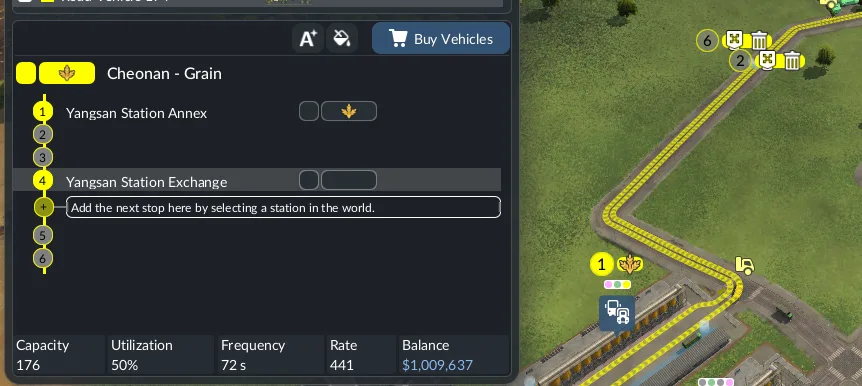
A waypoint guides a line through a preferred path without becoming a stopping point.
To redirect a managed road line:
- Select the line and inspect its route through the congested area.
- Identify a suitable point on the alternative road that the line must pass.
- Place a waypoint and add it to the line's stop list in the correct sequence, much like adding a station.
- Confirm that the displayed line path now uses the intended streets.
- Watch actual line vehicles complete the adjusted route and check the Traffic layer at both the old and new paths.
Vehicles visit a waypoint without stopping there. Use this tool when the line path itself is the problem, not as a general control for private traffic. The alternative route also needs enough capacity and correct junction connections; diverting a line onto another constrained road merely relocates its delay. Compare the old choke point, the new route, and the line's ability to reach every required stop before keeping the change.
Reduce private road demand with useful passenger alternatives
When the Passenger Flow layer shows substantial private travel through the congested corridor, a useful public-transport alternative can reduce pressure on that road. This is not achieved by placing stops everywhere. The service must connect origins and destinations that people actually use and offer a coherent complete journey.
The Passenger Flow layer separates public transport in green from private transport in blue. More saturated paths carry more people, and labels show how many people use a road or track section on their journeys. Origins and destinations are also distinguished in the layer, and you can filter the display to a single town or toggle the public and private views.
Use that information to design the alternative:
- Filter to the affected town and inspect the blue private-transport paths feeding the congested road.
- Identify the origin and destination areas connected by those paths.
- Inspect existing stop coverage rather than judging distance only by eye.
- Check whether the proposed service connects the useful buildings and whether passengers can continue to their final destinations.
- Follow several relevant citizens and review their journey information, including access, waiting, the vehicle ride, and onward connections.
- Reopen Passenger Flow after the service is operating and compare the public and private paths.
Several citizen journeys provide examples, not a complete survey, so combine them with the layer and stop coverage. A faster vehicle improves only the ride portion; it cannot compensate for poor access, long waits, or an inconvenient transfer. Extra stops can expand coverage but also add more stopping along the route, so each stop should serve a clear origin, destination, or connection.
Trams are a useful option where the corridor and passenger paths support them. Transport Fever 3 provides dedicated tracks and flexible lane use for trams, allowing you to design a passenger route that does not simply add another bus to the same blocked lane. The point is to give real trips a viable alternative, not to add a tram because the road is red. Confirm coverage, line continuity, vehicle access, and actual passenger use.
Verify that the congestion fix holds
Return to the same location, layer, and viewing conditions used for diagnosis. A successful repair should improve movement at the original limiting point without creating an equally persistent queue immediately downstream. Do not judge the result from a single vehicle or a brief gap in traffic.