

The Transport Fever 3 Reddit community is r/TransportFever3. Use its community search to find an existing answer, then choose Question or Problem/Issue when a new post is needed. Write in English, keep the post about one concrete problem, and include enough game state for another player to understand what should happen and what actually happens.
The community's bookmarks lead to the Game Manual, Mods, and Urban Games Forums. Use those destinations when the question needs a documented rule, a mod author's instructions, or the appropriate game forum. When a community answer resolves the problem, update the post and mark it Solved so the next player can find the result.
Find the right community and resource
Open r/TransportFever3 to browse the game-specific community.
Enter r/TransportFever3 in Reddit and check that you are reading the community for the third game. Advice about another entry can resemble the right answer while describing a different system, installation path, or mod.
Use the community's About information to inspect rules, bookmarks, and available flairs. Those controls give you a better starting point than assuming a general transport simulation discussion is the right destination for a specific game problem.
| Need | Starting point | What to look for |
|---|---|---|
| Explanation of a game rule | Game Manual bookmark | The actual system or interface involved |
| Existing player solution | Search within r/TransportFever3 | A matching game, problem, and current setup |
| Mod download or author information | Mods bookmark | Exact mod name, author, version, and description |
| Game forum discussion | Urban Games Forums bookmark | The relevant Transport Fever 3 area and its instructions |
| New player question | Question flair | A narrow question and the context needed to answer it |
| Reproducible malfunction | Problem/Issue flair | Expected result, actual result, and repeatable steps |
The subreddit is useful for player discussion and help. Its name or popularity does not make every comment an official rule or a confirmed bug fix. Follow a promising answer back to the actual mechanic, mod, or setting before applying it to an important save.
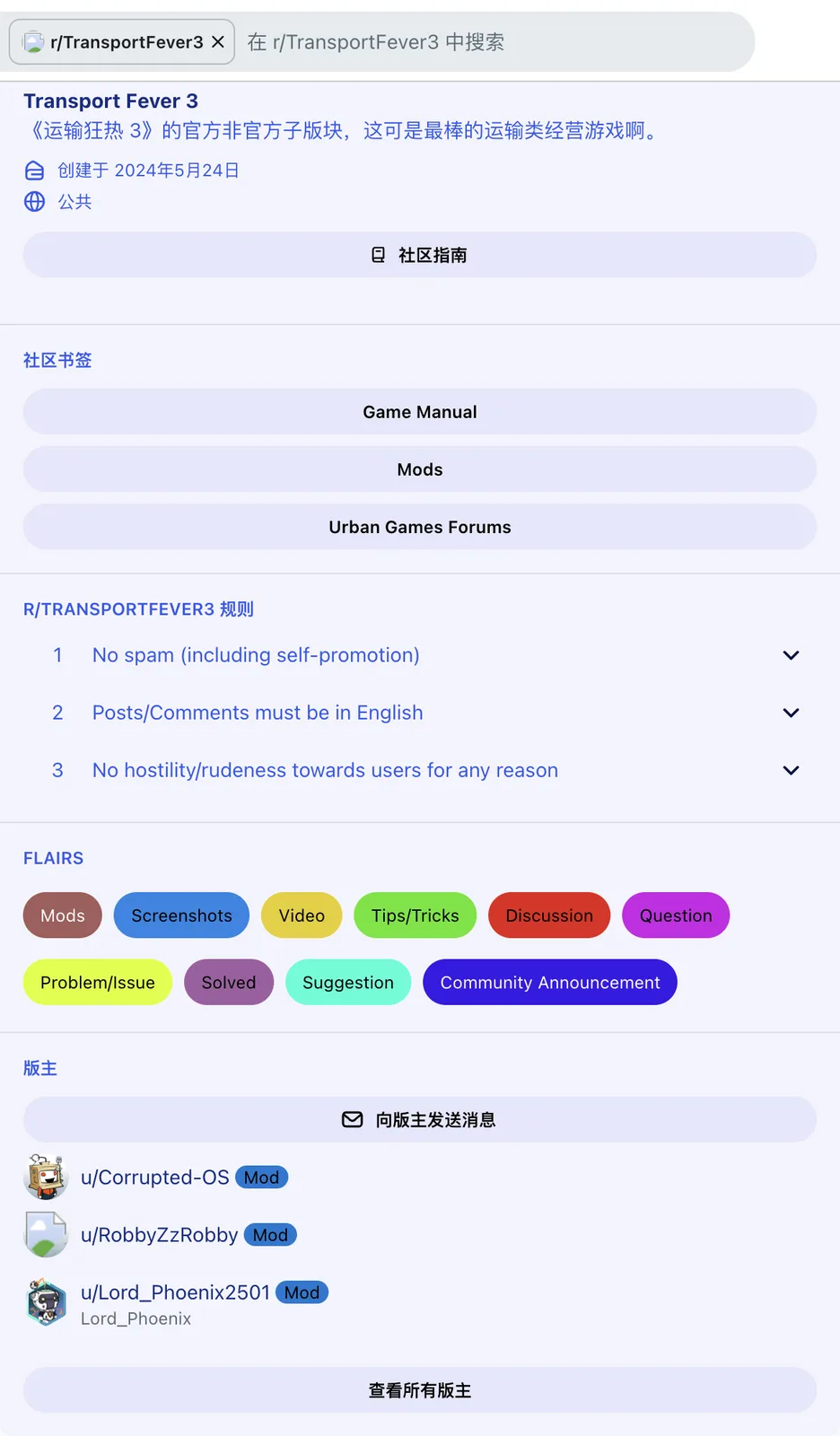
Use the community bookmarks and select a flair that matches the purpose of your post.
Search with the system name and symptom
Search the community before creating a new thread. Use the game's specific system name with the symptom rather than a broad phrase such as “help needed.” A search for a cargo transfer should identify the cargo, stop, or receiving industry that failed.
For example, distinguish cargo not loading from cargo not unloading. Those searches ask about different stages. Likewise, a ship failing to reach a harbor is a different question from a ship arriving without the correct liquid cargo.
For a mod, include its exact name rather than only “mods broken.” If the issue began after an update, include the relevant version or change when searching. A solution for a different station mod or an earlier construction may not apply to your save.
Read the full answer and the original post's context. Check whether the poster used the same platform, transport type, cargo, and mod. A short reply can omit a condition that was clear from the original screenshot but is not true in your own game.
A matching result is useful when it describes both the cause and the observed correction. A thread containing the same complaint but no demonstrated result can help identify a pattern, but it does not establish a working fix.
Use the community's bookmarks before guessing
The Game Manual is the right place to verify the stated behavior of a system. Use it for cargo classes, station access, line configuration, industry inputs, and other rules that can determine whether the setup is valid.
The Mods bookmark points to the game's mod community. Read a mod's description, dependency information, platform files, and author discussion when the issue involves that construction or vehicle. An ordinary base-game answer may not account for the mod's required track type or availability year.
The Urban Games Forums bookmark gives another route for game discussions. Read the destination's own posting instructions before making a report there. A subreddit comment telling you to “report it” is not itself a completed support request.
Keep those destinations distinct. A mod author can explain their construction's requirements; a community player can help inspect your route; a documented game rule can resolve an apparent contradiction. Moving between them is useful when each addresses the part it can actually explain.
If two answers conflict, describe the exact setting or version each one assumes. Do not resolve the conflict by selecting the most confident wording. A screenshot of the current interface can be more useful than several unsupported assertions.
Write a title that identifies the failed result
A useful title names the object and failure. “Liquid ship reaches harbor but Crude Oil does not reach refinery” tells readers much more than “Shipping bug.” It identifies the successful sea leg and the unresolved receiving leg.
For a passenger issue, name the missing journey: an underground railway station with no boarding, a feeder that does not reach the station, or a worker contract whose counter is not advancing. Those details help readers choose the relevant access or line configuration to inspect.
For a technical issue, describe the action that causes it. “Selecting a modded station crashes this save on Xbox” is more specific than “Game crashes constantly” when only that action has been reproduced. Keep the wider claim out of the title unless the evidence supports it.
Use Question when you are asking how a system works. Use Problem/Issue when a particular setup or action is failing. A problem that might be a misunderstanding can still be described objectively without labeling it a confirmed game defect.
Avoid putting several unrelated problems into one title. A cargo failure, a graphics issue, and a missing mod are likely to need different evidence and different helpers. Separate questions make the replies easier to follow and the eventual result easier to find.
Include the minimum useful game state
State the platform and the relevant game version if available. Identify whether the problem occurs in a campaign mission or a Free Game save. Campaign objectives can introduce requirements that do not apply to the ordinary production chain.
For a network question, describe the complete route from origin to destination. Name the producer, cargo, vehicle, intermediate transfers, and actual receiver. If the problem involves passengers, name the origin, stop, and destination that the journey is intended to connect.
| Field | Useful information | Less useful substitute |
|---|---|---|
| Platform | Exact PC operating system or console | “It should work on my machine” |
| Save context | Mission or Free Game, relevant year, active mods | “Normal game” |
| Expected result | Cargo delivered, counter advanced, train reached stop | “Everything works” |
| Actual result | The precise failed stage or visible warning | “Nothing happens” |
| Reproduction | The shortest sequence producing the same result | A long list of unrelated changes |
| Changes tried | One change and the observed outcome | “Tried everything” |
Provide the information relevant to the question rather than an exhaustive inventory of the whole save. A train path problem needs track and stop context; a mod login question needs the selected provider and visible message. The right evidence is the evidence that distinguishes the possible causes.
Add screenshots that show the deciding information
For a line problem, show its stop list or the relevant route and terminal assignment. For cargo, include the loading configuration and the producer or receiver state when those are the uncertain parts. A distant scenic view usually hides the detail another player needs.
For a station problem, show the actual connection, track type, and surface access where relevant. An underground railway station's entrance can resemble a tram station, so a picture of only the entrance can leave the crucial track question unanswered.
For an error or failed contract, include the visible message or task panel. Keep the counter and stated requirement readable. A cropped picture that removes the quantity or deadline can make an otherwise valid setup look like a different task.
Use enough context around the selected object to explain its position in the route. Too much cropping can conceal a disconnected segment; too much zooming out can make every label unreadable. A small set of focused views is usually easier to inspect than many nearly identical images.
Remove private information from support material before sharing it. Keep game state and error text that explain the problem, while excluding account credentials or unrelated personal content. An authentication code is not information a community helper needs to diagnose the selected login provider.
Describe a test without claiming the answer in advance
Explain one attempted correction and what changed. “Changed the harbor line from landing six to another reachable landing; the ship now arrives there” provides an observed result. “Built more docks, still broken” does not say whether the line's actual terminal assignment changed.
If the issue depends on mods, list the ones directly involved and their versions. Preserve the original save when trying a separate simpler test. Do not present removal of a required station dependency as proof that the base game caused the original failure.
A reproducible example should identify the shortest sequence that still causes the issue. That lets another player compare the mechanic rather than reconstruct your entire network. Keep uncertain causes separate from the sequence you have actually observed.
If a test cannot be reproduced consistently, state that. Intermittent behavior is useful context; replacing it with a categorical claim can send helpers toward the wrong explanation. Record what was different between the working and failed cases when you know it.
Follow the rules and use the right flair
The community requires English posts and comments, prohibits spam including self-promotion, and prohibits hostility or rudeness. A troubleshooting post should be a request for information about the game, rather than an advertisement for a channel or an attack on another user.
Other available flairs include Mods, Screenshots, Video, Tips/Tricks, Discussion, Suggestion, and Solved. Choose the one that describes the post's purpose. A screenshot can be evidence in a Problem/Issue post without making the post primarily a scenic Screenshots submission.
A suggestion describes desired behavior. It does not demonstrate that the current game already offers that feature. Keep suggestions separate from troubleshooting so readers can tell whether you are seeking an existing solution or proposing a change.
A mod discussion should identify the actual mod. Avoid attributing a mod-specific requirement or failure to every installation of the game. This helps both players and authors keep the report within the conditions it describes.
Close the thread with the actual result
When the problem is resolved, add the correction and the observed result to the post. Explain what setting, connection, dependency, or action changed. A final “fixed” without the cause leaves the next player with the original question.
Mark the post Solved, as the community's reminder requests. Preserve any important condition of the solution: the platform, the mod version, the required cargo, or the fact that a particular terminal was reassigned.
If the issue remains unresolved, keep the latest reproducible state clear. Summarize which tests ruled out specific causes without claiming that every possibility has been exhausted. That gives the next helper a useful place to continue.
Related guides
Use Cargo Not Loading or Cargo Not Unloading to identify the failed logistics stage before posting, and Mod.io Auth Code for email-code login problems.