
Transport Fever 3 is available on PS5 as a single-player simulation with offline play and Remote Play support. Its PlayStation listing also supports cloud streaming on PS5 and PS Portal with a Premium subscription. The important console limitation concerns saves: PC savegames uploaded to Mod Hub are documented as unavailable to download on consoles. That restriction is separate from the game's cross-platform mod browser.
Choose the PS5 version if you want to build and manage your transport network on the console, with access to the integrated mod system. If your plan depends on continuing a particular PC save, establish that save's availability before committing to a console playthrough. Performance observations from a PS5 Pro review also need careful interpretation: they do not establish a frame rate for the standard PS5.
PS5 capabilities at a glance
| Capability | PS5 position | What it means for your decision |
|---|---|---|
| Local play | Offline play enabled | An offline console playthrough is a supported option. |
| Player count | One player | Plan around managing the simulation yourself. |
| Remote Play | Supported | This is a listed way to access the game remotely. |
| PS5 cloud streaming | Supported with Premium | Check the subscription condition before choosing this option. |
| PS Portal cloud streaming | Supported with Premium | The same subscription condition applies to this listed feature. |
| Integrated mods | Supported through the in-game browser | Console play includes the game's shared mod system. |
| PC saves uploaded to Mod Hub | Documented as unavailable on consoles | A shared mod library does not guarantee access to a PC savegame. |
Account access and offline console play
The PlayStation license information permits you to download and play the game on the main PS5 associated with your account through the Console Sharing and Offline Play setting. It also permits play on other PS5 consoles when you sign in with that same account.
The game itself is marked as supporting offline play. That provides a clear basis for choosing a local console playthrough, but it should not be stretched into a claim that every connected feature works offline. Online features require a PlayStation account and are subject to the platform's terms. Treat integrated online content access and remote services separately from the ability to play the simulation locally.
Remote Play and conditional cloud streaming
The listing supports Remote Play and separately lists cloud streaming on PS5 and PS Portal with a Premium subscription. Choose the access method you intend to use, then check its applicable conditions. The Premium condition belongs to the listed cloud-streaming feature; it should not be turned into a requirement for every way of playing.
These capabilities do not establish identical image quality, input response or session behavior across local play, Remote Play and cloud streaming. No measured streaming-performance comparison is available here. Choose by the access you need rather than an assumed performance advantage.
Integrated mods and the PC save exception
Transport Fever 3 supports mods on PS5 through its integrated mod browser. The system uses mod.io and was designed around a shared mod destination across the game's platforms. You can discover and manage mods through the game instead of relying on a separate Steam Workshop library.
This matters when assessing the console edition because mod support is part of its stated functionality. Buying the PS5 version does not, by itself, mean abandoning the integrated mod ecosystem. However, the shared approach has a specific savegame exception: PC savegames uploaded to Mod Hub are documented as unavailable to download on consoles.
The save-compatibility notice says console compatibility will be added after launch. That is a future commitment in the notice, rather than confirmation that the restriction has already been removed. No verified patch baseline establishes its removal here, so do not build your platform choice around an assumed fix.
Plan a PC-to-PS5 move around the actual save
If you already have a PC network, separate two decisions: whether PS5 suits your future play, and whether it can continue the particular save you care about. The first can be assessed from the console's listed features. The second needs confirmation for the save-transfer route itself.
The documented restriction specifically concerns PC saves uploaded to Mod Hub. It is not a complete description of every possible account or storage feature, and it should not be expanded into an unsupported claim about universal cross-progression. Equally, nothing about the shared mod library proves that another transfer route is available.
A useful decision sequence is:
- Identify whether continuing the PC save is essential or whether you are comfortable starting a separate PS5 playthrough.
- If continuation is essential, check whether that exact PC save is available through the intended console route.
- If it remains unavailable, keep the existing PC playthrough as your continuing project rather than expecting the console copy to recover it automatically.
- Choose a separate PS5 playthrough only when you are comfortable with the distinction between shared mod content and separate save progress.
Recover from the documented empty-menu softlock
A known console issue concerns opening an empty construction menu while using a controller. The documented examples are the plane menu before 1920 and several industry menus in sandbox mode. The listed workaround is to save the game and load it again.
This is a specific failure case. It should not be treated as an explanation for every unresponsive button, construction problem or missing item. First compare what happened with the documented trigger: you opened a construction menu that had no available entries, in one of the described situations, and the controller interaction became stuck.
For that matching case, use the stated recovery:
- Save the game.
- Load the saved game again.
- Return to the construction task after the reload.
The workaround describes recovery from the stuck state; it does not claim to unlock aircraft before the relevant period or populate an empty industry menu. Keep the recovery action separate from the reason the menu had no entries.
The issue notice lists PlayStation among the affected operating systems and does not provide a verified later patch resolution. Avoid assuming that a particular update has fixed it when no confirmed build information is available. If your problem has a different trigger, this notice cannot establish its cause, and repeating the workaround is not a diagnosis.
What the PS5 Pro review establishes
A console review conducted on PS5 Pro found the game broadly workable with a controller and reported few major performance problems during that review. It also described visible graphical compromises relative to a powerful PC, including some elements becoming visible only as the camera moved closer.
Those observations help set expectations for the reviewed machine. They do not supply a measured frame rate, a rendering resolution or results from the standard PS5. There is no basis here for turning “few major performance problems” into a guaranteed FPS figure or a claim that every large simulation will behave identically.
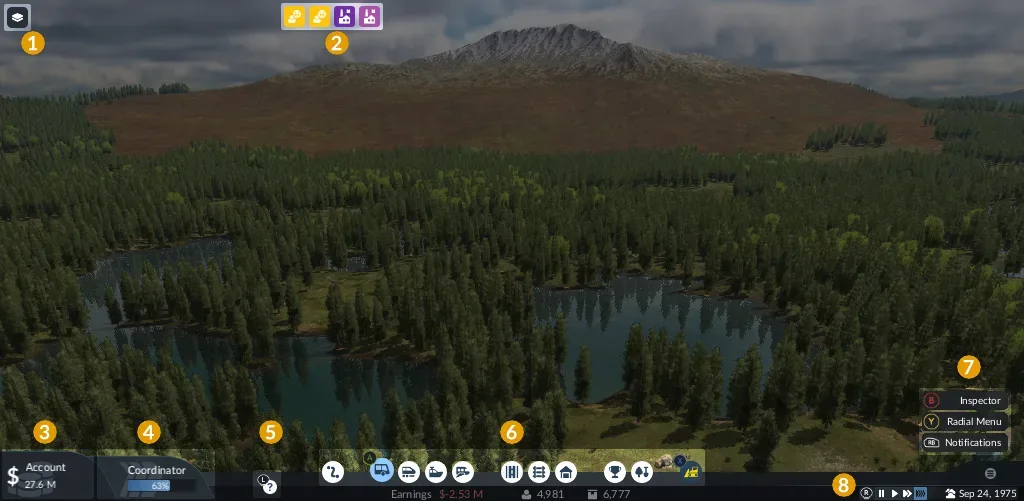
Shared console-interface example using Xbox-style prompts. It is neither a PS5-specific button reference nor an empty-menu bug capture.
The same review described precise track construction and extensive submenus as less convenient than mouse-and-keyboard interaction. It nevertheless found the console controls usable after some adjustment. That is relevant to platform fit: a workable console adaptation can still require care when placing infrastructure or navigating a long list.
The reviewer also encountered a track section that could only be completed after saving and reloading. That individual observation is distinct from the official empty-menu softlock. The symptoms and triggers differ, even though both accounts involve a reload. Do not merge them into a general promise that reloading fixes any construction error.
Language and accessibility checks
The PS5 listing identifies English and German voice support. Its screen-language list contains Simplified Chinese, Traditional Chinese, Dutch, English, French, German, Italian, Japanese, Korean, Polish, Brazilian Portuguese, Russian and Spanish.
Check the screen-language list separately from the voice list. A language appearing for interface text does not establish spoken dialogue in that language. If you depend on a particular interface language to read the simulation's menus, verify that language directly rather than inferring it from the game's availability in your region.
The listing also identifies 12 accessibility features, but the listing count does not describe them individually. That count alone cannot establish support for a particular adjustment you require. If a specific accessibility capability is essential to your play, inspect its actual description before relying on the count.
Community localization is another separate question. The existence of console mods does not establish that any particular translation has been tested on PS5. Language-specific compatibility and installation details need their own confirmed evidence; they should not be assumed from the general cross-platform mod statement.
If camera or menu input needs adjustment, open the controller settings guide. If you need to activate an existing mod or inspect save requirements, use the mods guide.