
For a Hungarian community translation of Transport Fever 3, look for Magyar Nyelv in the game's Mod Hub. The author's listing describes version 1.25 beta, revision 25, with targeted translations for the map editor, object windows, hover labels and help text. It remains a beta: complete interface coverage and in-game text layout checks are still in progress.
Use the Transport Fever 3 package rather than a similarly named translation for an earlier game. Check the installed file's version separately from the version described on the listing. The author's description does not provide an exact language-switching or activation sequence, so there is no confirmed Magyar menu choice or required per-save activation procedure to reproduce here.
What Magyar Nyelv currently covers
The author describes 2,168 targeted corrections. Revision 25 adds 52 translations, including freight wagons, cargo trams, truck body variants, the DPZ passenger and control coaches, and harbor and runway labels. These numbers describe the translation work listed by the author; they do not establish that every screen is fully translated.
| Area | What to inspect in a translated interface |
|---|---|
| Map editor | Translated interface labels used while editing the map |
| Object windows | Hungarian descriptions or labels in supported object panels |
| Hover text | Translated text when pointing at supported controls and objects |
| Help text | Hungarian wording in the help passages covered by the package |
| Vehicle variants | Added terminology for the listed freight and passenger components |
| Harbor and runway labels | Updated transport-infrastructure wording in the covered labels |
Manufacturer names and model names are deliberately preserved. An unchanged manufacturer or vehicle type is therefore not automatically a missing translation. The meaningful check is whether the surrounding interface text, descriptions and supported labels have changed as expected.
For a beta translation, inspect the parts of the game you use most. A player focused on freight may care about wagon and cargo labels; a map builder may care more about editor controls. Checking those actual screens is more useful than judging the package only by its advertised correction count.
Find the correct Transport Fever 3 package
Open the game's Mod Hub and search for the exact title Magyar Nyelv. Check that the result belongs to Transport Fever 3, then inspect its description and available file information. If several results appear, compare the game, package title and author information before downloading.
The search phrase “magyarítás” can also return older Transport Fever translations. Those are separate packages. Transport Fever 2 mods are not directly compatible with Transport Fever 3, so a translation that worked in the previous game should not be treated as an interchangeable replacement.
Read the version information on the file you will install. The description's beta revision and the installed file's version can be different pieces of information. Do not assume the latest paragraph on a listing proves that the downloaded file already contains that revision.
Installation information and the general mod interface
A downloaded package, a selected interface language and a mod enabled for a world are separate states. The author currently describes the translation's scope and beta revision, but does not establish which combination applies to Magyar Nyelv. Read the installed package's instructions before treating one of those states as a requirement.
The game's general Add Mods interface activates ordinary content for a new free game. Editable saves may expose an active-mod list through the save card's settings. These are general game capabilities, not verified installation instructions for this particular translation. Use them for Magyar Nyelv only if its actual package instructions or visible entry identify that route.
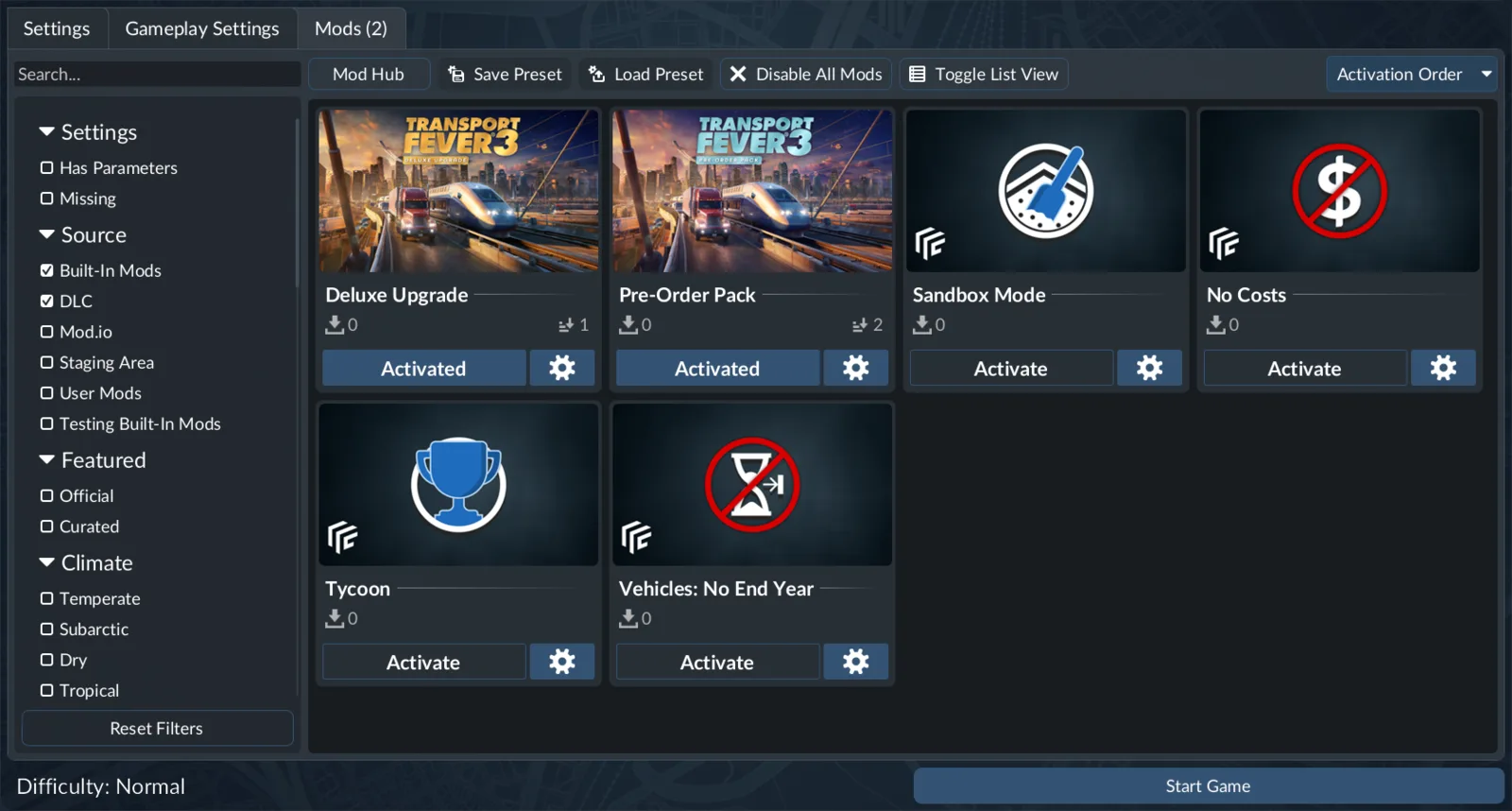
The pictured cards are built-in gameplay mods. This image identifies the general activation interface; it does not show Magyar Nyelv installed or prove that a language package requires per-world activation.
For now, the reliable sequence is to identify the correct package, check the downloaded file's version and read any instructions supplied with that file. If it exposes a documented language choice, follow that choice. If it explicitly requires world activation, apply that instruction to a suitable world. If neither route is specified, do not substitute the Czech translation's installation sequence.
When comparing results, use a supported window whose text you can recognize. Keep the same game installation, package revision and screen context. This makes an unchanged label useful evidence without pretending an unverified setup step is mandatory.
Keep an established save available separately if you are experimenting with its content selection. Preserve the other packages it requires. A missing vehicle or map dependency is a save-loading problem, not evidence that the Hungarian translation needs a different language setting.
Language settings and translation packages
The game's interface language setting is changed from the main-menu settings. That is separate from the active-mod list of a free game. A community translation package should not be treated as proof that Hungarian is a native language option on every installation.
If the package's installed documentation gives a specific language-selection instruction, follow that instruction for the file you actually installed. Do not select another language at random or assume there must be a Hungarian option in a particular menu position. Record the package version and inspect a supported translated screen; an unchanged result does not by itself identify the missing installation step.
You can adjust interface text scaling in settings if labels are difficult to read. Scaling changes presentation; it does not add missing translated strings. When judging layout, distinguish text that is absent from text that is present but clipped or crowded.
Check the beta with a small, repeatable test
Use one short inspection routine after installing or updating the package:
- Confirm the installed package is Magyar Nyelv for Transport Fever 3.
- Record the installed file's version.
- Follow any installation or language-selection instructions actually supplied with that file.
- Open a supported object window and read its surrounding labels.
- Inspect hover text on relevant controls.
- Check a listed vehicle or infrastructure label if available in that world.
- Look for clipping or awkward wrapping as well as untranslated text.
The point is to compare the same screen under the same conditions. A different calendar year can show a different vehicle, while another installation can contain a different package revision. Keep the comparison narrow enough that you can tell whether the package changed the text you were examining.
If a particular vehicle is unavailable in your world, use another supported screen for the first test. You do not need to alter the whole world date simply to establish that a translation is active. A later test can inspect the relevant vehicle when it is available.
For layout problems, write down the object, the exact label and the context where it appears. Include whether the issue occurs in a window, a tooltip or an editor panel. A statement such as “the translation is broken” does not distinguish a missing string from a line that is translated but too wide for its box.
The package is a beta, so a mix of translated and untranslated interface elements can reflect its current coverage. Compare the problematic screen with the areas the author actually describes rather than assuming the entire game must already be Hungarian.
Troubleshoot unchanged or incomplete text
| Symptom | What to check |
|---|---|
| Everything looks unchanged | Correct game, installed file version and the package's actual installation instructions |
| A manufacturer or model name stays original | Proper names are intentionally retained |
| Some labels change but another does not | The beta's coverage and the exact installed revision |
| Text appears but is clipped | Interface scale and the specific window or tooltip layout |
| A save cannot load after editing mods | Missing required content in its active-mod list |
| A label from another mod stays untranslated | That mod's text may be outside this package's stated scope |
If nothing changes, first check the file you installed and the instructions available for that revision. A successful download confirms that you obtained a package; it does not identify how its translated strings become selected. Repeated downloads are unlikely to clarify a missing activation instruction. Record what you actually changed rather than treating an assumed procedure as a completed test.
If only some text remains original, avoid reinstalling immediately. Read the label in context. It may be a proper name intentionally retained, a screen outside current coverage or a string introduced by another mod. These cases need different responses.
If the label is in the stated scope and is clearly an ordinary untranslated interface string, record the exact example and installed revision. That makes it possible to distinguish a coverage gap from a revision mismatch. Updating the package may help when the newer file actually lists a correction for that area; an unrelated version change does not guarantee a fix.
Distinguish missing translations from character-display problems
Hungarian uses accented letters including á, é, í, ó, ö, ő, ú, ü and ű. If a translated word is visible but its accents appear as replacement symbols or empty boxes, record the actual characters and the screen where they fail. That is a different symptom from an English label remaining unchanged.
Compare ordinary letters and accented letters within the same window. Then check whether the problem affects other Hungarian text you can actually see. A single cropped tooltip can indicate a layout issue; missing symbols across several labels suggest a broader display problem. These observations help describe the fault without claiming a specific font or encoding fix that the package author has not supplied.
Do not replace game fonts, change unrelated system locales or edit package files merely because one label looks wrong. First identify whether the text is missing, untranslated, clipped or displayed with broken characters. Keep the original package available while investigating, so a later comparison does not mix the author's beta with your own edits.
Updates, other mods and existing worlds
After an update, inspect the same supported screens again. A useful update check includes both the newly mentioned labels and a familiar window that already worked. This catches a changed layout or a different installed revision without requiring a broad inspection of the entire game.
Translations supplied by other content mods can differ in scope and terminology. Do not assume Magyar Nyelv translates every description added by an unrelated vehicle or building package. If a problem appears only on a modded object, compare it with a base-game object whose translation scope is clearer.
When isolating a possible interaction, use a separate test world or copy of the save. Preserve required content in the original world. Removing a vehicle package used by an established fleet just to test a label can turn a translation question into a missing-content problem.