
For unlimited money in a free game, activate the built-in No Costs mod: purchases and construction become free, and the bank balance displays infinity. For an editable balance while keeping money in the game, use Sandbox Mode. Tycoon unlocks the highest company rank and its perks; it does not give unlimited money.
You can choose these built-in options in the Add Mods tab when creating a new free game. Some existing saves also allow their mod list to be edited through the save card's settings. A campaign or another restricted save should not be assumed to offer the same controls.
Choose the cheat that matches your goal
| Goal | Built-in option | What it changes |
|---|---|---|
| Build without a budget | No Costs | Disables money; everything is free and the balance is infinite |
| Add or change a finite bank balance | Sandbox Mode | Allows bank-balance changes and other world edits |
| Unlock company perks immediately | Tycoon | Sets the company to the highest rank and unlocks all perks |
| Keep older vehicles purchasable | Vehicles: No End Year | Removes the end of vehicle availability after their start year |
| Make an economic game easier | Gameplay Settings | Adjusts specific income, cost and simulation settings |
These options solve different problems. Choose No Costs if you want to design a network without managing purchases. Choose Sandbox Mode if you want to give a company extra money and continue watching its finances. Choose Tycoon if a locked company perk is stopping your plan. Keeping old vehicles available is an availability setting, not a money change.
You can activate the options you need together, but start with the smallest combination that meets your goal. If you are diagnosing why a save behaves differently, fewer simultaneous changes make the result easier to understand.
Enable unlimited money in a new free game
- Open New Game from the main menu.
- Choose your map or generated climate.
- Set the world and gameplay options you want to use.
- Open Add Mods in the setup screen.
- Find No Costs and select Activate.
- Start the game and check that the bank balance displays infinity.
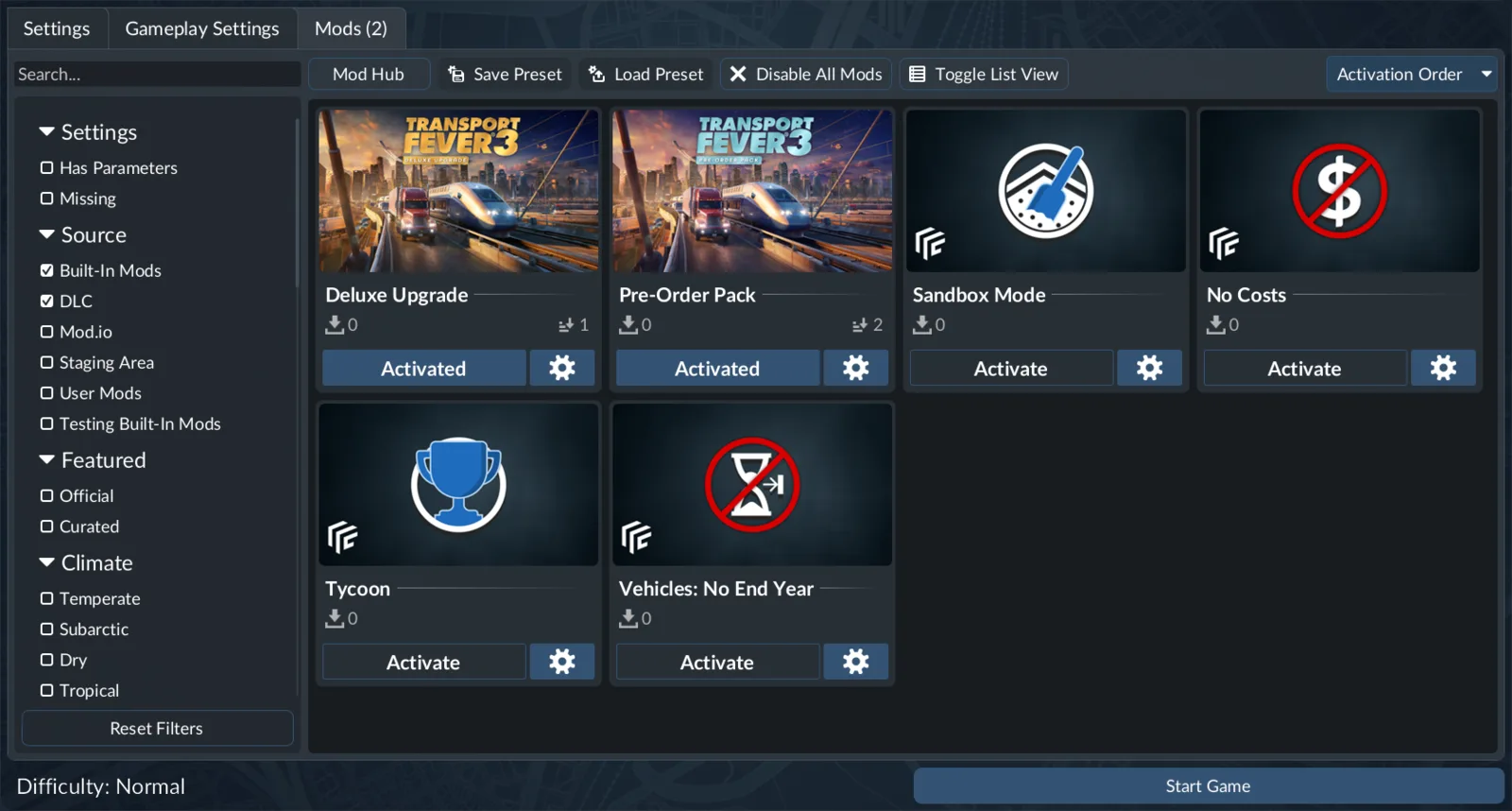
The setup screen presents the built-in options as individual mod cards. Activate the one you need before starting the world.
No Costs is shipped with the game, so this route does not need a separate trainer download. The important step is activating it for the world you are creating. Seeing the card in the available list does not mean it is already active.
Once the world starts, use the infinity balance as the first confirmation. Then make a small construction or vehicle purchase to check that your intended budget-free setup is working. This is a useful check before spending time on a large station, airport or railway design.
No Costs changes the financial restriction. It should not be treated as proof that every route, warehouse or vehicle combination now works. A vehicle still needs a valid route and compatible cargo. A disconnected transfer can remain empty even though building it costs nothing.
Use Sandbox Mode for a money edit
Sandbox Mode allows you to modify the bank balance. It also allows calendar changes, construction of towns and industries, adjustments to generated-town size and cargo demand, and town demolition. Activate it in Add Mods when creating a free game, just as you would activate No Costs.
The distinction is the financial outcome you want. A finite cash top-up is useful when you want to finish an expensive connection, then return to ordinary decisions about running costs and income. Disabling money entirely is useful when you want every subsequent purchase to be free.
After activating Sandbox Mode, use its available bank-balance editing controls in the loaded game. Confirm the resulting displayed balance before continuing construction. The bank-editing capability does not require you to enable Tycoon, and unlocking company rank is not a substitute for changing cash.
The precise bank-window menu path has not been verified for the current build. Use the No Costs steps above when you need a complete unlimited-money setup sequence.
Save a separate copy of an established world before making major sandbox edits. This gives you a practical way to compare the original company with the altered version. It is particularly useful if you are changing demand, the calendar and the balance in the same session, because those changes affect different parts of your plan.
A money edit can fund infrastructure, but it does not by itself correct an unprofitable line. If your intention is to keep playing with a finite budget, watch revenue and recurring expenses after the top-up. A route that continually loses money can consume the extra balance without improving service.
Use sandbox changes deliberately. Giving a company money, adding an industry and adjusting a town's demand are separate interventions. Make the change connected to your goal and inspect its result before moving on to another.
Add a built-in cheat to an existing save
Open Load Game and locate the save card. Open its settings rather than loading it directly. If the save allows editing, its gameplay settings and active-mod list are available there. Activate the required built-in option and load the edited save.
The availability of those tabs is the deciding factor. Do not assume that every save type exposes an editable mod list. If the controls are absent or restricted, create a separate free game for the budget-free project instead of relying on a supposed universal cheat command.
Before editing a developed company, keep a separate save copy. Note which built-in option you activated so that later financial behavior has a clear explanation. If the bank remains finite after you intended to use No Costs, first confirm that you edited and loaded the correct save and that the mod was activated.
If the Load Game button is disabled, inspect missing mod requirements. Adding No Costs does not repair a missing vehicle, map or construction dependency from the original save. Restore the required content before interpreting the load failure as a money-cheat problem.
Be careful when replacing the entire active-mod selection. A save can already use content that its vehicles or constructions depend on. Preserve those requirements while adding the built-in option you want. The financial change is separate from removing other content.
Tycoon unlocks perks, not cash
Tycoon sets your company rank to the highest level and unlocks all perks. This gives access to capabilities such as placing landmarks, prospecting for resources, using marketing campaigns and using the greenify industry tool. Other aspects of the game remain unchanged.
Use it when a rank requirement is the obstacle. If you can select the newly available capability but cannot afford the construction or purchase you intended, that does not mean Tycoon failed. You solved the progression restriction and still have the financial restriction.
If your project needs both unrestricted spending and unlocked perks, activate No Costs and Tycoon together. If you want the perks but retain a finite economic challenge, use Tycoon without No Costs. This distinction helps avoid confusing a rank unlock with an infinite-money mode.
Likewise, Sandbox Mode's ability to edit the bank balance does not mean the highest rank is automatically active. Choose the rank option explicitly if immediate perk access is part of the project.
Vehicles: No End Year does not unlock the future
The built-in Vehicles: No End Year option keeps vehicles available after their normal availability ends. A vehicle still has to reach its start year before it becomes purchasable. This is useful for a historic fleet you want to retain while the calendar advances.
For example, if a vehicle begins appearing in a later year than your current world date, removing its end year does not make it appear early. Check the start year in the vehicle catalog and the current game calendar before treating a missing vehicle as an activation failure.
Sandbox Mode can set the calendar to a specific date, but calendar changes are broader than a single purchase. Consider whether you want to move the world's date or simply keep an older model available. Choose the option that matches that distinction.
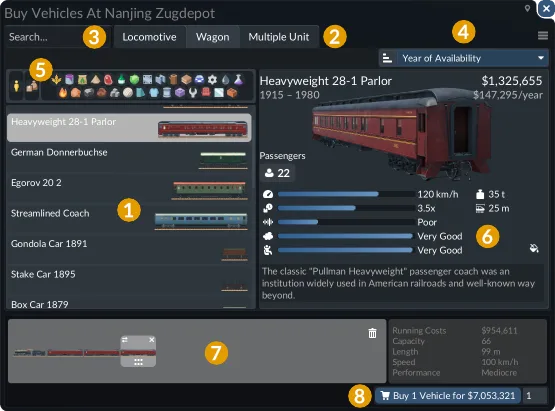
Use the purchase window to confirm vehicle availability and specifications in your actual world. A catalog entry alone does not override the world date.
Easier finances without switching money off
If you want a gentler economic game, the gameplay settings give more targeted choices than unlimited money. The finance settings include vehicle purchase costs, vehicle maintenance, infrastructure construction costs and infrastructure upkeep. The advanced settings include passenger and cargo income multipliers.
A lower construction cost changes the initial investment. Lower upkeep changes the continuing burden. Higher cargo income changes what completed deliveries earn. These are different adjustments, so identify whether your difficulty is the upfront build or the cost of running a working network.
For a new free game, select a difficulty preset and inspect the settings it applies. For an editable existing save, use its settings tabs. Keep a note of the changes if you want to compare two worlds or understand why a line's finances differ from another player's example.
Even an easier economic setup needs suitable terminals, cargo compatibility and a destination with demand. If you are spending money without receiving deliveries, inspect the transport chain before raising income. Multiplying income cannot create revenue from a line that carries nothing.
Console commands, trainers and common mistakes
The built-in routes above provide the practical money options. The debug menu on keyboard uses Right Alt + D when debug mode is enabled in settings. Opening that menu is not itself a money cheat, and this guide does not promise a universal cash command or a backtick console shortcut.
A video calling Tycoon a money cheat can send you to the wrong option. Confirm the result by the bank balance: No Costs shows infinity, Sandbox Mode allows a balance edit, and Tycoon changes rank and perks. Similarly, currency display settings change how amounts are presented; they do not add funds.
If a downloaded trainer claims additional abilities, its behavior and compatibility need separate verification. You do not need one for the shipped No Costs, Sandbox Mode, Tycoon or No End Year options. Start with the built-in method that directly serves your goal.
| Problem | First check |
|---|---|
| Balance is still finite | Was No Costs activated in the world you actually loaded? |
| Perks unlocked but money still runs out | Tycoon changes rank; use the appropriate money option |
| An old vehicle remains missing | Check its start year and other world requirements |
| Existing save will not load | Inspect missing content dependencies, not only built-in cheat settings |
| Empty vehicles after enabling cheats | Check loading, compatible cargo, transfer connections and destination |
| No editable mod tabs on the save | The save may not allow those changes; use a new free game |
Pick one observable result for the change you made: an infinite balance, a specific edited balance, unlocked perks or a retained older vehicle. Checking that result makes the setup easier to understand and keeps later transport problems separate from the cheat configuration.