

Transport Fever 3 is available for Xbox Series X and Xbox Series S. The Xbox store lists single-player, console keyboard and mouse support, Xbox achievements and Xbox cloud saves. Xbox One is not listed as a supported device for this product. The most important Xbox-specific issue is a saved-data warning that can appear before the game's documented 2 GB quota is reached.
Platform and issue information checked: 5 October 2026. Choose the console edition for a Series X|S playthrough, but check the save-transfer limitations before assuming you can continue a PC network.
Xbox compatibility and features
| Item | Current position | What to do |
|---|---|---|
| Xbox Series X | Listed as supported | Select the Series X|S product. |
| Xbox Series S | Listed as supported | Select the same Series X|S product. |
| Xbox One | Not listed for this product | Do not purchase expecting a native Xbox One version. |
| Multiplayer | Single-player is listed | Plan a solo playthrough. |
| Keyboard and mouse | Console support is listed | This is a supported alternative input option. |
| Achievements | Supported | Xbox achievements are part of the listed features. |
| Cloud saves | Supported | Keep this distinct from PC-to-console transfer. |
The Optimized for Xbox Series X|S label identifies the supported console family. It does not specify a guaranteed frame rate or a measured Series X versus Series S comparison.
Controller prompts and alternative input
The console interface shows controller prompts next to the actions they operate. In the example below, B appears beside Inspector, Y beside Radial Menu and RB beside Notifications. Use the prompts displayed in your current menu when switching between inspection, construction and management.
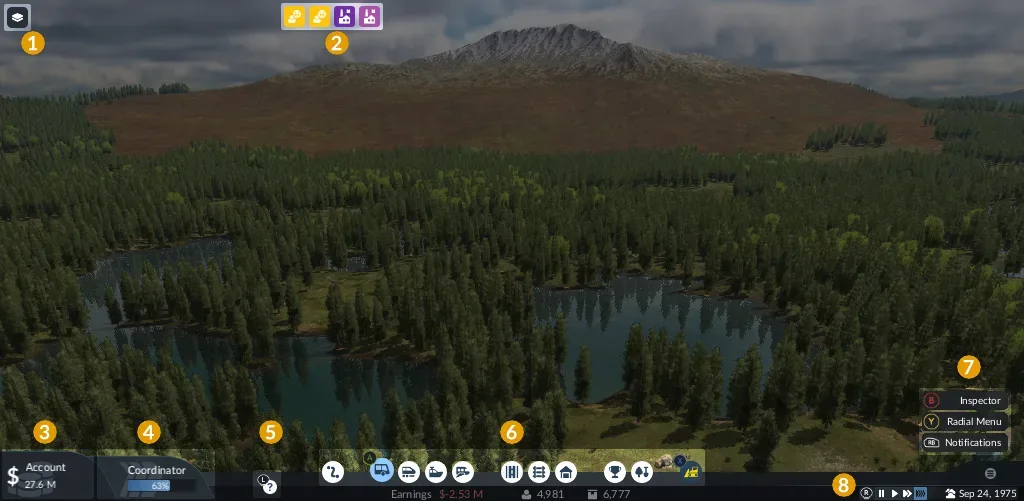
The right side identifies the Xbox-style action prompts; the bottom row contains construction and management tools.
Keyboard and mouse support is also listed for the console product. If that input style suits detailed placement better, it is an option to consider alongside the controller. This does not establish identical bindings across every input mode. Use the controller guide for the wider control reference.
Xbox cloud saves and PC network transfers
PC saves uploaded to Mod Hub cannot currently be downloaded on consoles. The issue notice names Xbox and PlayStation; compatibility is planned after launch. Xbox cloud saves alone do not establish PC-to-console transfer. If continuing a PC network determines your purchase, check that exact save's availability first. Otherwise, plan a separate Xbox playthrough.
Saved-data space warning on Xbox
“Your XBox is out of space for saved data” can appear before the 2 GB saved-data quota is reached. The issue concerns saved data rather than the installation drive. No workaround is currently listed. Retain valued saves; deleting or clearing them is not the published fix.
Recover from an empty-menu controller softlock
Opening an empty construction menu can softlock controller interaction; examples include the plane menu before 1920 and several Sandbox industry menus. For this matching trigger, save the game and load it again. That recovers the stuck state without unlocking unavailable content. A different trigger needs a separate diagnosis.
Mods on Xbox
The game includes an in-game mod browser. Use it to discover content available for your console, and check the package's platform and dependency information before adding it to a save.
Access to a shared mod destination does not mean every PC package is compatible with Xbox. It also does not remove the PC-save download restriction described above. The Mods guide covers installation and compatibility in more detail.
Choose the purchase and access route
The Xbox product lists Standard and Deluxe, with a separate Deluxe Upgrade requiring the base game. Use the dated price comparison for edition costs rather than buying an add-on expecting a complete game.
A cloud-saves label does not confirm cloud gameplay, Game Pass inclusion or Xbox Play Anywhere ownership. Check the specific access offer displayed to your account if any of those services determine your purchase. The confirmed playable-device listing here is Series X|S.
For a PlayStation purchase instead, the PS5 guide covers that platform's offline play, Remote Play and streaming conditions.