

To operate an airport in Transport Fever 3, choose a facility compatible with the aircraft, provide the required passenger or cargo terminal, and add at least two compatible stops to an air line. Buy planes through the airport's integrated hangar and assign them to that line. An airfield serves small planes; a full airport supports all plane types. Adding a runway alone does not create a passenger service or a cargo destination.
The German search term Flughafen refers to the airport. The important choices are the facility type, terminal use, ground access, and line assignment. Start with a usable connection between two places, then expand the airport's modules when the operating service gives you a reason to do so.
Select the right aviation facility
Open the aviation construction menu and choose the facility for the vehicles you intend to use. In the normal availability progression, airfields appear from 1920, while airports, heliports, and helipads appear from 1950. Your game's year and availability settings matter when the expected entry is missing from the menu.
| Facility | Main role | Vehicle compatibility | Important distinction |
|---|---|---|---|
| Airfield | Plane service using a smaller facility | Small planes | A large aircraft needs a compatible full airport |
| Airport | Full plane service | All plane types; helicopter landings are also supported | Includes aircraft hangars and can be expanded with a second runway |
| Heliport | Dedicated helicopter facility | Helicopters | Includes the helicopter-only depot used for purchasing helicopters |
| Helipad | Helicopter arrival and departure point | Helicopters | Landing space does not replace a purchasing depot |
Do not infer vehicle compatibility from the size of the visible terminal building. The airport type sets the facility's role. A small-plane airfield is not equivalent to a full airport simply because it has additional passenger or cargo modules.
Keep helicopter purchasing separate from plane purchasing. Use the dedicated heliport's helicopter depot for a helicopter fleet. A landing location and the depot that sells a vehicle are different parts of the operation, even when both appear in the aviation construction menu.
Before placing a facility, identify both ends of the intended service and the aircraft you want to use. A compatible airport at one end is not enough if the other end is still a small airfield unsuitable for that plane. Make the facility choice for the complete route.
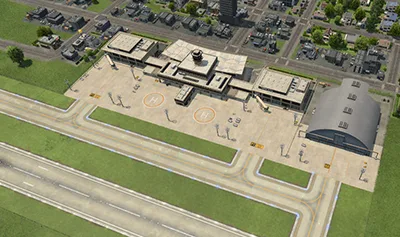
A full airport combines the runway, terminals and aircraft hangar.
Place the airport for a useful ground connection
An airport serves passengers or cargo through its catchment area. For passengers, a valid path must exist without major detours from the covered area. For cargo, the source or consumer needs to be within the catchment radius. A runway beside a town is not evidence that the airport can reach the town buildings you want to serve.
During placement, inspect the highlighted buildings rather than relying on the airport's apparent proximity to the skyline. The catchment display uses blue for cargo transfer, green for passenger transfer, and white when both are available. Select the built airport again after placement to inspect its effective coverage.
For a passenger route, check how residents can reach the airport and continue from the destination airport. The flight is only one part of the journey. A station outside useful passenger access can leave the line with little use, even when planes complete their flights correctly.
For cargo, identify the actual supplied or demanded goods at the intended destination. When placing stations, cargo icons indicate relevant district and industry demands or supplies. This helps distinguish a nearby consumer from a nearby building that has no use for the product your plane carries.
If you intend to use an onward ground service, establish what the ground connection needs to reach. Avoid expanding the airport terminal merely to compensate for missing access. More airport space does not automatically extend a bus route, supply a warehouse, or make an unrequested product useful to a town.
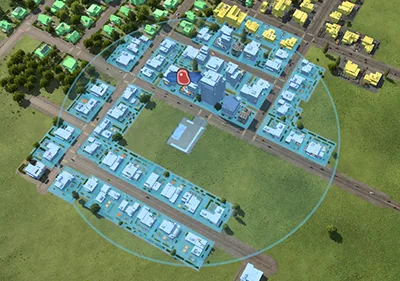
The catchment display identifies reachable buildings; inspect it at the airport you place.
Configure passenger and cargo terminals
Transport Fever 3 allows passenger and cargo terminals in the same airfield or airport. This lets one aviation facility support both service types, but individual terminals can still be exclusive to passengers or cargo. Inspect the terminal used by each line rather than treating the entire airport as one interchangeable stopping point.
To modify an existing station, select it and use Configure to open its module builder. Add or remove the modules required by the planned service. Keep the passenger and cargo roles visible in your plan so that a freight expansion does not become an assumed passenger-capacity improvement.
When setting up a mixed airport, distinguish these three checks:
- The facility can accommodate the selected aircraft type.
- The assigned terminal supports the line's passenger or cargo use.
- The catchment or onward connection reaches the appropriate source or destination.
A success in one check does not establish the other two. A compatible plane can land at an airport whose assigned terminal is unsuitable for the intended stop. Likewise, a correctly configured cargo terminal can remain inactive when no reachable consumer accepts the cargo.
Passenger waiting capacity depends on station space. Longer platforms and suitable side buildings can add capacity where supported, and shared waiting-hall space is shown in the station details. Inspect the description of the actual module before choosing it; there is no single capacity value that applies to every airport building.
Create the air line before buying a fleet
Open the line manager and create a line between the compatible aviation stops. A line is an ordered list of stops. Vehicles travel from one entry to the next and return to the first after the last. More than one stop is needed to transport passengers or cargo usefully.
Use a simple two-airport connection for the first operational check:
- Create a New Line in the line manager.
- Add the departure airport as the first stop.
- Add the destination airport as the next stop.
- Inspect the selected terminals and any connection warnings.
- Name the line so its passenger or freight purpose is recognizable.
- Buy one compatible aircraft and assign it to the line.
- Observe its first arrival, loading or unloading, departure, and return.
The first completed cycle is useful for establishing that the facilities and assignment work together. It does not prove that the route will be profitable or that every future demand increase can be served by the same terminal.
For longer passenger services, be deliberate about the stop order. A circular sequence is not automatically a convenient return journey for passengers. The line manager follows the configured sequence, so inspect what the complete outbound and return journey actually requires before adding another airport.
Do not apply road, rail, or ship waypoint advice blindly to air routing. The line's airport stops and assigned terminals are the relevant starting point here. Resolve the actual air-line warning rather than using a tool intended for a different transport mode.
Purchase planes from the integrated hangar
Aircraft hangars are integrated into airports. Select the appropriate hangar or use the line manager's Buy Vehicles action, which finds a compatible depot and opens its vehicle store. Confirm that the chosen purchase location belongs to the service you intend to start.
The plane store lists vehicles and displays their costs, availability, capacity, cargo specialization, and other properties. Use those details to match the line's purpose. A cargo aircraft and a passenger aircraft are not interchangeable merely because both fit the airport.
Filter the vehicle list by the cargo you need when arranging a freight route. Then inspect the selected vehicle's loading properties and operating cost before buying multiple units. The vehicle's specialization can affect loading speed, so do not judge the entire connection by top speed alone.
Assign the purchased aircraft to the intended line and check the first-stop selection in the assignment dialog. The line manager also lets you select vehicles individually, locate them, reassign them, replace them, or send them to a reachable depot. These controls help distinguish an unassigned purchase from a plane that is assigned but unable to complete its next movement.
If the expected plane is unavailable, compare the game's current year, the vehicle's displayed availability, and the facility compatibility. Do not rebuild a functioning airport before checking whether the missing entry is simply outside the current availability range.
Expand runways and terminals for an operating service
A full airport can be extended with a second runway. Its modular layout then allows a taxiway, additional terminals, and hangars on the other side of that second runway. Expansion changes the facility's arrangement; it does not create the new line or assign vehicles to the added space for you.
Review the existing terminal usage before expanding. If planes are reaching the airport but waiting for the assigned terminal, inspect whether a suitable alternative terminal is available. If they have no useful load, investigate the line's demand, aircraft cargo compatibility, and ground access before building another runway.
Runway direction is controlled by the side on which the approach lights are placed. Place the approach lights on the side from which planes should land when you want to swap the runway's direction. Inspect the resulting configuration instead of assuming the airport's overall rotation answers the same question.
Keep the expansion focused on a demonstrated need. More terminals provide additional stopping options, while a second runway and its associated modules change the airport layout. Neither is a universal cure for an empty route or a line configured with the wrong stop type.
Assign alternative airport terminals
Terminals are assigned automatically using reachability and utilization, and the line manager allows manual changes. An alternative terminal can be used when the primary terminal is occupied. For aircraft, the decision point is the end of the runway.
Open the line's stop controls and inspect the primary terminal first. Enable only alternatives that are suitable for the same operation and reachable within the airport. The line view renders the paths to alternative terminals more transparently, helping you distinguish them from the primary route.
When a connection warning appears, select the affected line and inspect the warning on its stop segment. The terminal-selection dialog indicates problems reaching or leaving a terminal. Read that specific message before changing the aircraft count or rebuilding modules.
Adding vehicles to a terminal problem can increase the number of aircraft experiencing the same restriction. Resolve compatibility and reachability first. Once the path works, observe whether the added alternatives are actually used and whether the waiting behavior improves.
Confirm passenger service or freight delivery
For passenger flights, inspect the airport's waiting passengers, the aircraft's actual load, and the line's transported-passenger history. Empty flights call for checking the complete journey and terminal configuration. A plane repeatedly arriving and departing establishes movement, but passenger use is a separate result.
For freight, check the aircraft's supported cargo and the loading configuration at the source stop. Cargo unloads where an eligible consumer or appropriately configured storage accepts it. Reaching an airport without an onward consumer does not establish final delivery to the town or industry.
Compare the line's income and operating costs after it has been working, using the line's balance history. Avoid treating a single loaded flight as proof that a large fleet is justified. Expand service in response to the observed load, terminal usage, and completed transportation.
Use the vehicle list to compare aircraft entries, the cargo-unloading guide for a freight destination that does not accept its load, and the station-bottleneck guide when an operating airport still has recurring terminal queues.