

Use the directory above to find a vehicle or component, narrow the list to your era, and compare the specifications that matter for the service. The reference contains 294 documented model and component entries across 12 categories. A locomotive and its wagons count separately, so this is not a count of 294 complete services or a promise of complete coverage for every edition and mod collection.
The underlying vehicle table was published 3 October 2026. The directory controls, capacity handling and examples on this page were reviewed 10 October 2026. That review did not remeasure every model in a current game build. Values remain a dated reference; the purchase window in your save is the final check.
Find a vehicle and save the comparison
- Enter the model name or a distinctive word in Search vehicles. Accents are optional: a search for
Citroenalso findsCitroën. - Select a Category to distinguish carrying vehicles from traction components. Use Transport when you want to inspect several categories within one mode.
- Enter your game's year in Start year at or before. This removes entries whose listed introduction is later than that year. It does not check retirement dates, content packs or the save's actual purchase menu.
- Choose First available, Speed, highest first, or Capacity within each unit. Capacity sorting requires a category and keeps passenger and cargo numbers in separate groups.
- Tick Compare on two or three cards. The comparison shows category, first year, speed, capacity or configuration, purchase price and annual cost. Changing a filter does not remove selected entries.
- Use Share current view to copy the filters and comparison together. If copying is unavailable, select the displayed link manually. Browser Back restores the preceding filter, page or selection change.
Reset filters restores the full directory while preserving the comparison. Clear comparison removes the selected entries. You can also remove a single entry from the comparison table when its card is hidden by a filter. The directory shows 30 cards per page; the full reference table below the controls keeps every documented row available for lookup.
Read units and capacity configurations
Top speed uses km/h. Passenger capacity uses passengers; cargo capacity uses units. The speed of a model is not its average journey speed, and capacity is not a line's annual delivery rate. Loading, waiting, route access and the service's actual operating conditions still need checking.
The reference contains 43 entries without a single sortable capacity number. They have two different explanations:
If needed, scroll horizontally to read every column.
| Entries | What the capacity field means | How to compare them |
|---|---|---|
| 30 train locomotives and 5 tram locomotives | Traction components; carrying capacity belongs to the paired wagons | Compare the power unit's recorded year and speed here, then inspect the assembled consist in the game |
| 2 ships, 3 aircraft and 3 helicopters | Mixed passenger/cargo configuration retained as text | Read the full configuration and confirm the selected use in the purchase window |
| Other numeric capacity entries | A recorded quantity with its own unit | Compare models in a relevant category and the same unit |
A locomotive displaying Carrying capacity belongs to paired wagons has not been assigned zero capacity. A mixed-use entry has not been assigned the larger of its passenger and freight figures. Both choices would give a misleading fleet ranking.
For example, the Piasecki H-21 Workhorse retains 20 passengers or 12 cargo. Junkers JU-52 Iron Annie retains 12 passengers or cargo. The first explicitly gives two quantities; the second does not separately state a cargo quantity. Read the wording as provided rather than turning either description into an invented universal number.
The comparison can show different categories together, but it warns when capacity is not like for like. Even two cargo vehicles with equal capacity are not necessarily substitutes: this reference does not contain a verified per-model cargo acceptance matrix. Confirm the required cargo icons in the game's store.
Read the Dated Resource Evidence
93 existing cards now include a Source-only resource evidence disclosure. Eight examples are: Stagecoach, L'Obéissante, AEC Routemaster, Citroën U55 Cityrama, MAN 19.304, Tesla Semi, German Class V 100 and EMD SD40-2. Open it to inspect the exported resource years, engine type, power in kW, tractive effort in kN, empty mass in kg, content package and exact resource ID.
These extra fields come from a public community extraction generated 7 October 2026, declaring Steam build 25533170. They describe source resources; they have not been re-extracted or checked in the current purchase window after the 8 October 40420 update. Each disclosure retains that provenance. The original capacity, purchase-price and annual-cost reference values remain separate.
For Stagecoach, the source has yearFrom=1896 and yearTo=1925. A search in this directory for 1940 still passes the start-year filter; check the game's availability settings before assuming the model can be bought. Tesla Semi has yearTo=0, meaning no end-year cutoff in that resource, rather than an unknown retirement date. These source values do not establish the exact purchase-year boundary in a particular save. The official model documentation explains the availability fields.
The matched Routemaster resource belongs to the Deluxe upgrade pack in this export; Cityrama belongs to base resources. That gives you an additional content-package check when one appears absent. Ownership, enabled content and the current store still determine what your save offers. A resource package label alone does not confirm purchase availability.
For the two sampled locomotives, the export records German Class V 100 at 809 kW and 177 kN, and EMD SD40-2 at 3,000 kW and 410 kN. These are single-resource engine values, not whole-consist results or a profitability ranking. Use power and traction to identify which route and load tests to make, then inspect the assembled consist. The official vehicle-type documentation defines these units and distinguishes component models from fixed formations.
The additional matches use unique exact names or the previously documented resource ID; ambiguous names are left unlinked. The repository file was rechecked on 15 October 2026 at its latest catalogue commit. Its export still declares 7 October and Steam build 25533170; a newer file commit is not a new game extraction.
This addition does not turn the 294-entry reference into a complete current-build database. The community export's capacity candidates, calculated prices, unresolved cargo expansion and raw resource count are not imported as tested store values or extra purchasable models.
Example: find an early road service
For a world around 1900, select Passenger Road Vehicles, enter 1900, and sort by First available. In this reference, Droshky and Stagecoach pass that start-year filter; L'Obéissante, introduced in 1905, does not. This answers which documented introductions fall within the era, rather than claiming every filtered model is currently buyable.
If needed, scroll horizontally to read every column.
| Passenger vehicle | First available | Top speed | Capacity |
|---|---|---|---|
| Droshky | 1892 | 17 km/h | 4 passengers |
| Stagecoach | 1896 | 20 km/h | 6 passengers |
Select those two cards to keep the figures together. Stagecoach has the higher recorded capacity and top speed, but the table alone does not establish the more profitable service in your save. Check the actual price and running cost, the passengers waiting, and whether the current vehicle is spending its visit loading, waiting or traveling.
For an early freight service, change the category to Cargo Road Vehicles. Small Horse Carriage is listed from 1885 with 4 cargo units and 16 km/h; Horse Carriage is listed from 1893 with 6 units and 20 km/h. These freight figures should be compared with each other, not ranked against the passenger numbers above. Clear the earlier comparison before selecting the freight pair if you want a focused purchase decision.
Example: compare two passenger buses
Search for Routemaster, select AEC Routemaster, then search for Cityrama and select Citroën U55 Cityrama. Both selections remain in the comparison even though each search hides the other card. Reset the filters afterward if you want to browse around the selected pair.
If needed, scroll horizontally to read every column.
| Recorded specification | AEC Routemaster | Citroën U55 Cityrama |
|---|---|---|
| First available | 1954 | 1956 |
| Top speed | 60 km/h | 50 km/h |
| Capacity | 25 passengers | 15 passengers |
| Purchase price, reference settings | $399,186 | $424,470 |
| Annual cost, reference settings | $66,531/year | $35,373/year |
This is a useful tradeoff rather than a universal winner: the Routemaster has greater recorded capacity and speed, while Cityrama has the lower listed annual cost in these reference settings. At a game year of 1955, the start-year filter removes Cityrama. At 1956 or later it passes that particular check, but availability still needs confirmation in the save.
Keep purchase price and annual cost separate. A lower running-cost figure does not necessarily mean the lower initial investment, and different financial settings can change the values displayed in your world. Use these figures to shortlist a pair; make the purchase decision using the current store and the service's actual demand.
Example: inspect a mixed-use helicopter
Select Helicopters and search for Workhorse. Its configuration is 20 passengers or 12 cargo, its listed start year is 1952, and its top speed is 210 km/h. Add Bell 206 Long Ranger to the comparison: that entry records 8 passengers, a 1965 start year and 241 km/h top speed.
For passenger service, the Workhorse's text explicitly provides a passenger figure; do not read its cargo quantity as extra passenger seats. For a cargo service, the Bell passenger entry does not establish the cargo suitability you need. A faster top-speed value therefore cannot settle the choice between these two configurations.
The comparison deliberately leaves the Workhorse outside numeric capacity sorting. It keeps the complete text visible so you can check the intended use. If the store offers a different configuration or changed values, use that current entry and do not treat the dated reference as a reason to ignore the game's display.
Verify the shortlist in the purchase window
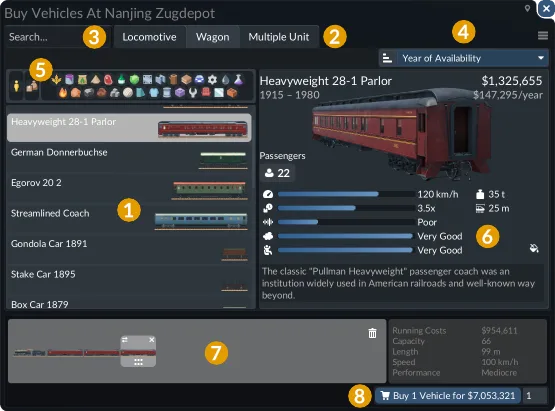
The illustrated train store separates Locomotive, Wagon and Multiple Unit tabs. The search is at the upper left, sorting is at the upper right, and cargo icons filter the model list. The selected model's specifications appear on the right; the assembled consist appears along the bottom.
Use that arrangement to check one purchase at a time:
- Open the appropriate vehicle store and find the model from your shortlist. Confirm that the selected tab matches the component you intended to compare.
- Inspect its current availability, purchase price and maintenance cost. A catalog introduction year is only the first part of the availability check.
- For freight, apply the required cargo icons and confirm the selected configuration supports what the line carries. A name containing a cargo word is not a substitute for this check.
- Read the properties missing from this directory when they affect the route: loading speed, comfort, pollution, noise and technical specifications appear in the game's detailed model view.
- For a train or tram consist, inspect the combined arrangement before buying. The specification of one wagon is not automatically the capacity or performance of the whole assembled vehicle.
If vehicles already wait while cargo piles up, investigate the station or loading condition before replacing the fleet. Vehicle and fleet choices covers the service-level decision; train consist choices covers the railway composition. If the model's operating attributes have deteriorated, check vehicle maintenance coverage.
Resolve a missing purchase or unexpected value
If needed, scroll horizontally to read every column.
| What you see | Check next | What a successful check establishes |
|---|---|---|
| An entry disappears when you enter a year | Compare the entered year with its listed introduction | Whether the catalog's start-year condition excludes it |
| A filtered entry is absent from the store | Check the save's date and active content, then inspect its store availability | Whether the model is purchasable in that particular world |
| An older model is no longer purchasable | Inspect availability settings, including Vehicles: No End Year if enabled | Whether the save retains models after their introduction |
| A price differs from this reference | Read the current vehicle and finance settings | The actual cost of this purchase, without substituting another world's figures |
| Capacity is textual | Identify traction versus mixed configuration | Why the entry is not part of a single numeric ranking |
| A supposed upgrade does not move more cargo | Observe a complete visit and check supply, compatibility and waiting | Whether vehicle size or speed was the actual limitation |
Vehicles: No End Year keeps purchasable vehicles available after their start year; it does not remove that start year. For the built-in availability options, continue to the cheats and world settings guide. The directory's year filter is a lookup aid and does not change any settings in the game.
The reference does not supply current-build verified retirement years, per-model cargo acceptance, loading rates, condition-adjusted values or every edition's content. The 93 source-evidence disclosures add dated resource parameters with their provenance; they do not replace these checks in the purchase window. Use the directory to shortlist recorded entries, then confirm the service in your save.
Use a Dated Database Snapshot When Planning a Route
The directory contains 294 documented vehicle and component entries, not 294 independently tested complete vehicles. Use its filters to make a shortlist, then use the current game's purchase window to validate availability, cargo configuration and cost. A locomotive's own carrying capacity is not a substitute for the capacity of its attached wagons.
When sharing a comparison, include the selected entries and the saved filter URL. Record your game's displayed build, enabled edition content and relevant mods alongside that link. The 93 dated resource disclosures remain source evidence from the declared export; the table does not turn those values into a fresh 15 October purchase-window test.
For the economic decision after choosing the fleet, use the route planning and profit calculator. It accepts observed annual figures rather than estimating revenue from the reference's top-speed or capacity values.